Diet Planner – 30-Day Healthy Meal Routine | Toolota
Taking care of your nutrition doesn’t have to be a complicated task. Our Diet planner makes it easy for you to create a custom 7-day eating plan in just a few moments. This handy tool from Toolota is all about making healthy living simpler, by figuring out exactly how many calories you need and offering meal ideas that match your lifestyle and what you enjoy eating.
Table of Contents
What This Tool Does
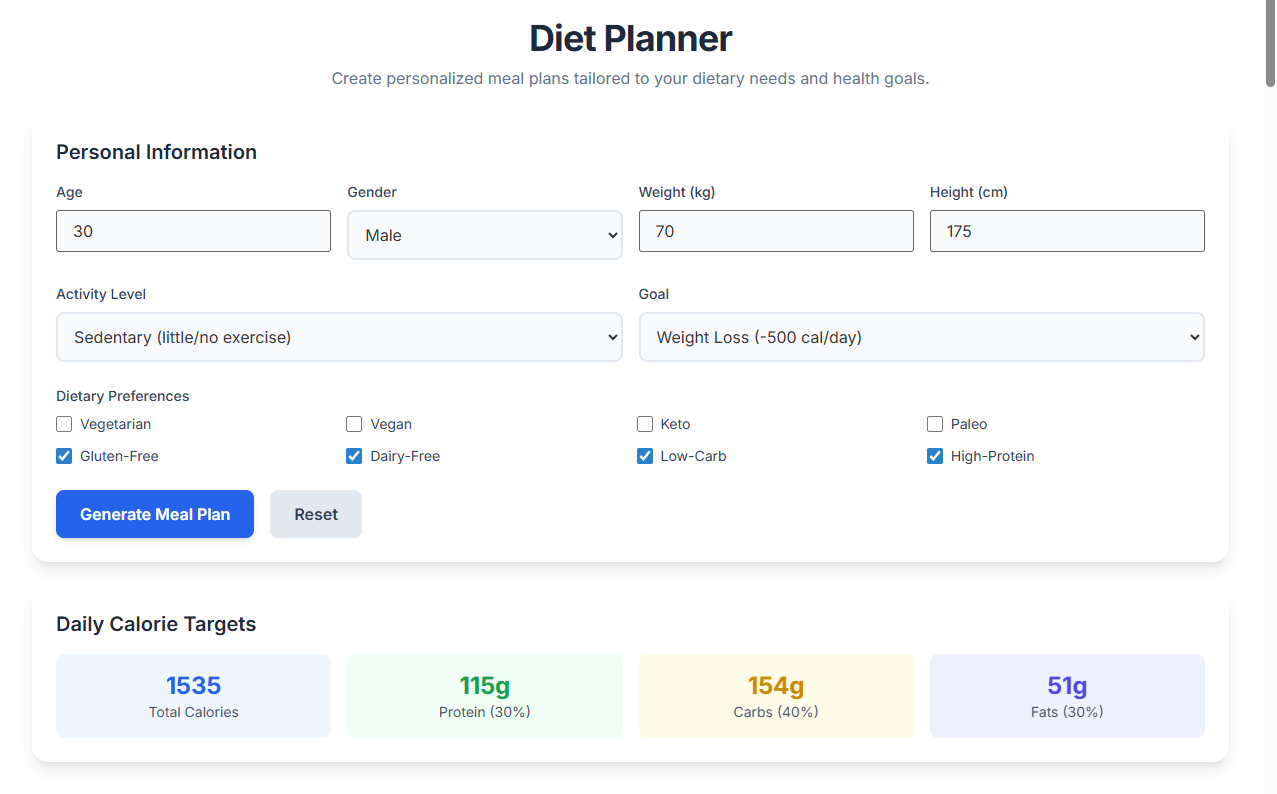
The Toolota Diet planner is a super interactive web app that helps you plan meals without all the guesswork. Think of it as your personal nutritionist right in your browser, using a proven formula called the Harris-Benedict equation to figure out your Basal Metabolic Rate (BMR).
This tool is designed to help you in three main ways:
Caloric Calculation: It works out exactly how many calories you need every day to keep your weight steady, lose a few pounds, or gain some muscle, based on your current stats.
Macro-nutrient Distribution: It automatically divides your daily calorie target into a balanced mix: 30% protein, 40% carbs, and 30% fats.
7-Day Scheduling: It creates a full week’s worth of ideas for breakfast, lunch, dinner, and snacks, and can even tailor them to special diets like Keto, Vegan, or Paleo.
Whether you’re a serious fitness fan or just starting to focus on your health, this tool takes the stress out of making decisions. It gives you a simple, clear plan to follow.
Why Choose Toolota
Choosing Toolota for your diet planning needs means you’re using a tool crafted with careful attention to detail and up-to-date web practices. We built it to be trustworthy, so it doesn’t just spout random figures; instead, it uses your specific details—like age, gender, weight, and how active you are—to generate a profile based on solid data.
Unlike many online calculators that make you pay to see results, Toolota provides a clear, full-screen experience that’s completely free of charge. Some standout features of this Diet planner are:
Tailwind CSS Integration: A neat, responsive design that works smoothly whether you’re on your phone or your computer.
Real-time Logic: Calculations are done instantly right in your browser—no information is sent to any server, so your privacy is protected.
Exportability: You have the option to download your plan as a standalone HTML file, which you can view without an internet connection or print out.
How This Tool Works: The Most Detailed Section
This part takes a closer look at the HTML and JavaScript that power the Diet planner. Getting familiar with these components will help you get the most out of the tool on Toolota.
1. Personal Information Input Fields The tool begins with a set of four key fields to enter your details:
Age: Enter your age as a whole number between 1 and 120. This figure is used in the calculations to account for metabolic changes over time.
Gender: Use the dropdown menu to choose between ‘Male’ and ‘Female’. This selection helps apply the correct baseline metabolic rate (BMR) constant.
Weight (kg): You can enter your weight with decimal points (e.g., 70.5) for accurate calorie calculations.
Height (cm): Your height is used together with your weight to figure out your body’s surface area needs.
2. Activity Level and Goal Selectors
The “Activity Level” dropdown lets you pick a physical activity level (PAL) multiplier to adjust your BMR:
Sedentary: 1.2
Lightly Active: 1.375
Moderately Active: 1.55
Very Active: 1.725
Extremely Active: 1.9
The “Goal” selector then tweaks your final Total Daily Energy Expenditure (TDEE). If you select “Lose,” the system automatically subtracts 500 calories. If you choose “Gain,” it adds 500 calories instead.
3. Dietary Preferences Checklist The tool features a comprehensive checklist for eight different dietary preferences, such as Vegan, Keto, Paleo, and Gluten-Free. The JavaScript function getMealType() reads these selected checkboxes to filter the meal database accordingly.
4. How We Calculate Calories
The main math behind this uses these formulas (written in LaTeX) to figure out your Basal Metabolic Rate (BMR):
For guys:
$88.362 + (13.397 \times \text{weight}) + (4.799 \times \text{height}) – (5.677 \times \text{age})$
For women:
$447.593 + (9.247 \times \text{weight}) + (3.098 \times \text{height}) – (4.330 \times \text{age})$
5. What You See After You Plan
When you hit “Generate Meal Plan,” our displayResults function brings up a neat dashboard:
7-Day Meal Cards: This section shows your full week of meals. Each meal gets its own color: blue for breakfast, green for lunch, indigo for dinner, and yellow for snacks.
Export Button: Click this to create a downloadable version of your meal plan using Blob and URL.createObjectURL.
Reset Button: This clears everything you entered and hides the results by simply going through all the input fields and wiping them clean.
Benefits This Tools
The Diet planner on Toolota comes with several great benefits for both your productivity and health:
It’s fast: You can whip up a full weekly meal plan in less than 30 seconds.
It’s precise: Nutritional calculations use standard ratios (4 calories per gram for protein and carbs, 9 for fat) to keep things accurate.
It’s user-friendly: Features like smooth animations and a clear notification when your plan is exported make it easy to use.
It looks clean: Using the Inter font and a slate color palette helps keep the interface looking crisp and easy on the eyes.
Important Conditions & Guidelines for Use
Think of the Diet planner as a really useful tool on Toolota, but keep these points in mind:
Be Spot On with Your Info: The meal plans it creates are only as good as the numbers you give it. Make sure your age, weight, and height are accurate – it really makes a difference!
Talk to the Experts: Please remember, this planner is just for information. It’s smart, but it’s not a substitute for a professional. Always have the AI-generated plans checked by a certified nutritionist or your doctor.
For You, Not for Business: This tool is designed to help you track your own health, not to give medical advice for business purposes or to groups.
Internet Needed (Just at First): Even though the tool works right in your browser once it’s open, you’ll need an internet connection the very first time you load it to grab the necessary styles and fonts.
Frequently Asked Questions (FAQ)