JWT Decoder |Free Client-Side Token Analysis | Toolota
Table of Contents
What This Tool Does
A JWT Decoder is an essential utility for developers and security professionals working with modern web authentication. JSON Web Tokens (JWTs) are the backbone of secure API communication and session management, but they appear as long, encrypted strings like eyJhbGci.... Reading these tokens in their raw form is impossible. This is where a dedicated JWT Decoder becomes invaluable. It transforms these opaque strings into human-readable JSON, revealing the critical information embedded within: who the user is, what permissions they have, when the token was issued, and when it expires.
The JWT Decoder from Toolota takes this a critical step further by performing all analysis directly in your web browser. Unlike online tools that send your sensitive tokens to a remote server, our tool ensures your authentication credentials never leave your device. This client-side approach guarantees absolute privacy and security, making it the go-to choice for inspecting tokens in production, development, or security audit scenarios.
Why Choose Toolota
In a landscape filled with online utilities, Toolota’s JWT Decoder stands out by prioritizing your security and workflow efficiency. The core differentiator is its 100% client-side operation. When you paste a token into our JWT Decoder, all the processing—splitting the string, decoding the Base64Url components, and formatting the JSON—happens instantly using JavaScript running on your own machine. This means there is no network latency, no risk of your tokens being logged on a server, and no dependency on an internet connection after the page loads.
Furthermore, our tool is built with a professional, intuitive interface that doesn’t compromise on power. It provides not just raw decoding, but structured analysis with a clear view of the token’s header, payload, and signature, alongside a dedicated metadata panel for quick insights. Whether you’re debugging a failing API call, learning how JWTs are structured, or verifying token claims, this JWT Decoder is designed to give you clear, accurate, and immediate results without any fuss.
How This Tool Works: The Most Detailed Section
Using the JWT Decoder is straightforward and designed for immediate productivity. Follow these exact steps to analyze any JWT token.
Step 1: Access the Tool
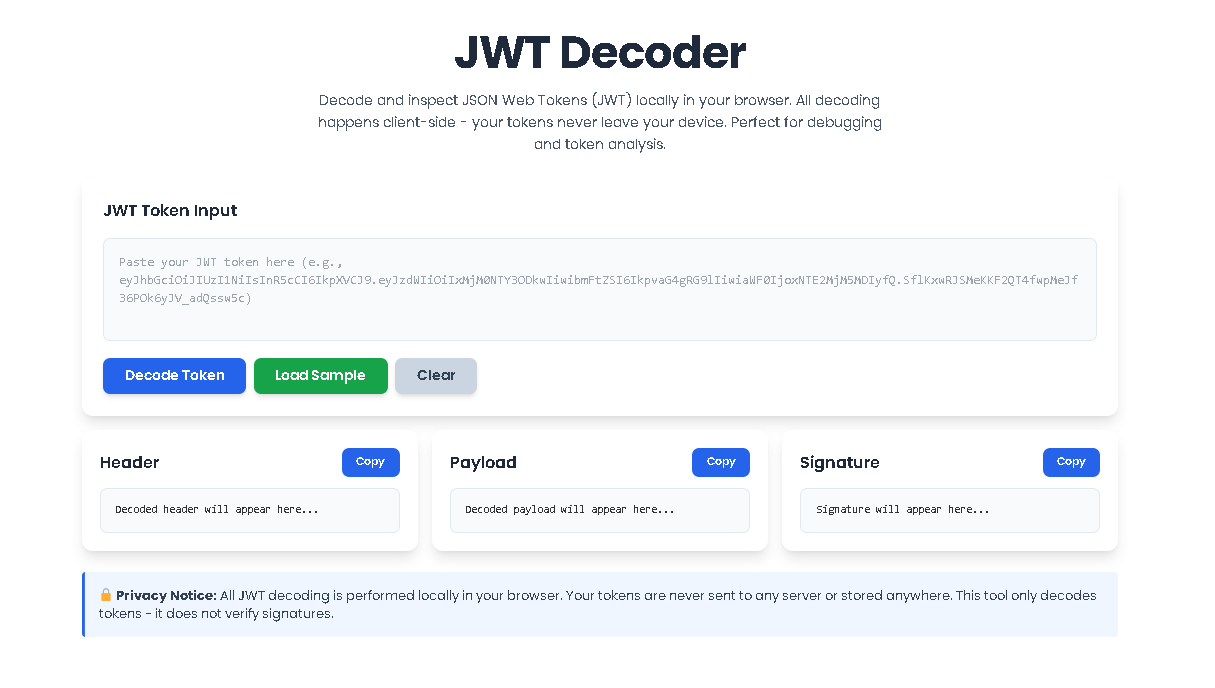
Navigate to the JWT Decoder tool on the Toolota website. The page will load instantly, presenting you with a clean, focused interface centered around a large input textarea.
Step 2: Input Your JWT Token
Locate the text box labeled “JWT Token Input.” This is where you will paste your complete JWT token. A JWT is a string consisting of three sections separated by periods (e.g., header.payload.signature). You can manually type it, but copying and pasting from your application logs, browser storage (LocalStorage), or API testing tool (like Postman) is the most common method. The interface includes a “Load Sample” button which pre-fills a standard example token if you want to test the tool’s functionality first.
Step 3: Initiate Decoding
Once your token is in the input box, you have two options. You can click the prominent “Decode Token” button. Alternatively, due to the smart auto-decode feature, the tool will begin processing automatically as soon as it detects a valid three-part JWT structure in the input field. You will see the interface update in real-time.
Step 4: Review the Decoded Output
After processing, the main display area splits into three clearly defined panels:
Header Panel: Displays the decoded first part of the token, showing the signing algorithm (like HS256 or RS256) and token type.
Payload Panel: Shows the core “claims” of the token—the data about the user and the token itself, such as sub (subject), iat (issued at), and exp (expiration).
Signature Panel: Shows the final, encrypted signature string used to verify the token’s integrity.
Each panel has a “Copy” button to easily copy the formatted JSON or signature string to your clipboard for use elsewhere.
Step 5: Analyze Token Metadata & Status
Below the three main panels, a Token Metadata section will appear. This dashboard extracts and presents key claims in an easy-to-read format, including the Algorithm, Token Type, Issued At timestamp, Expiration time, Subject, and Issuer. Simultaneously, a Token Status banner at the top will inform you if the token is valid or has expired based on the current time and the exp claim.
Step 6: Clear and Repeat
To analyze a new token, simply use the “Clear” button. This will reset the entire interface, empty the input field, and allow you to start fresh with another JWT.
Benefits This Tools
The advantages of using a dedicated, client-side tool like this JWT Decoder are significant for any professional workflow.
Unmatched Security & Privacy: This is the paramount benefit. By eliminating server transmission, you completely remove the risk of tokens being intercepted, logged, or stored by a third-party service. This is non-negotiable when dealing with production tokens.
Speed and Reliability: Since there is no network round-trip, decoding is virtually instantaneous. The tool also works offline after the initial page load, providing reliability regardless of your connection.
Educational Value: For developers learning about authentication, the clear visual separation of header, payload, and signature demystifies JWT structure better than any textbook explanation.
Debugging Efficiency: Quickly verify the claims inside a token during development or when troubleshooting authentication errors in an application. Is the exp time correct? Is the sub as expected? The JWT Decoder provides immediate answers.
Convenience: It eliminates the need to write temporary scripts or use command-line tools to decode a token, saving valuable time and streamlining your debugging process.
Important Conditions & Guidelines for Use
While the JWT Decoder is a powerful tool, it should be used responsibly and with an understanding of its purpose.
Decoding vs. Verification: This tool is a JWT Decoder, not a verifier. It can display the contents of any token, but it cannot cryptographically verify if the token’s signature is valid. Signature verification must always be done server-side with the appropriate secret or public key.
Input Defines Output: The accuracy and usefulness of the decoded information depend entirely on the validity of the input token. A malformed string will result in a decoding error.
Sensitive Information: Be mindful that JWTs can contain sensitive data in their payload (like user IDs or emails). While our tool is private, always ensure you are in a secure environment when working with real production tokens.
Legal & Ethical Use: Only decode tokens you are authorized to inspect, such as those from applications you own, develop, or have explicit permission to test. Do not use the tool to attempt to decode tokens from systems you are not authorized to access.
Frequently Asked Questions (FAQ)