Write HTML, CSS, and JavaScript with instant live preview in an isolated sandbox.
In the modern era of web development, speed and accessibility are the cornerstones of innovation. The HTML/CSS/JS (Live Editor) provided by Toolota is a robust, browser-based playground designed to bridge the gap between writing code and seeing results. This tool allows users to input standard web languages—HyperText Markup Language (HTML), Cascading Style Sheets (CSS), and JavaScript (JS)—into an isolated environment where changes are rendered in real-time.
Whether you are a student learning the ropes of the “Hello World” phase or a seasoned developer prototyping a complex UI component, this sandbox eliminates the need for local server setups or complex IDE configurations. It solves the fundamental problem of “context switching” by keeping your structure, styling, and logic in one unified interface. By providing a safe, isolated sandbox, the HTML/CSS/JS (Live Editor) ensures that your experiments stay contained while providing high-fidelity previews of how your code would behave in a live production environment.
Toolota has engineered this HTML/CSS/JS (Live Editor) with a focus on minimalist design and maximum functional output. Unlike traditional editors that feel cluttered, Toolota prioritizes the “Live Preview” experience, ensuring that the interface stays out of your way while you create.
The reliability of Toolota stems from its use of modern web standards, such as the Tailwind CSS framework for its own UI and a highly responsive JetBrains Mono font for the code area, which reduces eye strain during long coding sessions. Productivity is significantly improved because the tool handles the “compilation” of these three distinct languages into a single cohesive preview frame automatically. By choosing Toolota, you are opting for a platform that values clean UI/UX and provides a professional-grade console output to help you debug logic errors on the fly.
The HTML/CSS/JS (Live Editor) is engineered with a logical flow to help you transition from logic to layout effortlessly. Here is an exhaustive breakdown of how the tool functions:
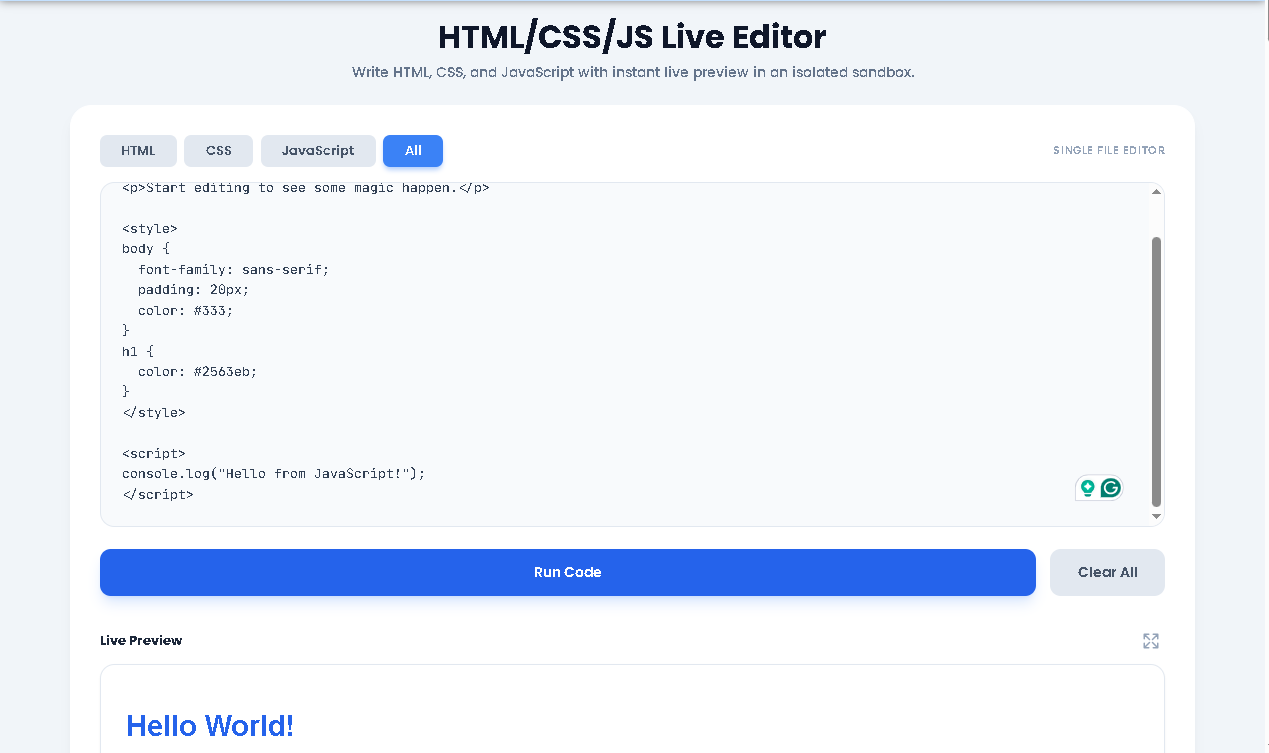
Tab-Based Editor System: The top toolbar features four distinct tabs: HTML, CSS, JavaScript, and All. The “All” tab is particularly powerful, as it dynamically combines your separate code blocks into a single HTML document for final review.
Intelligent Code Input: The main textarea supports standard development features like tab indentation (two spaces) and custom placeholders to guide your syntax. It also supports keyboard shortcuts, such as using Ctrl+Enter to trigger the run command instantly.
Dynamic Source Compilation: When you click the “Run Code” button, the HTML/CSS/JS (Live Editor) creates a unique Blob URL that contains your compiled code, ensuring it loads safely and quickly within the preview frame.
Sandbox Preview Window: The live preview section is an isolated iframe. This means your code runs in its own environment, preventing any experimental JavaScript from interfering with the main Toolota website functionality.
Advanced Console Integration: At the bottom of the interface lies a custom console. It captures all console.log, warn, and error outputs directly from your script, displaying them in a readable, color-coded format that is essential for debugging.
Editor Toolbar Actions: You can quickly reset your workspace using the “Clear All” button or clear just the console history to keep your debugging logs tidy.
Fullscreen Mode: For projects requiring more visual space, the preview container includes a fullscreen toggle, allowing you to view your creation without the surrounding UI.
High Speed: The HTML/CSS/JS (Live Editor) on Toolota eliminates the “save and refresh” cycle, showing changes the moment you execute the code.
Total Accuracy: Because the tool uses native browser rendering, what you see in the preview is exactly how it will appear in a standard web browser.
No Installation: You can access this professional-grade HTML/CSS/JS (Live Editor) from any browser, making it perfect for coding on the go.
Clean UI/UX: The minimalist design helps you focus on your code, while the toast notification system confirms successful execution.
To ensure the best experience with the HTML/CSS/JS (Live Editor), users should adhere to these guidelines:
Output Quality: The result is a direct reflection of your input; ensure your HTML tags are closed and your JavaScript logic is sound.
Manual Review: While Toolota provides a stable environment, we recommend manually reviewing code if you are copying it from external AI sources before running it.
Safety First: The sandbox is for testing and learning; avoid using the tool to process sensitive private data or execute harmful scripts.
The tool stores your code in a temporary state while the tab is open, but for long-term storage, you should copy your work to a local file.
Yes, you can link to external CDNs like Tailwind or Google Fonts within the HTML tab of the HTML/CSS/JS (Live Editor).
The integrated console in the HTML/CSS/JS (Live Editor) will display the specific error message, helping you identify the exact line of code that needs fixing.
Toolota does not impose strict character limits, allowing you to prototype everything from simple buttons to complex landing pages.
Toolota is your all-in-one online tools platform. Fast, simple, and free utilities designed to make everyday digital tasks easier and smarter.
