
Input
0 chars | 0 lines
Plain Text
Output
0 chars
Base64
Supports images, documents, and other binaries
Note: Needs valid CORS configuration on source server.
In the digital world, moving data from one place to another isn’t always straightforward. That’s where the Base64 Encoder & Decoder comes in. It’s a specialized online tool designed to turn binary data into a safe, text-based ASCII format—and back again.
Why does this matter? Because many platforms are built to handle plain text only. By using this conversion process, you ensure that your images, files, or sensitive snippets stay perfectly intact, without any risk of corruption during transmission.
Why choose Toolota? We’ve taken a complex technical process and wrapped it in a clean, user-friendly interface. Whether you are a veteran web developer or a digital marketer just starting out, Toolota makes encoding and decoding accessible to everyone.
Common ways to use it:
Web Design: Easily embed images directly into your HTML or CSS code.
Data Security: Safely encode sensitive information for secure transfers.
API & Email: Prepare data for web APIs or handle email attachments without a hitch.
At its core, Toolota’s Base64 tool is all about solving compatibility issues. It bridges the gap between different systems, making sure your data moves quickly, safely, and precisely every single time.
Not all online tools are created equal, and when it comes to a Base64 Encoder & Decoder, reliability and privacy are everything. Toolota is designed with a user-first mindset, focusing on what actually makes your workflow faster and safer.
Your Privacy Comes First Unlike many basic converters that process data on a server, Toolota is built on a modern HTML5 and JavaScript foundation. This means all the “heavy lifting” happens right inside your browser. Your data never leaves your computer, providing a level of security and privacy that server-side tools simply can’t match.
Built for Speed and Productivity We’ve packed the interface with features that developers and creators actually need:
Real-Time Processing: See your results instantly without waiting for page refreshes or server delays.
Dynamic Flexibility: Easily switch between encoding and decoding modes, and input everything from plain text to files and URLs.
Ready-to-Use Output: Whether you need a Raw String, a Data URI, or specific code for CSS and HTML, we provide it instantly. It’s a total game-changer for direct project integration.
A Modern Experience on Any Device We believe high-quality tools should also be beautiful and easy to use. Toolota features a sleek “glass-morphism” design that isn’t just for looks—it’s fully responsive and provides clear visual feedback so you know exactly what’s happening at every step.
Toolota isn’t just a simple converter; it’s a reliable productivity partner designed to make working with digital data feel effortless.
Getting started with Toolota is simple. Here’s a breakdown of how the tool works and how you can make the most of each feature
.
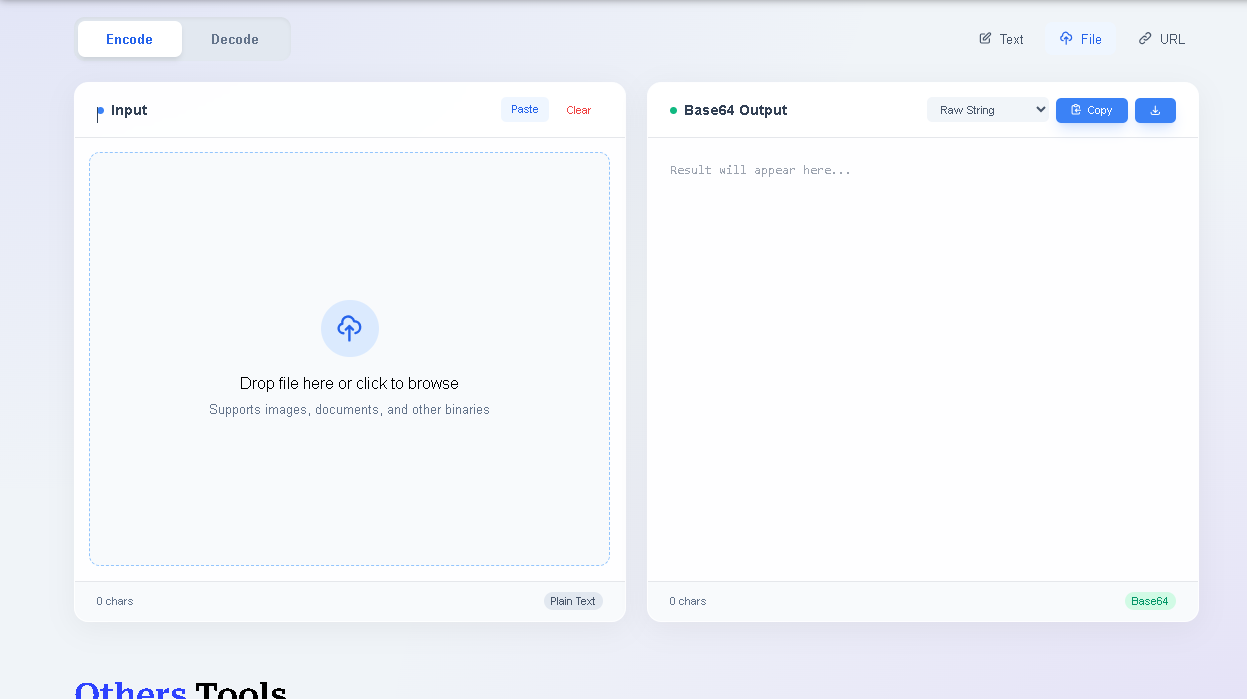
At the very top, you’ll see two main buttons.
Encode: Use this when you have plain text, a file, or a URL that you want to turn into a Base64 string.
Decode: Use this to take a Base64 string and turn it back into its original, readable form. The interface is smart—it updates instantly based on your choice.
We know data comes in different forms, so we’ve provided three ways to upload it:
Text: Just type or paste directly into the box.
File: Have an image, PDF, or document? Just drag and drop it into the zone, or click to upload.
URL: If your file is hosted online, just paste the link. The tool fetches and processes it for you in one go.
The input area isn’t just a blank box. It’s a live workspace. You can use the Paste button to save time or Clear to start over. As you work, you’ll see live stats like character and line counts appearing at the bottom, so you’re always in control of your data.
This is where Toolota really shines. Instead of just giving you a wall of text, you can choose how you want your result formatted:
Raw String: Just the code.
Data URI: A ready-to-use link.
CSS/HTML: Perfect for developers! It generates the full background-image rule or <img> tag, saving you the hassle of writing the code yourself.
Once your result is ready, the output toolbar gives you quick options:
Copy: Grab everything with one click.
Download: Save your result as a .txt file.
Visual Preview: If you’re encoding an image, a “Show Preview” button appears so you can double-check that everything looks right.
While you see a simple interface, the tool is doing some heavy lifting. It uses modern JavaScript (like the FileReader and UTF-8 APIs) to process your data right in your browser. This means it’s lightning-fast and, most importantly, your data stays private because it never travels to a server. If you accidentally paste a broken code while decoding, the tool will even give you a friendly error message to help you fix it.
The best part? Everything is live. You can tweak your text and see the output change instantly. No “Submit” buttons, no waiting—just a smooth transition from our tool to your project.
What makes Toolota different? We’ve focused on the things that actually matter to your daily workflow: speed, privacy, and ease of use.
Blazing Fast Results: Forget about hitting a “submit” button and waiting for a page to refresh. Our tool works in real-time, giving you results in milliseconds. It’s snappy, responsive, and keeps you moving.
Privacy You Can Trust: Security isn’t just a buzzword for us. Because our tool runs entirely in your browser (client-side), your sensitive data is never uploaded to our servers. It stays on your machine, exactly where it belongs.
A Secret Weapon for SEO & Devs: We don’t just give you raw code; we give you ready-to-use snippets. By using our Data URI, CSS, or HTML formatting, you can reduce HTTP requests on your website. This speeds up your page load times—something that both your users and Google will love.
Handles More Than Just Text: Whether you’re working with a simple sentence, a complex document, or an image from a live web URL, Toolota handles it all. It’s a versatile powerhouse that goes far beyond basic converters.
Design That Just Works: We believe professional tools shouldn’t look like they’re from the 90s. Our clean, modern “glass-morphism” design is easy on the eyes and intuitive to navigate, making it perfect for beginners and pros alike.
Workflow-Friendly: We’ve added one-click “Copy” and “Download” buttons because we know every second counts. It’s designed to be a seamless part of your toolkit, helping you get the job done without any extra steps.
To get the most out of Toolota, there are a couple of practical things you should know. Think of this as the “fine print,” but in plain English:
Quality In, Quality Out: The tool is incredibly precise, but it can only work with what you give it. If you’re decoding something and the input string is broken or incomplete, the result won’t be accurate. Double-checking your source data is always a good habit!
Watch the File Size: Because everything happens right in your browser to protect your privacy, your computer’s memory does the work. While it handles most common files easily, trying to process massive files (over 50MB) might make your browser tab a bit sluggish or even cause it to crash.
Use It Responsibly: We built this tool to help developers, designers, and creators do great work. Please keep things ethical—don’t use it to handle copyrighted content you don’t own or for anything that breaks the law. We’re all about supporting the creative community!
Our Reliability Goal: We’ve worked hard to make Toolota 100% reliable, and we’re constantly improving it. However, because technology can be unpredictable sometimes, we can’t promise it will be perfect for every single “edge-case” scenario. It’s always smart to verify your results for mission-critical projects.
Toolota’s Base64 Encoder & Decoder stands out due to its client-side security, multiple input methods (text, file, URL), and practical output formats (like direct CSS or HTML snippets). The live preview for images and clean, ad-free interface provide a superior user experience focused on real productivity.
Yes, security is a key advantage. Our Base64 Encoder & Decoder runs entirely in your web browser. The data you encode or decode is never transmitted over the internet to Toolota’s servers, ensuring your sensitive information remains completely private on your machine.
Absolutely. This tool is built for web developers. The ability to encode images into Data URIs or directly generate CSS background-image code makes it ideal for embedding assets, creating simple icons, or reducing HTTP requests in your web projects efficiently.
Yes, the tool is fully responsive. The Base64 Encoder & Decoder interface adapts to phone and tablet screens, and core features like file encoding (using your device’s file picker) and text decoding work perfectly on modern mobile browsers.
Toolota is your all-in-one online tools platform. Fast, simple, and free utilities designed to make everyday digital tasks easier and smarter.