Color Code Converter: Translate HEX to RGB to HSL | Toolota
Struggling to translate a HEX code to RGB for your CSS? Need the CMYK equivalent of an HSL value for a print design? Manually converting color codes is a tedious, error-prone bottleneck that slows down designers and developers. This is where a precise, instant Color Code Converter becomes an indispensable tool in your digital workflow.
Toolota‘s free online Color Code Converter eliminates this friction. It’s more than a simple translator; it’s an interactive workspace where you can convert between HEX, RGB, HSL, and CMYK formats in real-time, generate harmonious palettes, and copy production-ready CSS code with a single click. Perfect for web design, digital art, and print preparation, this tool ensures accuracy and saves valuable time, letting you focus on creativity rather than calculation.
Table of Contents
What This Tool Does
A Color Code Converter is a specialized digital tool that translates a color’s value from one numerical or alphanumeric format to another. In the digital world, colors are represented using different models depending on the medium. For example, screens use RGB (Red, Green, Blue), web code often uses HEX (hexadecimal), designers adjusting hue and saturation use HSL (Hue, Saturation, Lightness), and professional printing uses CMYK (Cyan, Magenta, Yellow, Key/Black).
Manually performing these conversions requires complex mathematical formulas. A robust Color Code Converter automates this process instantly, providing accurate, synchronized values across all major formats as you adjust a single parameter. Toolota‘s implementation elevates this further by integrating a visual preview, palette generation, and direct code export, making it a comprehensive color utility.
Why Choose Toolota
This tool is essential for a wide range of digital professionals and enthusiasts:
Web Developers & Front-End Engineers: Need to implement design specs accurately, converting designer-provided HEX or HSL values into functional RGB or RGBA CSS.
UI/UX & Graphic Designers: Work across different software (e.g., Figma uses HEX/RGB, Photoshop uses CMYK) and need to maintain color consistency.
Digital Artists & Illustrators: Want to understand color relationships, create palettes, and ensure their art displays correctly on various screens.
Print Designers: Must convert screen-based RGB colors to printable CMYK values to predict how colors will look on paper.
Marketing & Brand Managers: Responsible for ensuring absolute color consistency across digital assets and printed merchandise.
Students & Educators: Learning about color theory and the technical implementation of color in digital media.
If your work involves any form of digital color, a reliable Color Code Converter is a non-negotiable asset in your toolkit.
How This Tool Works: The Most Detailed Section
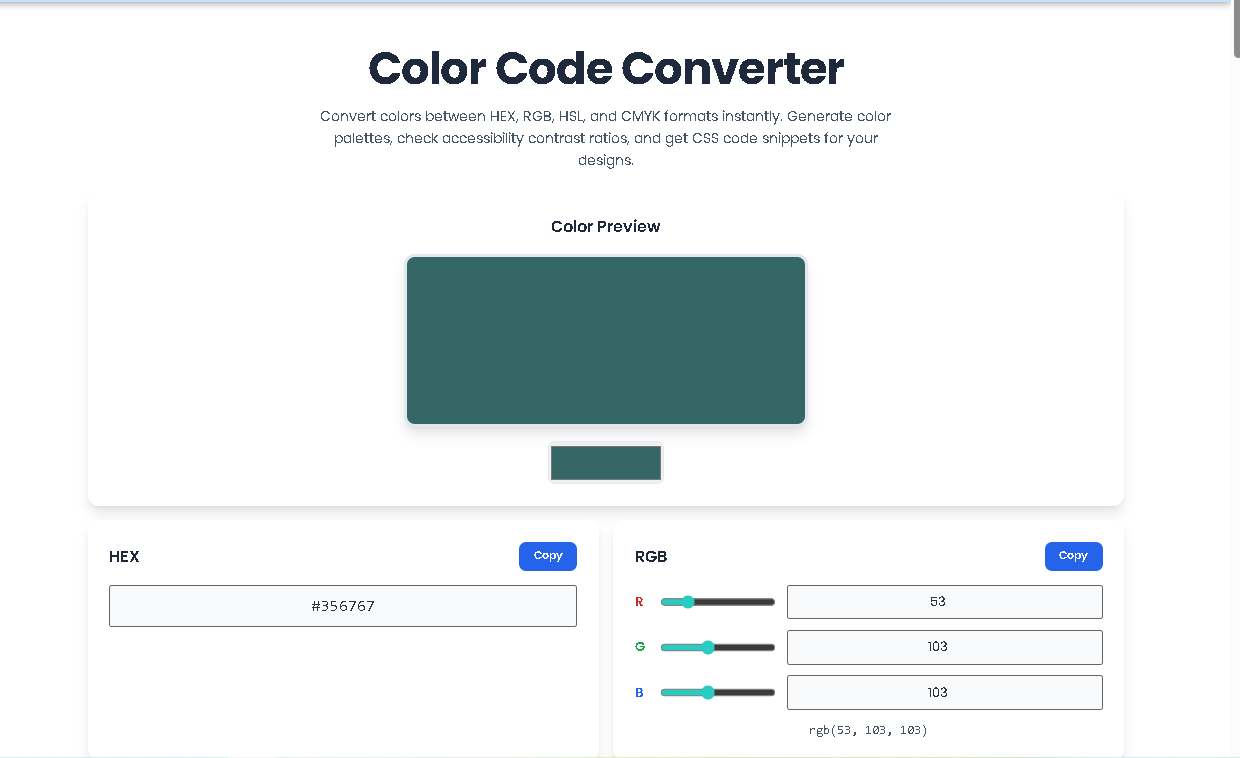
Let’s walk through the exact workflow of Toolota‘s tool. This guide follows the actual interface and functionality present in the HTML.
Step 1: Input Your Color
You can start in three ways:
Use the Color Picker: Click the color box in the “Color Preview” section. A native OS color picker will appear. Select any color and release.
Enter a HEX Code: Directly type or paste a 6-digit HEX code (e.g., #FF5733) into the HEX input field and press Enter or click outside the box.
Adjust RGB/HSL Sliders: Drag the “R,” “G,” “B” sliders or the “H,” “S,” “L” sliders. The corresponding number fields will sync.
Step 2: Observe Real-Time Conversion
As you input your color, watch the magic of this Color Code Converter happen in real-time:
The large “Color Preview” box updates immediately.
All other format fields synchronize. The HEX code updates, the RGB/HSL sliders and numbers move, the CMYK percentages recalculate, and the CSS code refreshes.
Step 3: Generate & Use Your Palette
Look at the “Color Palette” section. Five swatches are generated based on your color. To use a variant, simply click on its swatch. That color becomes your new active color, and all formats will convert accordingly.
Step 4: Export Your Code
Find the code you need in its respective panel.
To get the RGB or HSL value for a function like rgba() or hsla(), copy the text from the output paragraph.
To get the CSS declarations, click the “Copy CSS” button in the CSS Code section.
A “Copied to clipboard!” notification will briefly appear at the bottom right.
Step 5: Explore with Action Buttons
Use the buttons at the bottom to experiment:
Click “Random Color” for inspiration.
Click “Invert Color” to quickly find a high-contrast opposite.
Click “Reset” to return to the starting blue.
Benefits This Tools
Speed & Efficiency: Eliminates minutes of manual lookup or calculation for every color conversion, dramatically accelerating design-to-code workflows.
Guaranteed Accuracy: Removes human error from complex conversions, especially critical for brand colors and print production where a slight deviation can be costly.
Enhanced Workflow Integration: The one-click copy function for all formats means you never have to manually type a color code again, reducing typos and streamlining your process.
Improved Design Decision-Making: The instant visual feedback paired with the palette generator allows you to make informed color adjustments and discover harmonious shades on the fly.
Educational Value: Seeing how changes to HSL sliders directly affect RGB and HEX values is a powerful way to learn color theory in a practical, applied manner.
Important Conditions & Guidelines for Use
Input Quality Dictates Output: The accuracy of conversions depends on entering valid color codes. The tool validates HEX input, but providing an out-of-gamut RGB color will still yield a theoretical CMYK value that may not print perfectly.
CMYK is a Simulation: The CMYK values shown are a standard conversion. For critical print work, always consult with your printer and use professionally calibrated monitors and printer-specific color profiles.
Tool as an Aid: This Color Code Converter is designed to assist and accelerate professional work. The generated CSS and palettes should be reviewed within the context of your overall project.
Browser-Based Convenience: No download or installation is needed, but an active internet connection is required to load the tool.
Frequently Asked Questions (FAQ)