Molecular Weight Calculator – Exact Mass Tool | Toolota
Table of Contents
What This Tool Does
Navigating the complexities of chemical formulas requires precision and speed, whether you’re a student facing a tight deadline, a teacher preparing lab materials, or a researcher analyzing compounds. The Molecular Weight Calculator available on Toolota is a specialized digital instrument designed to eliminate the tedious and error-prone process of manual molar mass computation. This tool does more than just add numbers; it intelligently parses standard chemical notation—including complex formulas with parentheses like Mg(OH)2—and provides an exact molecular weight in grams per mole (g/mol) alongside a transparent elemental breakdown.
Why Choose Toolota
In a digital landscape filled with generic converters, Toolota stands out by focusing on building reliable, user-centric tools for specific technical needs. Our Molecular Weight Calculator embodies this philosophy. We understand that accuracy is non-negotiable in scientific calculations, which is why our tool is built upon a rigorously verified database of atomic weights. You won’t find rounded-off approximations here; the calculations reflect the precise isotopic abundances recognized by the international scientific community.
Beyond raw accuracy, the Toolota Molecular Weight Calculator is built for an exceptional user experience. The interface is clean and intuitive, stripping away complexity without sacrificing capability. Features like one-click example formulas (Glucose, Caffeine, Salt) serve as both convenient shortcuts and educational guides for proper formatting. The visual design of the results—with clear typography and a structured breakdown—ensures that information is absorbed quickly and easily. Choosing this tool means opting for a seamless blend of computational power, verified data, and thoughtful design, all hosted on Toolota’s stable and secure platform. It’s a tool that respects your time and intelligence, delivering professional-grade results without a steep learning curve.
How This Tool Works: The Most Detailed Section
This section details the exact interaction flow with the tool, as determined by analyzing its HTML and JavaScript structure. Follow these steps to use the Molecular Weight Calculator effectively.
Step 1: Access the Input Field
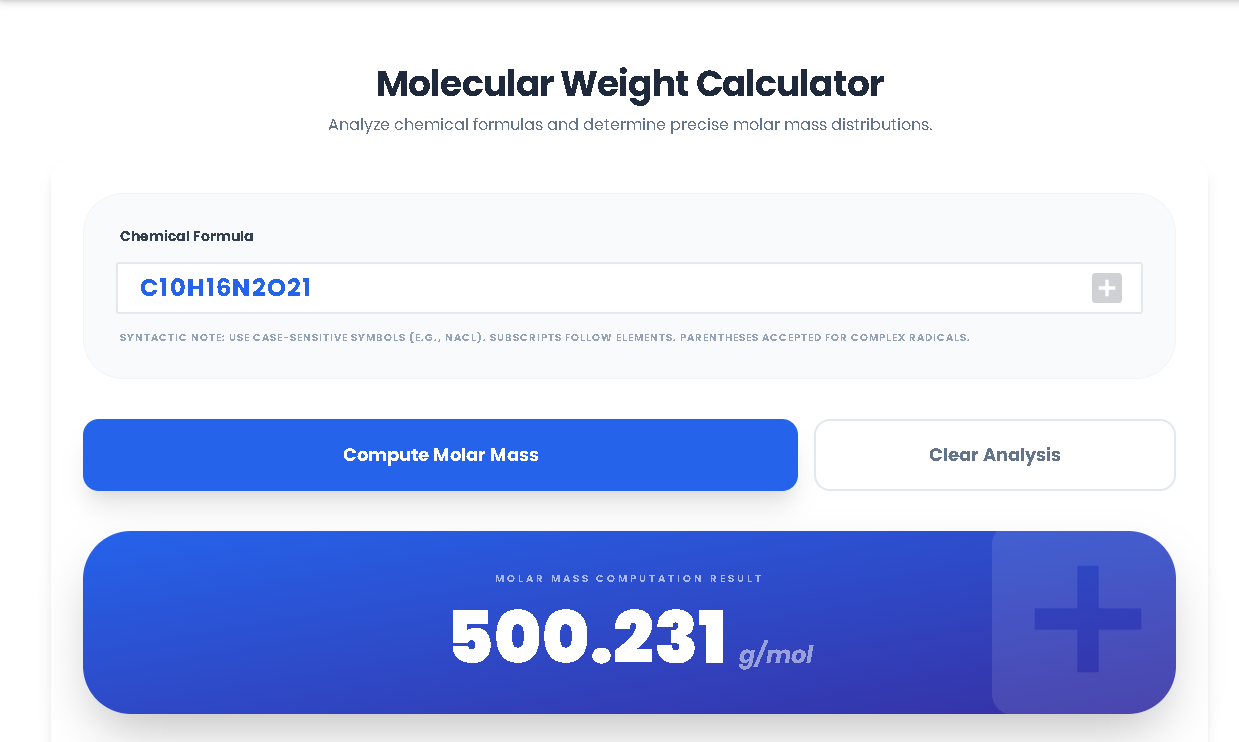
Upon loading the tool on Toolota, your primary point of interaction is the large, prominently placed text input field labeled “Chemical Formula.” This field has a blue, uppercase-styled text cue and is designed to be the focal point. You can click or tap into this field to begin.
Step 2: Enter Your Chemical Formula
Type your chemical formula directly into the field. The tool expects case-sensitive notation:
Use standard element symbols (e.g., ‘C’ for Carbon, ‘H’ for Hydrogen, ‘Na’ for Sodium).
Numbers are treated as subscripts. For C6H12O6, simply type it as written.
For grouped atoms (polyatomic ions), use parentheses. For example, for Magnesium Hydroxide, type Mg(OH)2. The tool’s parser is designed to multiply everything within the parentheses by the following subscript.
For quick testing, you may click on any of the “Discovery Preset” buttons (e.g., D-Glucose, Caffeine, Table Salt) located below. This will automatically populate the input field with that compound’s formula.
Step 3: Initiate the Calculation
With your formula in place, you have two ways to trigger the Molecular Weight Calculator:
Primary Method: Click the large, blue button labeled “Compute Molar Mass.”
Keyboard Shortcut: Press the “Enter” key on your keyboard while the text input field is active.
Step 4: Processing & Output
Upon triggering, the tool’s JavaScript engine executes a specific sequence:
Parsing: The parseFormula function scans your input string. It identifies element symbols, differentiates between single and double-letter symbols (like ‘He’ vs ‘H’), reads subscripts, and correctly handles nested parentheses by using a stacking algorithm.
Weight Calculation: It cross-references each identified element against the embedded atomicWeights object, which contains over 100 elements with their precise masses. It multiplies the atomic weight by the number of atoms present.
Error Handling: If an unrecognized symbol is entered (e.g., ‘Xy’), or the formula syntax is invalid, the function throws an error. The tool catches this and displays an alert message asking for a valid formula.
Display Results: If successful, two main sections become visible:
Molar Mass Result: A large, visually striking blue panel fades in, displaying the total calculated mass (e.g., “180.156”) followed by the “g/mol” unit.
Elemental Composition Breakdown: Directly below, a grid appears. Each row in this grid corresponds to a unique element in your formula. It shows the element symbol, the count of atoms (“× 6”), and that element’s cumulative mass contribution (“72.066 g/mol”). This is the detailed breakdown provided by the Molecular Weight Calculator.
Step 5: Resetting for a New Calculation
To perform a new calculation, you do not need to refresh the page. Simply click the “Clear Analysis” button. This performs two actions: it empties the text input field and hides both the results panel and the elemental breakdown grid, returning the interface to its initial clean state.
Benefits This Tools
Speed and Efficiency: The Molecular Weight Calculator delivers results in milliseconds. What traditionally requires opening a periodic table, looking up values, and performing manual arithmetic is now accomplished with a single click, dramatically speeding up study sessions, lab preparation, and data analysis.
Guaranteed Accuracy: The tool’s internal database is sourced from standard atomic weight values, minimizing the risk of human error from misreading a table or making a calculation mistake. This reliability is crucial for academic integrity and professional reporting.
Educational Transparency: The elemental breakdown feature is a significant educational benefit. It moves beyond being a simple black-box calculator to a teaching aid, helping users visualize and understand how the total mass of a compound is distributed among its constituent atoms.
Superior UI/UX: From the thoughtfully designed input field to the gradient result panel, the interface is modern and intuitive. The use of spacing, clear typography, and visual feedback (like hover effects on buttons) makes the tool a pleasure to use.
Zero-Hassle Workflow: There is no login, no download, and no cost. The Molecular Weight Calculator runs directly in your web browser on Toolota. The “copy-and-paste” friendly output makes it easy to transfer results into reports, notes, or lab sheets.
Handles Complexity: Unlike basic calculators, this tool correctly interprets chemical notation with parentheses, making it versatile for simple compounds like NaCl and more complex ions or organic molecules.
Important Conditions & Guidelines for Use
Output Quality Depends on Input: The accuracy of the result from the Molecular Weight Calculator is directly contingent on the user providing a correctly formatted chemical formula. The tool parses syntax; it cannot interpret common names or incorrect notation.
Review for Critical Applications: While the tool is highly accurate, for mission-critical applications such as formal research publications or pharmaceutical calculations, it is prudent to verify results using established primary sources or software.
Intended Use Case: This tool is designed for educational, research, and professional chemistry applications. It must not be used to plan or analyze compounds for illegal, hazardous, or harmful purposes.
Formula Assumptions: The calculator assumes standard isotopic abundances as defined in its atomic weight database. For calculations requiring specific isotopic masses (e.g., for mass spectrometry), a more specialized tool would be necessary.
Frequently Asked Questions (FAQ)