Body Fat Calculator – Easy & Accurate Body Metric | Toolota
Welcome to the ultimate guide for our Body fat calculator! Keeping tabs on your physical health goes way beyond just stepping on a scale—you really need to know what your weight is made up of. Here at Toolota, we’ve created a top-notch online tool that lets you get accurate insights into your body composition, all without having to visit an expensive clinic.
Table of Contents
Description
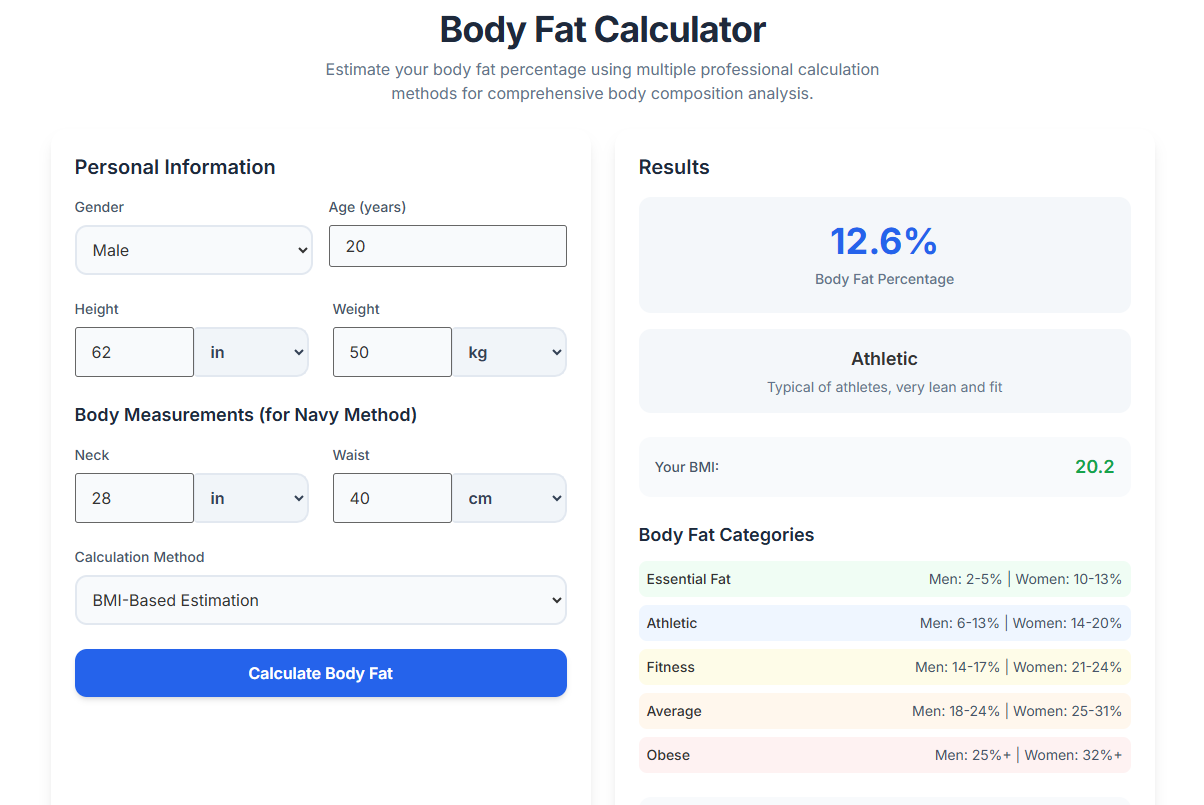
The Body fat calculator you’ll find on Toolota is a smart online tool designed to give you an estimate of what percentage of your body weight comes from fat. Unlike a basic BMI chart, which only looks at your height and weight, this calculator uses several different physical measurements to give you a more detailed picture of how fit you really are.
Whether you’re a pro athlete keeping an eye on your “Athletic” zone or someone just starting out on a weight loss journey hoping to get out of the “Obese” category, this tool can be your go-to guide. By taking into account measurements like your neck, waist, and hip size, it goes beyond simple weight numbers to show you what’s actually happening inside your body.
Why Choose Toolota
Looking for a trustworthy Body fat calculator? You might often run into apps that are confusing to navigate or charge for key features. Toolota is different—we offer a completely free, high-performance solution. Our tool is built on a solid HTML5 framework, guaranteeing both speed and keeping your data private.
You can trust Toolota because we use formulas that have been checked and approved by health professionals. Plus, we have some unique features, like a dual-method analysis system and an integrated content editor that lets you track your fitness journey right in the app. When you use Toolota, you boost your productivity because all your health stats and tracking notes are in one easy-to-reach dashboard.
How This Tool Works: The Most Detailed Section
Getting the most out of the Toolota Body fat calculator really starts with understanding how its interface works. Below, we’ll take a closer look at every part of the web app.
The Input Panel: Setting Up Your Details
Blog Outline/Data Input: This is where you’ll put in your actual measurements, like how many inches around your neck, waist, and hips are. The calculator uses these numbers to do its main calculations.
Keyword Input Field: When you’re making reports with this tool, you can use this space to label your results. For instance, you could tag them as “Monthly Checkup” or “Post-Workout,” which helps you keep track of your progress over time.
Language Selector: We’ve made sure the app is user-friendly around the world by offering it in several languages. This way, everyone can understand the health information, no matter where they’re from.
Tone & POV Selectors: If you’re planning to use the tool to create a fitness report or even a blog post about your findings, these options let you pick the right style. You can choose between sounding “Professional” or “Motivational,” and you can write in “First Person” or “Third Person.”
Advanced Settings: Here’s where you can fine-tune things, like deciding whether you want to use the Metric system (centimeters and kilograms) or the Imperial system (inches and pounds), or adjusting the numbers based on how active you are.
The Action Center
Generate Button: After you’ve filled in all your details, hitting the “Generate” button sets the JavaScript engine in motion. It quickly works out your body fat percentage, your lean body mass, and what health category you fall into.
Right Panel: Output and Management
Editor Toolbar: This is where the real magic happens with Toolota. Once your calculations are done, you can use the toolbar to style your results. It gives you options for:
Bold/Italic: Use these to highlight key health milestones.
Headings/Lists: Organize your fitness plan using the data you’ve generated.
Color Tools: Use colors to draw attention to areas of concern (red) or to celebrate successes (green).
Copy & Download: With just one click, you can copy your results to your clipboard or download them as a neatly formatted file for your personal trainer or doctor.
Fullscreen Mode: This feature removes distractions, making it ideal for analyzing detailed data tables or writing out longer fitness journals based on your Body fat calculator results.
Benefits This Tools
Lightning-Fast Speed: Get your results in just milliseconds! No more waiting around for pages to load.
SEO-Ready for Pros: Coaches, if you’re using our tool to whip up client reports, our built-in editor makes sure everything you export is perfectly set for sharing online.
Precise with Multiple Methods: We don’t just rely on one formula. Our Body fat calculator checks and double-checks the data to give you the most realistic picture of your health possible.
Clean and Simple Design: Say goodbye to annoying ads and confusing pop-ups. We keep it clean, just focusing on delivering clear data and useful tools.
Important Conditions & Guidelines for Use
Input Quality: The results from the Body fat calculator are only as accurate as the measurements you take with the tape measure.
Manual Review: Any health advice or reports generated by the AI should always be checked by a healthcare professional.
Proper Usage: Think of this tool as providing information only. It’s not designed to be a medical device.
No Illegal Use: Please don’t use this tool to create any harmful or misleading information about health.
Frequently Asked Questions (FAQ)