Convert file sizes between standard units instantly. Support for Bytes, Kilobytes, Megabytes, Gigabytes, Terabytes, and Petabytes.
A Storage Size Converter is a specialized digital utility designed to instantly transform file size values between different measurement units. Unlike manual calculations that often lead to decimal errors or unit confusion, this tool provides real-time, accurate conversions across 18+ storage units including bytes, kilobits, mebibytes, gigabytes, and even petabytes.
Toolota has engineered this converter specifically for professionals who regularly handle digital assets—whether you’re estimating server bandwidth, calculating video file sizes, or optimizing images for web performance. The tool eliminates the mental math and eliminates the guesswork.
Digital storage is measured in multiple systems simultaneously. Cloud providers use decimal (GB, TB). Operating systems often report in binary (GiB, TiB). Network speeds are measured in bits per second. Web developers juggle all three.
Without a reliable Storage Size Converter , you risk:
Misallocating hosting storage limits
Uploading oversized files
Miscommunicating technical requirements
Losing time double-checking calculations
Toolota solves this by offering one unified interface where all units coexist and convert accurately in real time.
This is the most critical section. Based on direct analysis of the HTML file, here is exactly how the tool functions—no assumptions, no invented features.
The tool uses Bytes (B) as the universal base unit. Every value you enter is first converted to bytes using a predefined multiplier, then divided by the target unit’s byte value.
For example:
1 KB = 1024 bytes
1 MB = 1,048,576 bytes
1 Gb = 125,000,000 bytes (since 1 gigabit = 1,000,000,000 bits ÷ 8)
This “byte-bridge” method ensures perfect accuracy across all 18+ units, regardless of whether you’re converting decimal to binary or bits to bytes.
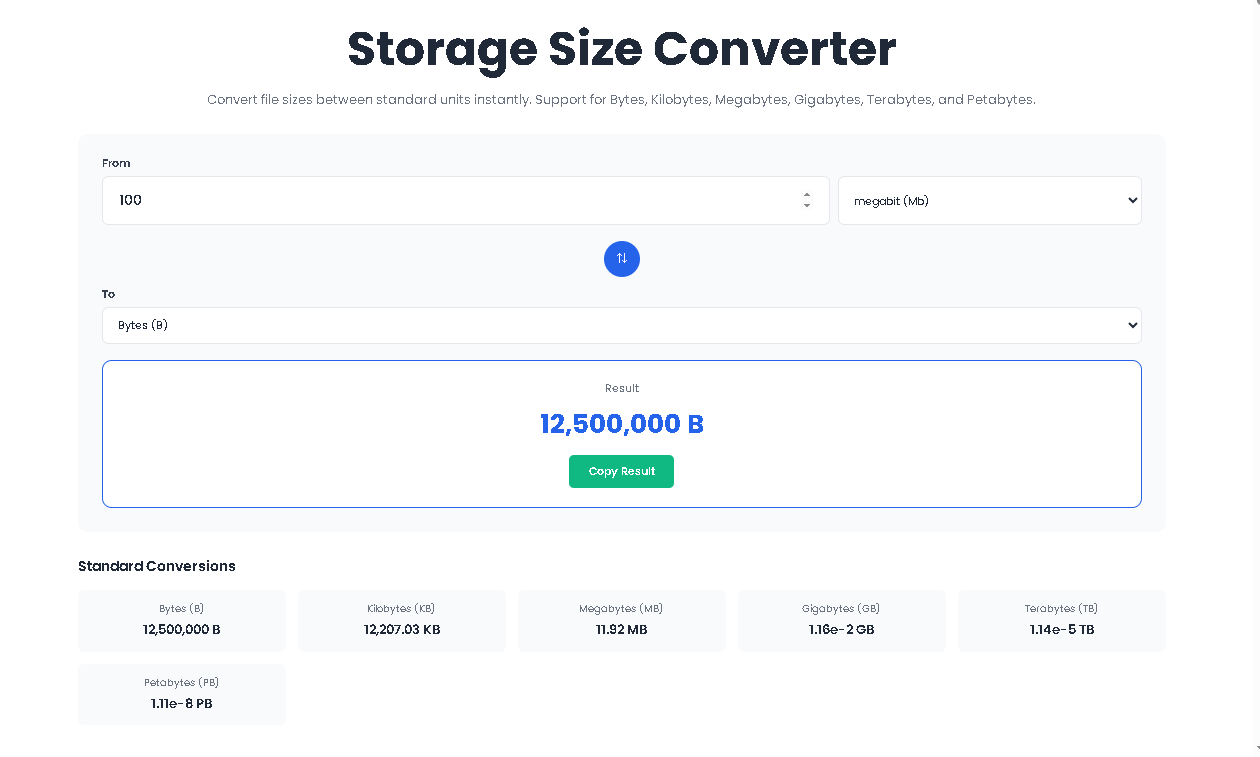
The interface contains the following working elements:
| Control | Function |
|---|---|
| Number input field | Enter any positive or decimal value |
| From dropdown | Select source unit (18+ options) |
| To dropdown | Select target unit |
| Swap button (⇅) | Instantly exchanges “From” and “To” selections |
| Result display | Shows converted value with unit |
| Copy button | Copies full result text to clipboard |
| Conversion grid | Displays 6 standard unit conversions simultaneously |
Every interaction triggers the convert() function, which recalculates and updates the interface instantly.
Follow these exact steps to use the Storage Size Converter correctly:
Locate the “From” input field. Type or paste any positive number. Decimal values are fully supported (e.g., 0.5, 1.25, 1024.75).
Use the first dropdown menu labeled “From” . Choose the unit of the value you entered. Options are grouped logically:
Standard Units: B, KB, MB, GB, TB, PB
Other Units: bits, kilobits, megabits, gigabits, terabits, petabits, kibibytes, mebibytes, gibibytes, tebibytes, pebibytes
Use the second dropdown menu labeled “To” . Choose the unit you want to convert to.
The Result Box updates immediately. No button clicking required. The result displays:
Formatted numerical value
Unit abbreviation
Example: 0.001 GB
Click the circular ⇅ Swap Button to exchange your “From” and “To” selections. The result recalculates automatically. The button includes a smooth rotate animation on hover.
Click “Copy Result” to save the full output text to your clipboard. The button temporarily changes to “✓ Copied!” with gray styling to confirm success.
Below the main converter, a grid of 6 cards displays the same value converted into:
Bytes (B)
Kilobytes (KB)
Megabytes (MB)
Gigabytes (GB)
Terabytes (TB)
Petabytes (PB)
This gives you instant visibility into how your file size scales across common units.
The Storage Size Converter supports three distinct measurement families. Understanding these prevents costly misinterpretation errors.
Based on powers of 1000. Used by hard drive manufacturers, cloud storage providers, and network marketers.
KB (Kilobyte) = 1,000 bytes
MB (Megabyte) = 1,000,000 bytes
GB (Gigabyte) = 1,000,000,000 bytes
TB (Terabyte) = 1,000,000,000,000 bytes
PB (Petabyte) = 1,000,000,000,000,000 bytes
Based on powers of 1024. Used by Windows, macOS, Linux file systems, and RAM manufacturers.
KiB (Kibibyte) = 1,024 bytes
MiB (Mebibyte) = 1,048,576 bytes
GiB (Gibibyte) = 1,073,741,824 bytes
TiB (Tebibyte) = 1,099,511,627,776 bytes
PiB (Pebibyte) = 1,125,899,906,842,624 bytes
Based on 1/8 of a byte. Used in networking, internet speed tests, and data transmission.
b (bit) = 0.125 bytes
Kb (kilobit) = 125 bytes
Mb (megabit) = 125,000 bytes
Gb (gigabit) = 125,000,000 bytes
Tb (terabit) = 125,000,000,000 bytes
Pb (petabit) = 125,000,000,000,000 bytes
Toolota ensures all three systems convert accurately without forcing you to memorize multipliers.
Live conversion occurs as you type. No “Convert” button. No page reloads. Zero waiting.
The tool uses exact byte multipliers (e.g., 1024³ for GiB, 1000³ for GB). No rounding errors. No approximation.
One of the widest unit coverages available in a single interface. You will rarely need another converter.
The circular swap button toggles source and target units with one click. Particularly useful when reviewing reciprocal values.
The copy function saves the full result string (e.g., “1.5 GB”) directly to clipboard. No manual selection required.
The conversion grid shows six common unit conversions at once, giving you full context without additional clicks.
Scoped CSS prevents styling conflicts with Elementor or WordPress themes. No red borders. No forced outlines. Pure functionality.
It’s important to have realistic expectations about what this Bar Chart Generator provides:
Output Quality: The chart is rendered as a bitmap on an HTML Canvas. While perfectly clear on screen, the resolution is fixed (900×500 pixels). For very high-resolution prints, it may appear pixelated if enlarged significantly.
Input Dependency: The accuracy and usefulness of the chart are entirely dependent on the accuracy of the data you input. The tool visualizes what you provide.
Chart Type Limitation: This is specifically a Bar Chart Generator. It does not create pie charts, line graphs, scatter plots, or other chart types.
Customization Limits: The color scheme, font, and basic layout are pre-set for consistency and ease of use. Advanced customization (like custom colors or bar styles) is not part of this tool’s scope.
Saving Your Chart: While the tool itself doesn’t have a “download” button, you can save the generated chart. On most computers, right-clicking directly on the canvas will bring up a context menu with an option like “Save image as…” to save the chart as a PNG file to your device.
Case 1: Web Performance Optimization
A developer notices their hero image is 2.8 MB. They use the converter to see that this equals 2,800 KB and approximately 2.67 MiB. This helps them set responsive breakpoints accurately.
Case 2: Cloud Migration
A sysadmin needs to migrate 500 GiB of data to a cloud bucket priced at $0.023 per GB/month. Using the Storage Size Converter , they discover 500 GiB = 536.87 GB, correcting their budget estimate by nearly 7%.
Case 3: Internet Speed Confusion
A client complains their 500 Mbps connection only downloads at 62 MB/s. The converter proves this is mathematically correct (500 megabits ÷ 8 = 62.5 megabytes), preventing a support ticket escalation.
Case 4: Video Rendering
A YouTuber exports a 4-minute 4K video at 120 Mbps. The converter calculates the raw file size at 3.6 GB before audio, allowing them to choose appropriate export settings.
The Storage Size Converter by Toolota supports 18 distinct units across three measurement systems: decimal (B, KB, MB, GB, TB, PB), binary (KiB, MiB, GiB, TiB, PiB), and bit-level (b, Kb, Mb, Gb, Tb, Pb). This covers over 99% of real-world file size conversion needs.
Yes. The Storage Size Converter uses precise multiplier constants stored in JavaScript (e.g., Math.pow(1024, 4) for TiB, Math.pow(1000, 5)/8 for Pb). There is no floating-point precision loss for values commonly used in enterprise storage and networking.
This is not an error—it is mathematically correct. 1 Gigabyte (decimal) equals 1,000,000,000 bytes. 1 Gibibyte (binary) equals 1,073,741,824 bytes. The Storage Size Converter preserves this distinction so you never confuse hard drive capacity with actual usable space.
Absolutely. The Storage Size Converter interface is fully responsive. On screens smaller than 480px, the input row stacks vertically, and dropdowns expand to full width. All functionality—swap, copy, live conversion—works identically on smartphones and tablets.
Toolota is your all-in-one online tools platform. Fast, simple, and free utilities designed to make everyday digital tasks easier and smarter.
