Plan storage for photos, videos, documents, backups, and growth over time. Includes redundancy/RAID overhead, device recommendations, cloud vs local comparison, and cost per GB.
| Option | Capacity | Why | Cost Estimate |
|---|
The Storage Space Calculator is a sophisticated, free online tool designed to solve a universal digital problem: “How much storage do I actually need?” Unlike basic estimators that simply multiply file counts by average sizes, this planner, developed by Toolota, introduces critical real-world variables that professionals and enthusiasts often overlook. It transforms guesswork into a precise, data-driven storage plan.
Moving beyond simple arithmetic, the Storage Space Calculator factors in the natural expansion of your digital life—your annual growth rate—and projects needs over a timeframe you set, whether it’s one year or five. It accounts for the hidden “tax” of file system overhead, which can consume significant space when managing thousands of small files. Most importantly, it integrates redundancy strategies like RAID mirroring or the 3-2-1 backup rule, ensuring the final recommended capacity includes the copies necessary for data safety, not just the raw data itself.
Underestimating storage needs is a costly and stressful mistake. Running out of space can halt creative projects, complicate backups, and force rushed, expensive purchases. Conversely, over-provisioning leads to wasted money on unused capacity and higher-than-necessary power consumption. The Storage Space Calculator exists to navigate this tightrope.
The modern digital footprint is dynamic, not static. A family’s photo library might grow by 30% after a vacation year; a videographer’s project files might balloon with a shift to 4K or 8K resolution. Planning based solely on today’s data is a recipe for future shortfall. By using a Storage Space Calculator that incorporates annual growth, you future-proof your investment, ensuring your chosen solution has room to breathe for years to come.
Furthermore, the true cost of storage isn’t just the price of a hard drive. It’s the total cost of ownership, which includes redundancy for protection, the efficiency (or inefficiency) of the file system, and the ongoing operational cost of cloud subscriptions. A tool that illuminates these factors—like the one from Toolota—empowers you to compare apples to apples. It answers not just “how much,” but “in what form,” and “at what true cost,” allowing for strategic budgeting and avoiding hidden expenses down the line.
Using the Toolota Storage Space Calculator is a straightforward process that mirrors a logical planning session. Follow these steps to get your personalized storage report.
Step 1: Quantify Your Current Data
Begin by filling in the core input fields in the “Current Data” section.
Photos: Enter the approximate number of photos you have. Then, use the adjacent dropdown to select the most appropriate average file size (e.g., “6 MB (Phone HDR)” for modern smartphones, “15 MB (RAW)” for professional cameras).
Videos: Input your estimated number of video files. Choose an average size from the menu, with “1 GB (typical)” being a common starting point for HD footage.
Documents: Estimate your document count and select an average size like “250 KB” for standard files.
Other Data: Use this field for any miscellaneous data—application files, software installers, game libraries, etc.—inputting the total directly in Gigabytes (GB).
Step 2: Define Your Future Needs
This is where strategic planning happens.
Annual Growth Rate: Honestly estimate how much your data will grow each year. A 20-30% rate is common for active media creators.
Planning Horizon: Select how many years into the future you want your storage solution to cover (e.g., 3 years is a standard tech refresh cycle).
Step 3: Configure Technical & Safety Factors
These advanced settings drastically affect the final calculation.
File System Overhead: Leave this at “5% (typical)” unless you manage enormous numbers of very small files, in which case a higher percentage is more accurate.
Redundancy / RAID: This is crucial for data integrity. Select your strategy:
None: For a single, non-critical copy.
RAID1 / Mirror: For instant duplication on two drives (2x total space).
RAID5/6: For parity-based protection in multi-drive arrays.
3-2-1 Backup: For a robust, multi-copy strategy (3x total space).
Step 4: Generate & Analyze Your Plan
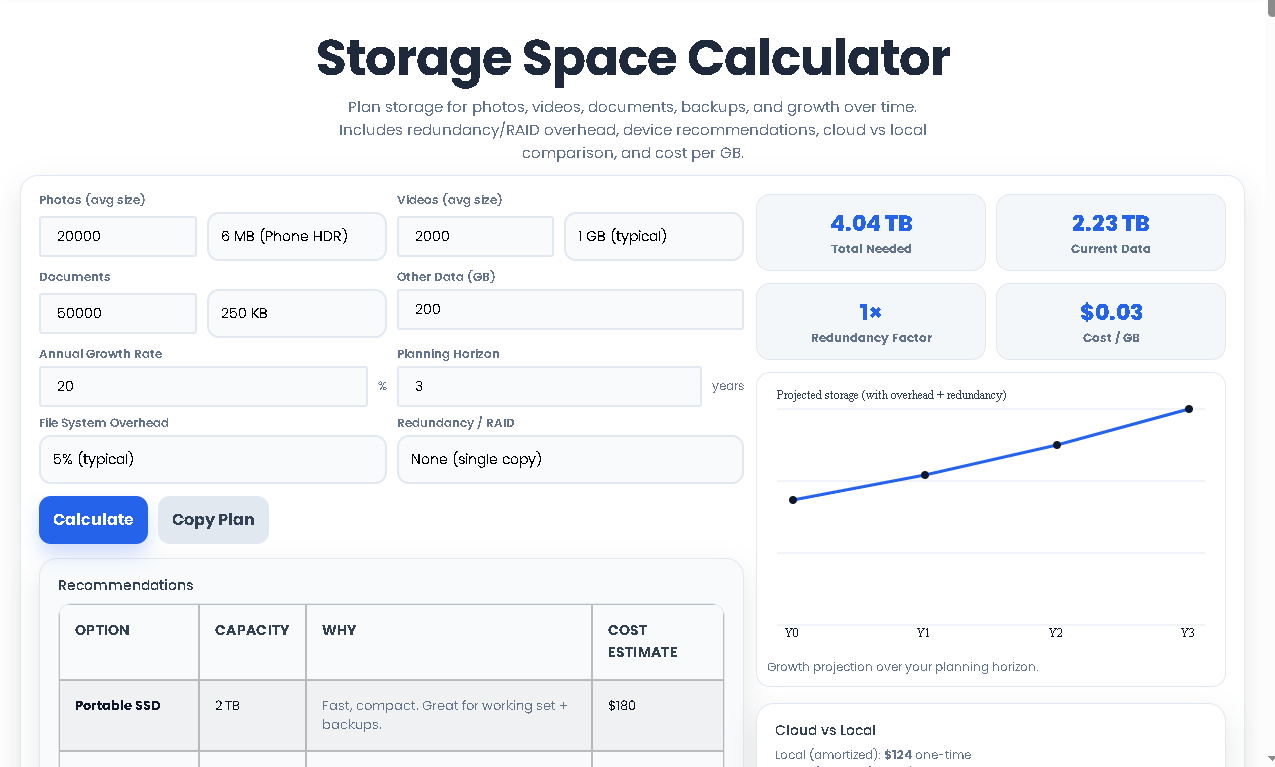
Click the “Calculate” button. The tool instantly processes all inputs. Your eyes should go first to the “Total Needed” KPI, which is your final, comprehensive capacity requirement. Review the “Redundancy Factor” to see the multiplier effect of your safety choice. Examine the “Growth Projection” chart to visualize your storage trajectory over the chosen years.
Step 5: Explore Recommendations & Costs
Scroll to the “Recommendations” table. This translates your abstract GB/TB need into real-world options (e.g., “NAS (2-bay mirror)”). Simultaneously, the “Cloud vs Local” section provides a stark monthly vs. one-time cost comparison, while the “Environmental Impact” offers a thought-provoking estimate on footprint. Use the “Copy Plan” button to save your key results for later reference or to share with a vendor.
The value of the Storage Space Calculator lies in its detailed output. Let’s decode what each section means for your decision-making.
The Core Metrics:
Current Data: The sum of your inputs before growth, overhead, or redundancy. This is your “raw” data footprint today.
Total Needed: The most important number. This is the usable storage capacity you must purchase or subscribe to, after all factors are applied. It’s the figure you give to a salesperson or use for cloud plan selection.
Redundancy Factor: A simple multiplier (e.g., 2x) showing how much your safety strategy amplifies your raw storage need.
The Visual Projection Chart:
This line graph plots your estimated storage usage from Year 0 (today) to the end of your planning horizon. It provides an intuitive, at-a-glance understanding of your growth curve, helping you decide if you need a scalable solution.
The Recommendations Table:
This is your actionable shopping list. The tool cross-references your “Total Needed” with common product categories. It suggests specific device types, explains their use-case (“Great for archival backups”), and provides a ballpark cost estimate. This bridges the gap between calculation and purchase.
The Cost & Impact Analysis:
Cloud vs. Local: This breakdown is vital for budgeting. It contrasts a rough one-time, amortized cost for buying hardware with the recurring monthly fee for an equivalent amount of cloud storage, highlighting the long-term financial commitment of each path.
Environmental Impact: Based on the energy required to store and serve data, this rough CO₂ equivalent estimate encourages mindful consumption and efficient storage planning.
Leveraging the Toolota Storage Space Calculator provides distinct advantages over manual calculation or guesswork:
Comprehensive Accuracy: By integrating growth, overhead, and redundancy—three commonly missed elements—it delivers a true “real-world” capacity figure, eliminating the risk of costly under-provisioning.
Informed Financial Decisions: The side-by-side cloud vs. local cost analysis and product recommendation table empower you to optimize for budget, translating technical needs into clear financial scenarios.
Time Efficiency & Simplicity: What would require spreadsheets, research on RAID penalties, and growth projections is accomplished in under a minute through an intuitive interface, freeing you to focus on implementation.
Future-Proofing: The built-in growth projection forces proactive, long-term thinking, helping you select a solution that won’t be obsolete in 12 months.
Clarity Through Visualization: The chart transforms abstract numbers into an understandable trend, making it easier to communicate needs to team members, family, or clients.
Risk Mitigation: By explicitly factoring redundancy into the required capacity, the tool inherently promotes data safety planning, ensuring your backup strategy is financially and technically accounted for from the start.
Output Accuracy Relies on Input Honesty: The precision of the Storage Space Calculator’s results is directly proportional to the accuracy of your inputs. Over- or under-estimating file counts or growth rates will skew the plan.
Cost Estimates are Illustrative: The local and cloud cost-per-GB figures used are industry averages for guidance. Actual market prices, sales, and specific service provider rates will vary and should be researched before purchase.
Professional Review for Critical Data: While the tool provides excellent planning guidance, mission-critical business or irreplaceable personal data strategies should be reviewed by an IT professional to ensure suitability.
Technology Changes: Storage technology, pricing, and cloud service offerings evolve. Use this tool as a foundational plan, but be prepared to adjust based on the latest products available at your time of purchase.
Simply adding file sizes gives you a “raw data” total. The Storage Space Calculator adds the critical layers most people forget: future annual growth, the hidden space taken by the file system itself (overhead), and, most importantly, the extra capacity needed for your chosen backup or RAID redundancy strategy. It calculates the total usable storage you need to buy, not just the data you have.
Absolutely. In fact, it’s an ideal use case. When planning for a NAS, use the “Redundancy / RAID” dropdown to select your intended protection level (like “RAID1 / Mirror” or “RAID5”). The “Total Needed” result will be the total usable capacity your NAS should provide after the RAID is configured. The recommendations table often includes a NAS option based on your calculated needs.
Data is rarely static. Your photo library, video projects, and documents will grow. The growth rate allows the Storage Space Calculator to project your future needs, preventing you from buying a solution that is too small in a year. To estimate, think about how much your data grew last year. If you added 2 TB to a 10 TB collection, that’s a 20% growth rate. If unsure, 20-25% is a common, conservative estimate for active users.
It provides a highly valuable comparative framework and ballpark figures using standardized averages. The analysis clearly shows the different financial models: a higher upfront cost for local hardware versus an ongoing operational expense for cloud. For precise budgeting, you should use the “Total Needed” output from the calculator and then research current prices for specific hard drives or cloud plans (like Google One, Dropbox, or Backblaze) to get your exact numbers.
Toolota is your all-in-one online tools platform. Fast, simple, and free utilities designed to make everyday digital tasks easier and smarter.
