Robots txt Generator | 100% Free txt Generator | Toolota
Table of Contents
What This Tool Does
In the vast ecosystem of search engine optimization, few files carry as much weight as the humble robots.txt. This simple text file serves as the gatekeeper between your website and the countless crawlers scanning the internet daily. Enter the Robots txt Generator – a powerful, intuitive tool designed to demystify the process of creating perfectly formatted robot exclusion rules.
The Robots txt Generator from Toolota transforms what could be a complex technical task into a straightforward, error-free experience. Whether you’re an SEO professional managing multiple client sites, a web developer implementing security protocols, or a website owner taking your first steps into search engine optimization, this tool bridges the gap between technical requirements and practical implementation.
What makes this Robots txt Generator particularly valuable is its adherence to the official robots.txt protocol standards while offering a user-friendly interface. You don’t need to memorize syntax rules or worry about formatting errors – the tool handles all the technical nuances while you focus on your crawler management strategy.
Step-by-Step Usage Guide
Using the Robots txt Generator requires no technical expertise, but following these steps ensures optimal results:
Step 1: Select Your User-Agent
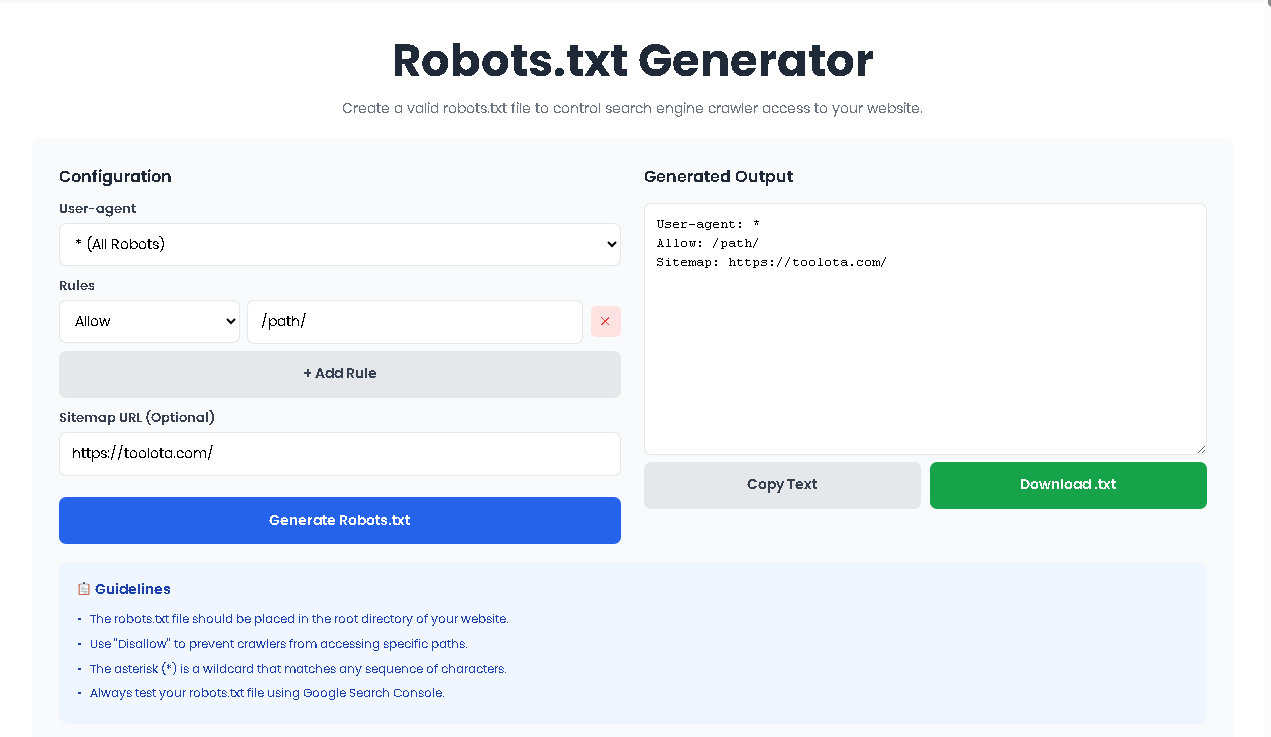
Begin by choosing which crawler you want to target from the dropdown menu. For general rules affecting all bots, select the asterisk (*) option. For search-engine-specific directives, choose the appropriate crawler like Googlebot or Bingbot.
Step 2: Add Your First Rule
Click the “Add Rule” button to create your first directive. Each rule consists of two components:
Rule Type: Choose between “Allow” (permission) or “Disallow” (restriction)
Path: Enter the specific directory or file path (e.g., /admin/, /private/, /images/)
Step 3: Build Multiple Rules
Continue adding rules until you’ve covered all necessary paths. The Robots txt Generator maintains proper ordering, which is crucial because crawlers read rules sequentially.
Step 4: Include Your Sitemap
Enter your complete sitemap URL in the optional field. This should be the full URL, including the protocol (https://) and complete path to your sitemap file.
Step 5: Generate and Review
Click the “Generate robots.txt” button to ensure your output matches expectations. Review each line carefully, paying special attention to path syntax.
Step 6: Download and Deploy
Once satisfied, click “Download File” to save your robots.txt. Upload this file to your website’s root directory (the main folder where your index.html or homepage resides).
How This Tool Works: The Most Detailed Section
Understanding the inner workings of the Robots txt Generator reveals why it has become an essential tool for web professionals. At its core, the tool follows a logical, user-centered workflow that mirrors how search engines interpret robots.txt files.
When you access the Robots txt Generator interface, you’re presented with a clean, two-column layout. The left side contains all configuration options, while the right side displays your generated robots.txt in real-time. This immediate feedback loop ensures you always know exactly what your final file will look like.
The tool operates on a simple principle: structured input produces standardized output. Each element you configure – from user-agent selection to individual rules – maps directly to a line in the final robots.txt file. The Robots txt Generator handles the formatting, ensuring proper line breaks, correct syntax, and optimal file structure.
Behind the scenes, the tool validates every entry. When you add a rule path, it checks for proper formatting. When you include a sitemap URL, it verifies the structure. This validation layer prevents common errors that could otherwise block legitimate crawlers or expose sensitive content.
Benefits This Tools
The Robots txt Generator comes packed with features that cater to both beginners and advanced users. Understanding these capabilities helps you maximize the tool’s potential.
Comprehensive User-Agent Support
The tool includes seven pre-configured user-agents covering major search engines and crawlers. From the catch-all asterisk (*) that affects all bots to specific agents like Googlebot, Bingbot, Yahoo Slurp, and DuckDuckBot, you have granular control over which crawlers receive which instructions.
Unlimited Rule Creation
Unlike basic generators that limit you to one or two rules, this Robots txt Generator allows unlimited Allow and Disallow directives. Each rule you add becomes a separate line in your file, giving you precise control over every directory and file on your server.
Sitemap Integration
Modern SEO demands proper sitemap submission. The dedicated sitemap field automatically formats and places your sitemap URL correctly at the bottom of your robots.txt file, following protocol standards.
Real-Time Preview
The output textarea updates instantly as you configure options. This feature proves invaluable when testing complex rule combinations or verifying that your directives appear exactly as intended.
One-Click Download
Once your configuration is complete, the download button creates a properly named robots.txt file ready for upload to your server’s root directory.
Best Practices for Robots.txt Creation
To maximize the effectiveness of your Robots txt Generator output, follow these professional guidelines:
Test Before Deploying
Always test your generated robots.txt using tools like Google Search Console’s robots.txt tester before going live. This verification step catches any oversight in your configuration.
Keep It Simple
While the generator supports unlimited rules, simpler files are easier to maintain and debug. Group related paths and use patterns where appropriate.
Regular Reviews
Search engine crawlers evolve, and your site structure changes. Review your robots.txt quarterly using the generator to ensure it still reflects your current needs.
Include Your Sitemap
Always add your sitemap URL. This helps crawlers discover your content more efficiently and is considered a search engine best practice.
Protect Sensitive Areas
Use Disallow rules to block crawlers from admin panels, staging environments, duplicate content, and private user areas.
Common Use Cases
The Robots txt Generator serves various scenarios across the web development and SEO spectrum:
E-commerce Sites
Online stores use the generator to block crawlers from shopping cart pages, user account areas, and checkout processes while allowing product and category indexing.
Content Management Systems
WordPress, Joomla, and Drupal sites benefit from blocking wp-admin, /includes/, and other system directories that don’t need indexing.
Development Environments
Staging and development sites use comprehensive Disallow rules to prevent search engines from indexing test content.
Media Publishers
News sites and blogs use the generator to manage crawler access to archives, tag pages, and duplicate content.
Ideal Uses and Applications
While the Robots txt Generator provides professional-grade output, understanding its parameters ensures proper expectations:
Input Quality Matters
The generated file quality directly depends on the accuracy of your inputs. Valid paths and correct sitemap URLs are essential for proper functionality.
AI-Generated Content Review
If you’re using AI to help plan your robots.txt strategy, always review recommendations against your actual site structure before implementation.
No Illegal Use
The tool should never be used to attempt blocking legal crawlers from accessing content that must be publicly available.
Basic Usage Rules
The generator follows standard robots.txt protocol. Extremely advanced configurations requiring comment lines or non-standard directives may need manual editing.
Frequently Asked Questions (FAQ)