
Resume Keyword Generator
Extract and analyze the most important keywords from any job description or resume text.
Extract and analyze the most important keywords from any job description or resume text.
A Resume Keyword Generator is an intelligent tool designed to cut through the noise of lengthy job descriptions and resume text. In today’s digital hiring landscape, up to 75% of resumes are never seen by human eyes, filtered out instead by Applicant Tracking Systems (ATS) that scan for specific keywords. This creates a critical challenge for job seekers: how do you quickly and accurately identify the exact terms that will get your resume noticed?
This is where a dedicated Resume Keyword Generator becomes indispensable. It’s not about guessing which words are important; it’s about using a systematic, analytical approach to extract them. The tool you’re using here, provided by Toolota, automates this process. By pasting any block of text—whether it’s your dream job’s description or your current resume draft—the generator performs an instant linguistic analysis. It filters out hundreds of common, filler words (like “the,” “and,” “with”) and surfaces the substantive, recurring terms that truly define the content. The result is a clean, prioritized list of keywords that represent the core skills, tools, technologies, and qualifications.
Manually scanning a job description for keywords is not only time-consuming but also highly inefficient. The human eye tends to skim, and it’s easy to miss subtle repetitions or prioritize flashy phrases over substantively repeated terms. Relying on intuition can lead you to emphasize the wrong skills on your resume. The modern job search demands precision, and a Resume Keyword Generator provides five undeniable advantages:
ATS Optimization: This is the primary reason. An ATS ranks resumes based on keyword relevance and density. By using a generator to identify the exact terms from a job description, you can integrate them naturally into your resume, boosting its score and visibility.
Time Efficiency: What might take you 15-20 minutes of careful reading, highlighting, and note-taking can be accomplished in less than 10 seconds with a reliable Resume Keyword Generator. This allows you to apply to more positions with higher-quality, tailored applications.
Objective Analysis: The tool removes bias. It doesn’t get distracted by attractive job titles or company branding. It coldly analyzes word frequency, giving you a data-driven list of what the text actually emphasizes, not what you think it emphasizes.
Competitive Edge: Most candidates still tailor resumes manually, if at all. Using a generator ensures your resume is more accurately optimized than many of your competitors, giving you a measurable edge in the initial screening phase.
Clarity and Focus: The generated list provides crystal-clear direction. Instead of a vague sense of what’s important, you have a concrete checklist of terms to verify are present and prominent in your resume, cover letter, and even your LinkedIn profile.
The power of Toolota‘s tool lies in its remarkable simplicity. You don’t need an account, and there are no complex settings to configure. The entire process is built for speed and immediate utility. Follow these steps to go from raw text to an actionable keyword list in under a minute.
Step 1: Prepare Your Source Text
First, identify the text you want to analyze. The most common use case is a job description. Open the job posting in your browser. Select and copy the entire description (Ctrl+C or Cmd+C). You can also use text from a professional resume (yours or a template) to see what keywords it currently emphasizes.
Step 2: Paste into the Generator
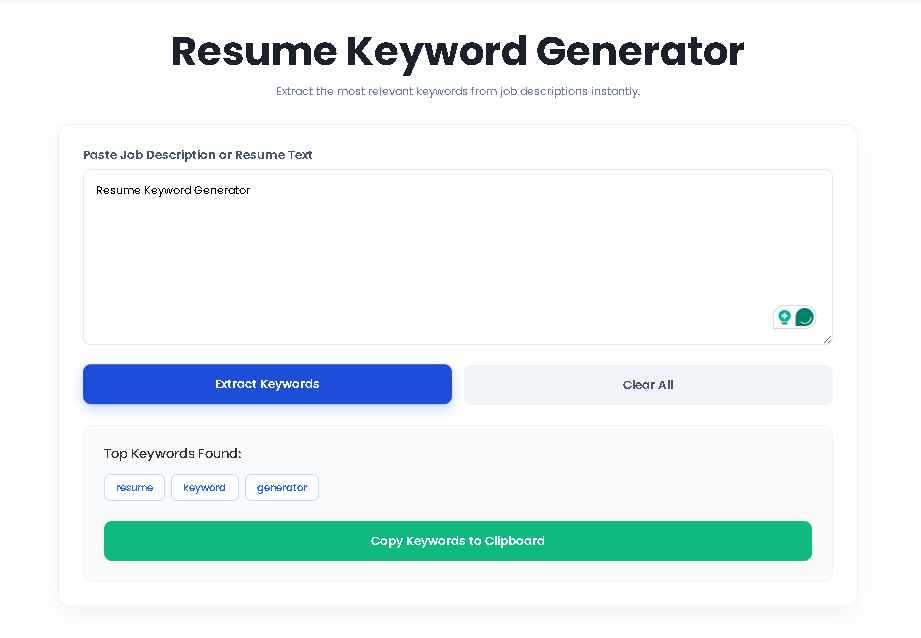
Navigate to the Resume Keyword Generator tool. You will see a large, clean text box with the placeholder text “Paste your job description or resume text here…” Click inside this box and paste (Ctrl+V or Cmd+V) the text you copied. The box can handle large amounts of text, so don’t worry about being too selective.
Step 3: Initiate the Analysis
Directly below the text box, you will find the action buttons. Click the blue button labeled “Extract Keywords.” This activates the tool’s core function. The JavaScript engine immediately processes your pasted text: converting it to lowercase, stripping punctuation, splitting it into words, comparing each word against a built-in library of common “stopwords,” and calculating the frequency of the remaining meaningful words.
Step 4: Review Your Generated Keyword List
Instantly, a new results panel will appear below the buttons. It is headed “Top Keywords Found.” Here, the tool displays its analysis output: the top 20 most frequent, relevant keywords extracted from your text. Each keyword is presented in a visually distinct, blue “tag” or badge (e.g., management, python, development, client). This grid format allows for quick, at-a-glance comprehension.
Step 5: Copy and Apply Your Keywords
Beneath the keyword tags, you will see a green button labeled “Copy All Keywords.” Clicking this button copies the entire list of 20 keywords to your computer’s clipboard, formatted as a simple comma-separated list (e.g., “management, python, development, client, project, agile…”). You can now paste this list into a document for reference or directly use it as a guide to edit and optimize your resume, ensuring these terms are appropriately included.
Step 6: (Optional) Clear and Start Anew
If you want to analyze a different text, simply click the grey “Clear All” button. This will instantly empty the text box, hide the results panel, and reset the tool, ready for your next analysis.
Choosing this specific Resume Keyword Generator offers tangible benefits that go beyond simple keyword extraction:
100% Free & No Login Required: There are no hidden fees, tiers, or requirements to create an account. Access the tool instantly and use it as often as you need without any limitation.
Lightning-Fast Processing: The analysis happens locally in your web browser, delivering results in milliseconds. There is no waiting for server processing or upload delays.
Clean, User-Friendly Interface: The design is intuitive and distraction-free. From the clear instruction text to the logically grouped buttons and visually appealing keyword tags, the interface is built for a seamless user experience (UX).
One-Click Copy Functionality: The integrated “Copy All Keywords” feature is a major time-saver. It eliminates the tedious task of manually typing or selecting each keyword from the screen, streamlining your workflow.
Privacy-Focused: Since the tool runs in your browser, your sensitive resume and job description text is not sent to or stored on any external server. Your data stays on your machine.
Universal Compatibility: The tool works with any text. Whether you’re in tech, marketing, healthcare, or finance, the linguistic analysis is effective across all industries and job types.
When you receive your list of 20 keywords, it’s important to interpret them correctly to take strategic action.
High-Frequency Skills/Tools: Keywords that appear at the very start of your list (often nouns like JavaScript, budget, CRM, nursing) are the most heavily emphasized hard skills or specific tools in the source text. These are non-negotiable; they must be prominently featured in your resume if you possess them.
Core Competencies & Verbs: Keywords like manage, develop, analyze, coordinate, or optimize represent key action verbs and core competencies. Integrate these into the bullet points under your work experience to match the job’s language.
Contextual & Industry Terms: The list may include specific methodologies (agile, scrum), certifications (PMP, CPA), or industry jargon. Their presence confirms their importance to the role.
A Note on “Common” Keywords: The generator filters standard English stopwords, but some frequent business terms (team, project, client) may still appear. Don’t dismiss these—their high frequency underscores their importance to the role’s context. Your resume should demonstrate experience with these concepts through concrete examples.
Your goal is not to stuff your resume with every keyword in a forced way. Instead, use the list as a verification checklist. For each relevant keyword, ask: “Does my resume clearly demonstrate my experience with this?” If the answer is no, find a way to incorporate it authentically.
For optimal results, please keep these conditions in mind:
Output Quality Depends on Input: The generator can only analyze the text you provide. Vague or poorly written job descriptions will yield less actionable keyword lists. Use clear, comprehensive source text for the best analysis.
Context is King: The tool provides a list of what words are used, not how they are used. You must apply human judgment to understand the context and prioritize which keywords are most relevant to your specific background.
Complement, Don’t Replace: This tool is designed to assist your resume tailoring process, not to write your resume for you. The final editing, formatting, and personal narrative are your responsibility.
Ethical Use: Use the tool to honestly match your skills to a job’s requirements. Keyword stuffing (adding irrelevant terms) is easily spotted by both ATS and humans and will harm your application.
The Resume Keyword Generator is significantly more consistent and thorough than manual analysis for identifying word frequency. It processes every single word without skimming, eliminating human error and bias. For the specific task of extracting the most frequently used substantive terms, it is objectively more accurate. However, it doesn’t understand semantic nuance, so your judgment is still needed to interpret the list’s significance.
The current version of this specific Resume Keyword Generator is optimized for English text. Its internal “stopword” filter contains common English words. While it can process text in other languages and will extract frequent terms, the results may be less precise because common words in other languages (e.g., “der,” “die,” “das” in German) will not be filtered out, potentially cluttering your keyword list.
Technically, you can paste a very large amount of text. However, for the most effective and focused results, it is recommended to paste clean, relevant text. If a job description is surrounded by heavy website navigation, legal disclaimers, or multiple unrelated sections, consider copying only the core “Responsibilities” and “Requirements” text. The tool works best with 100-1000 words of focused content.
First, double-check that the skill’s exact term is in the pasted text. The generator treats “project-management” and “project management” as different words. If the term is present but rare (mentioned only once in a long document), it may not appear in the top 20. The tool prioritizes frequency. In this case, use your own knowledge to include that important but less-frequent skill on your resume. The generator provides a data-driven foundation, not an exhaustive mandate.
Toolota is your all-in-one online tools platform. Fast, simple, and free utilities designed to make everyday digital tasks easier and smarter.