
Salary Calculator
Calculate your expected salary based on experience, skills, and job category.
Calculate your expected salary based on experience, skills, and job category.
In today’s dynamic job market, knowing your professional worth isn’t just an advantage—it’s a necessity. Enter the Toolota Salary Calculator, a sophisticated yet user-friendly digital tool designed to demystify compensation expectations. This isn’t a simple lookup table; it’s an interactive estimator that processes multiple dimensions of your career profile to generate a personalized, data-informed salary range.
Built with precision by Toolota, this Salary Calculator empowers job seekers, career changers, and negotiation-minded professionals. By integrating key variables like job seniority, hands-on experience, and specialized skill level, it moves beyond generic averages to provide a tailored snapshot of what you could—and should—be earning. Whether you’re preparing for a performance review, exploring a new industry, or crafting a job application strategy, having a clear, calculated benchmark is the first step toward confident career advancement.
Relying on gut feeling or anecdotal evidence during salary discussions can lead to leaving significant money on the table or pricing yourself out of a role. A dedicated Salary Calculator solves this by introducing objectivity and structure to your evaluation.
Informed Negotiation: Walking into a negotiation with a credible, calculated range shifts the dynamic. It transforms “I want more money” into “Based on my profile of X years in a senior role with expert-level skills, the market data suggests a range of Y.”
Career Planning: Understanding how each career step—a promotion, a new certification, or accumulated years—impacts your earning potential helps you plan your professional development strategically.
Market Reality Check: Salaries fluctuate with geography, industry trends, and economic conditions. A robust Salary Calculator that uses updated parameters helps align your expectations with current market realities, ensuring your targets are both ambitious and achievable.
Time Efficiency: Researching salaries across multiple job boards and reports is time-consuming. Toolota‘s tool consolidates this research into a 60-second interactive process, delivering immediate insights.
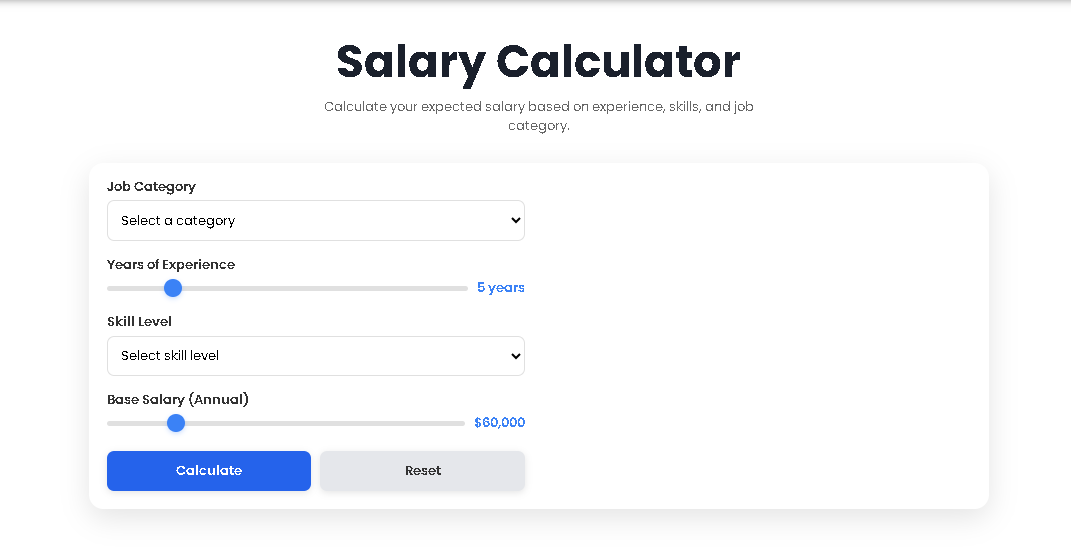
The power of our Salary Calculator lies in its simplicity. Follow this exact sequence to get your accurate estimate. The interface is designed for a logical flow, mirroring how employers assess compensation.
Step 1: Select Your Job Category
Locate the “Job Category” dropdown menu. Click and select the option that best matches your target or current position level: Entry Level, Mid Level, Senior Level, or Executive. This sets the foundational baseline salary for the calculation, as each category corresponds to a different industry-standard starting point.
Step 2: Adjust Your Years of Experience
Directly below, you’ll find the “Years of Experience” slider. Click and drag the circular thumb left or right to match your total, relevant professional experience. The range is from 0 to 30 years. As you move the slider, the number displayed to the right updates in real-time. This factor adds an annual “experience bonus” to your base.
Step 3: Define Your Skill Level
The “Skill Level” dropdown is critical. Honestly assess your proficiency relative to your field. Choose from:
Beginner: You are developing core competencies.
Intermediate: You possess solid, dependable skills and can work independently.
Expert: You have advanced, niche skills and can lead strategy or mentor others.
This choice applies a multiplier, significantly affecting the final estimate.
Step 4: Set the Base Salary Reference
Use the “Base Salary (Annual)” slider to input a relevant salary figure. This could be your current salary, the typical starting salary for your role in your region, or a figure from your research. Adjust it between $30,000 and $200,000 in $5,000 increments. This slider allows for regional and industry customization.
Step 5: Generate Your Calculation
Once all four fields are populated, click the prominent blue “Calculate” button. The tool instantly processes your inputs using its internal algorithm. Do not click “Reset” during this process.
Step 6: Review Your Results
Instantly, two new panels will appear on the right side of the calculator:
The Expected Salary Range Card: This shows your primary result—a low-to-high annual salary range.
The Salary Breakdown Panel: This transparently shows how the result was built, listing the base salary for your category, the calculated experience bonus, the applied skill multiplier, and the final estimated total.
Choosing the Toolota tool offers distinct advantages:
Speed and Instantaneity: Receive a comprehensive salary analysis in less than a minute, eliminating hours of fragmented research.
Data-Backed Accuracy: The calculation model uses logical multipliers and additive factors based on common compensation structures, providing a more reliable figure than a simple guess.
Transparency and Education: The detailed breakdown demystifies how your salary is built, educating you on the value of experience and skills, not just the final number.
Clean, Intuitive UI/UX: The design prioritizes user experience. The sliders offer tactile control, and the layout logically groups inputs and results, making the process effortless.
Zero Commitment & Free Access: There is no registration, no login, and no cost. You can use the Salary Calculator as often as you like, testing different career scenarios instantly.
Scenario Testing: Easily use the “Reset” button and re-calculate to answer “what-if” questions. What if I get a promotion to a Senior level? What value does an expert certification add?
The results panel is designed for clarity and insight. Let’s decode what you see:
Expected Salary Range (e.g., “$85,000 – $104,000”): This is your key takeaway. The tool calculates a central “estimated salary” and then shows a range approximately 10% above and below that figure. This range accounts for variables like company size, specific industry nuances, and benefits packages. It’s the bracket you should consider during negotiations.
Breakdown – Base Salary: This is the predefined starting point associated with the “Job Category” you selected (e.g., “Senior Level” has a higher base than “Mid Level”).
Breakdown – Experience Bonus: This is calculated as Years of Experience x $2,000. It quantifies the monetary value added by each year of practical work history.
Breakdown – Skill Multiplier: This shows the multiplier (0.8x, 1.0x, 1.3x) applied based on your selected “Skill Level.” An “Expert” multiplies the sum of (Base + Experience), while a “Beginner” reduces it.
Breakdown – Estimated Total: This is the precise central figure (Base + Experience Bonus) x Skill Multiplier before the range is applied. It’s the engine room output of the Salary Calculator.
For the most effective use of this tool, please consider:
Output Depends on Input Quality: The accuracy of your estimate is directly related to the honesty and precision of your inputs. Thoughtfully select the category and skill level that truly represent your profile.
It’s an Estimator, Not a Guarantee: This Salary Calculator provides a powerful market estimate based on standardized variables. Final job offers will include other factors like specific company budget, your interview performance, and total benefits (healthcare, bonuses, equity).
Use as a Benchmark: Treat the generated range as a core data point in your broader research, which should include looking at salary reports for your specific job title and location.
Contextualize Your Base: When using the “Base Salary” slider, try to input a figure that reflects the market rate for the role in your target geography, not just your personal history.
Professional Use Only: This tool is intended for career development and personal financial planning. It should not be used for unlawful or discriminatory purposes.
The Toolota Salary Calculator is designed to provide a highly realistic market estimate based on the fundamental pillars of compensation: role level, experience, and skills. Its accuracy is maximized when users input reflective, honest data. It serves as an excellent benchmark, though individual offers may vary based on company-specific factors.
The calculator uses a universal compensation logic applicable across many professional industries. However, the monetary values (base salaries, experience bonus rate) are generalized. For the most precise estimate, use the “Base Salary” slider to anchor the calculation to a known salary figure from your specific industry and region.
The skill multiplier directly scales the combined value of your base salary and experience bonus. Selecting “Beginner” (0.8x) reduces the total, reflecting a developmental stage. “Intermediate” (1.0x) applies no change, representing standard proficiency. “Expert” (1.3x) significantly increases the total, quantifying the premium value of advanced, specialized, or leadership skills.
When switching fields, focus on your transferable skills. For “Job Category,” select the level commensurate with your professional maturity (e.g., if you were a senior manager, you might still target “Senior” or “Mid” level). For “Skill Level,” assess the applicability of your existing skills to the new role. Use the sliders to model different scenarios, providing a range of potential entry points into your new career.
Toolota is your all-in-one online tools platform. Fast, simple, and free utilities designed to make everyday digital tasks easier and smarter.