
HR Email Generator
Generate professional HR emails for various scenarios. Customize templates with your details.
Email Preview
Select an email type and fill in your details to generate an email...
Generate professional HR emails for various scenarios. Customize templates with your details.
Crafting professional, polished, and effective emails for human resources (HR) scenarios is a critical skill, yet it often consumes valuable time and mental energy. Whether you’re a job seeker following up on an application, an employee negotiating a salary, or a professional submitting a resignation, the pressure to get the tone, structure, and content just right is immense. This is where a specialized tool becomes indispensable.
The HR Email Generator by Toolota is a free, web-based application designed to eliminate the guesswork and hassle from professional HR correspondence. It is not just another template library; it is an interactive platform that allows you to input your specific details into expertly crafted templates and receive a complete, formatted email in real-time. This tool solves a concrete problem: bridging the gap between knowing what you need to communicate and presenting it in a flawlessly professional manner. By leveraging this HR Email Generator, you transform a time-consuming drafting process into a quick, efficient, and error-free task, ensuring you always put your best foot forward in written communication.
You might wonder why a simple copy-paste template from a blog post isn’t sufficient. The difference lies in customization, context, and convenience. Generic templates lack personalization, which can make your communication feel impersonal and lazy to the recipient. A dedicated HR Email Generator like this one provides a structured framework that guides you to insert the right information in the right places.
Manually drafting each email from scratch exposes you to risks of forgetting key details, using unprofessional phrasing, or making formatting errors. In high-stakes situations like salary negotiations or resignation letters, such mistakes can have tangible consequences. This tool acts as both a guide and a quality-control checkpoint. It ensures that all essential components—a proper subject line, a courteous greeting, a clear body, and a professional sign-off—are present and correctly ordered. The live preview pane immediately shows you the final product, allowing you to review and feel confident before you send. In essence, this HR Email Generator provides the strategic outline; you simply provide the personal touch, resulting in communication that is both efficient and impactful.
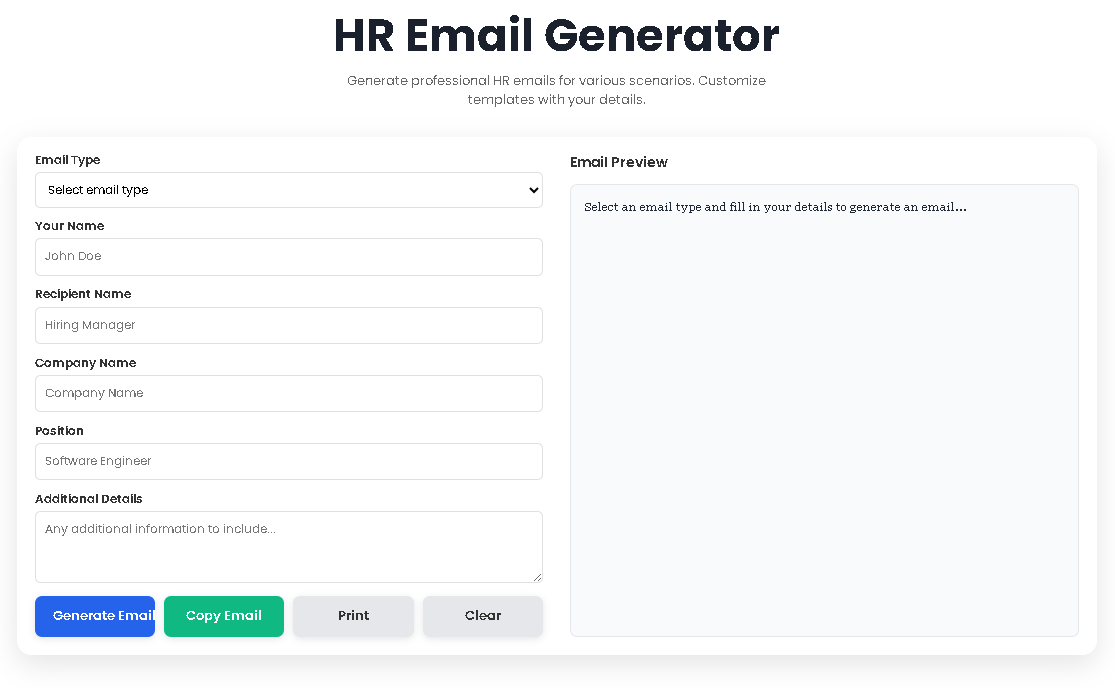
The beauty of the HR Email Generator lies in its intuitive design. You do not need any technical expertise. Here is the exact process, mirroring the tool’s real interface:
Step 1: Select Your Email Type
Navigate to the dropdown menu labeled “Email Type.” This is your starting point. You will find six core scenarios: Follow-up Email, Interview Request, Thank You Email, Offer Acceptance, Resignation Letter, and Salary Negotiation. Click and select the one that matches your current need. This action sets the foundation for the template.
Step 2: Input Your Personal Details
Once a template is selected, the form fields become your customization hub. Fill in the following:
Your Name: The name you will use to sign the email (e.g., John Doe).
Recipient Name: The name or title of the person you are addressing (e.g., Ms. Smith, Hiring Manager).
Company Name: The name of the organization involved.
Position: The specific job title or role being discussed.
Additional Details: This is a critical, open text box. Use it to add unique information, such as a specific date you applied, a particular point from an interview you wanted to thank them for, or your proposed salary figure in a negotiation.
Step 3: Generate and Preview in Real-Time
As you type in the fields, the tool works automatically. The “Email Preview” section on the right-hand side updates in real-time, showing you the complete email with all your details inserted seamlessly into the professional template. You can scroll through this preview to read the entire email before proceeding.
Step 4: Take Action on Your Generated Email
Below the form, you have a set of action buttons:
Generate Email: Use this to manually refresh the preview if needed.
Copy Email: This is the primary function. Clicking this copies the entire text from the preview pane to your computer’s clipboard. You can then paste it directly into your email client (Gmail, Outlook, etc.).
Print: Clicking this opens a clean print dialog with just the email text formatted for printing or saving as a PDF.
Clear: This resets the entire form and preview, allowing you to start fresh for a new email.
This logical flow—Select, Input, Preview, Act—ensures that using the HR Email Generator is a straightforward, minute-long task.
Speed and Efficiency: Generate a complete, structured email in under a minute, freeing up time for other important tasks like interview preparation or job searching.
Professional Accuracy: Eliminate formatting errors, forgotten salutations, or awkward phrasing. The templates ensure your communication meets professional standards.
Confidence in Communication: Reduce the anxiety associated with writing important emails. Knowing you have a professionally vetted structure allows you to communicate with greater assurance.
Customization with Guardrails: The tool offers flexibility in the “Additional Details” field but within a proven framework, preventing you from inadvertently including unprofessional or irrelevant content.
Convenient Output Options: The one-click copy function and print option integrate seamlessly into your workflow, whether you prefer to send immediately or save a copy for your records.
Let’s explore the specific scenarios covered by the HR Email Generator and what makes each template valuable.
Follow-up Email: Used after submitting a job application or after an interview if you haven’t heard back within the expected timeframe. The template is polite, reaffirms your interest, and prompts a response without being pushy.
Interview Request: This template is ideal for when a recruiter contacts you initially. It expresses enthusiasm, confirms your availability, and offers flexibility regarding interview format (phone, video, in-person), making scheduling easy for the HR team.
Thank You Email: Sent within 24 hours of an interview. It thanks the interviewer for their time, mentions something specific from the conversation to show engagement, and reiterates your fit for the role and excitement about the company.
Offer Acceptance: A formal and positive response to a job offer. It clearly states your acceptance, expresses gratitude and enthusiasm for joining the team, and asks about the logical next steps, demonstrating professionalism from day one.
Resignation Letter: A formal notification of your departure. The template is gracious, provides a clear effective date, expresses gratitude for the opportunity, and offers assistance with the transition, helping you leave on positive terms.
Salary Negotiation: Perhaps the most delicate email to write. This template provides a strong, respectful framework to propose a counter-offer. It shows appreciation for the initial offer, states your case clearly based on market value and experience, and opens the door for further discussion.
Each template within the HR Email Generator is built on standard HR and business communication best practices, giving you a reliable starting point that you can trust.
The HR Email Generator is a powerful assistant, but optimal results depend on user input. The quality of the final email is directly tied to the accuracy and thoughtfulness of the details you provide. Remember, the output is AI-generated based on a template and your inputs; it is your responsibility to review the final preview thoroughly to ensure it perfectly aligns with your intent and situation. This tool is designed for legitimate professional and personal use. It should not be used to generate communication for fraudulent, harassing, or otherwise harmful purposes. For best results, always pair the generated text with your own genuine voice and double-check all specifics before sending.
Yes, the HR Email Generator by Toolota is completely free. There is no subscription, sign-up, or hidden fee. You can access all six templates and use the copy, print, and generate functions as often as you need.
Absolutely. The primary workflow is to generate and copy the email text. Once it’s pasted into your email client (like Gmail or Outlook), you can—and should—edit it further. Think of the HR Email Generator as providing a first draft. You can tweak sentences, add more personal details, or adjust the tone to be a perfect fit.
No. The HR Email Generator operates entirely within your web browser. The information you type into the form fields is not sent to any server or saved in a database. It exists only on the page during your session and is cleared when you refresh the page, close the tab, or click the “Clear” button.
The current HR Email Generator focuses on the six most common and critical HR email scenarios. For other types of professional emails, you can often adapt one of the existing templates. For example, the professional and polite structure of the “Thank You Email” could be adapted for other post-meeting follow-ups. The tool is designed to teach a reliable structure that can be applied flexibly.
Toolota is your all-in-one online tools platform. Fast, simple, and free utilities designed to make everyday digital tasks easier and smarter.