
Job Application Tracker
Track all your job applications in one place. Monitor status and follow-up dates.
| Company | Position | Date Applied | Status | Actions |
|---|---|---|---|---|
| No applications yet. Add one to get started! | ||||
Track all your job applications in one place. Monitor status and follow-up dates.
| Company | Position | Date Applied | Status | Actions |
|---|---|---|---|---|
| No applications yet. Add one to get started! | ||||
A Job Application Tracker is an essential digital tool for anyone navigating the modern job market. It acts as a centralized, organized system to record, monitor, and manage every job application you submit. Think of it as a personal Customer Relationship Management (CRM) system, but specifically designed for your job search. Instead of relying on memory, scattered emails, or messy spreadsheets, a dedicated Job Application Tracker provides a clear dashboard of your entire search campaign. It answers critical questions at a glance: Where did I apply? When did I apply? What is the current status? What’s my next step? The Job Application Tracker from Toolota transforms this concept into a simple, powerful, and free web application that runs directly in your browser, requiring no downloads or sign-ups, and stores your data privately on your own device.
While a spreadsheet can be a starting point, a specialized Job Application Tracker like the one from Toolota offers distinct advantages that streamline your search and reduce stress.
Reduces Mental Clutter & Prevents Missed Opportunities: When applying to multiple roles, it’s easy to forget which company received your resume two weeks ago or when you promised to follow up. A tracker eliminates this guesswork, ensuring no opportunity slips through the cracks.
Provides Instant Visual Feedback: Our tool uses color-coded status badges (like “Applied,” “Interview,” “Offer,” “Rejected”). This visual system allows you to assess your entire pipeline in seconds, understanding your success rates and where you need to focus your energy.
Enables Strategic Follow-ups: By having a clear record of application dates, you can schedule timely and professional follow-up emails, demonstrating your continued interest and organization to potential employers.
Offers Privacy & Portability: Unlike some online platforms, Toolota’s tracker stores your sensitive job search data locally in your browser. It’s your private record, accessible anytime you open the tool on your device.
Simplifies the Process: The intuitive form and one-click actions (“Add,” “Edit,” “Delete”) are faster and less error-prone than manually editing spreadsheet rows and formatting cells.
This section details the exact workflow of the tool, based on its real functionality. Follow these steps to manage your job search effectively.\
Step 1: Access the Tool
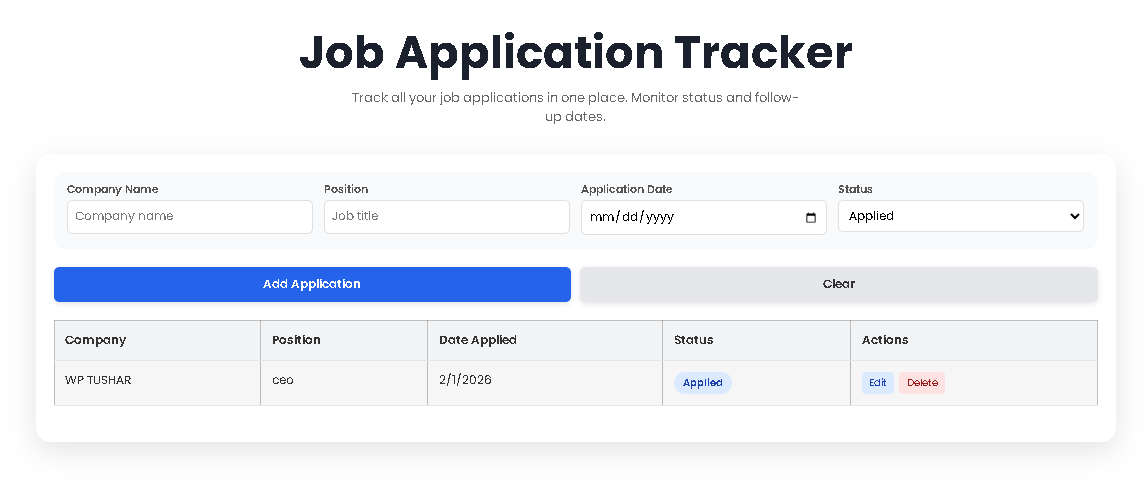
Navigate to the Job Application Tracker page on Toolota. The tool loads instantly in your web browser. You will see a clean header, an input form, action buttons, and an empty table ready for your data.
Step 2: Input Your First Application
Locate the form section with four input fields:
Company Name: Type the full name of the employer (e.g., “Tech Innovations Inc.”).
Position: Enter the exact job title you are applying for (e.g., “Senior Marketing Manager”).
Application Date: Use the date picker to select the day you submitted your application. This is crucial for tracking.
Status: Select the current stage from the dropdown menu: Applied, Interview, Offer, or Rejected.
Step 3: Save the Entry
Click the “Add Application” button. The tool will validate that all fields are filled. Upon success, you will see a brief notification (e.g., “Application added successfully!”) at the bottom-right of your screen. The form will automatically clear, ready for your next entry.
Step 4: View & Manage Your Dashboard
Your new entry will now appear in the table below, which is the core of your Job Application Tracker. The table columns display all the information you entered. Crucially, the Status column will show a colored badge matching your selection (blue for Applied, yellow for Interview, green for Offer, red for Rejected). All applications are automatically sorted with the most recent date at the top.
Step 5: Edit an Existing Application
If you need to update an application’s status (e.g., moving from “Applied” to “Interview”) or correct a detail, click the “Edit” button in the Actions column for that specific row. This will instantly populate the form above with that application’s data. Make your changes and click “Add Application” again. The old entry is replaced, and the table updates.
Step 6: Delete an Entry
If you wish to remove an application (e.g., a duplicate or an expired listing), click the “Delete” button in its row. A confirmation dialog will appear to prevent accidental loss. Upon confirming, the entry is permanently removed from your table and local storage, and a notification confirms the action.
Step 7: Persistence and Revisiting
Close your browser tab or shut down your computer. When you return to the Toolota Job Application Tracker page, all your applications will be there exactly as you left them. This is because the tool uses your browser’s local storage to save your data securely on your machine.
100% Free & No Registration: Immediate access without email sign-ups, accounts, or hidden fees.
Clean, Intuitive User Interface (UI): Designed for clarity and ease of use, allowing you to focus on your job search, not on figuring out the tool.
Visual Status Management with Color-Coded Badges: Gain instant insight into your job search pipeline. See your progress move from blue (Applied) to green (Offer) at a glance.
Local Browser Storage for Maximum Privacy: Your data never leaves your computer. It is not stored on any external server, ensuring complete confidentiality.
One-Click Editing & Deletion: Update application details or clean up your list with minimal effort, maintaining an accurate and current dashboard.
Automatic Date Sorting: Your applications are always organized chronologically, making it easy to identify which follow-ups are due.
Responsive Design: The tracker works seamlessly on desktops, laptops, and tablets, so you can manage your search from any device.
Be Consistent: Make it a habit to add every application to the tracker immediately after hitting “submit” on a job portal. Consistency is key to its usefulness.
Utilize the Status Field Proactively: Don’t just set it and forget it. Regularly update statuses after interviews or when you receive communications. This turns the tracker into a dynamic log of your interactions.
Leverage the Data for Reflection: Periodically review your table. Are most entries stuck on “Applied”? It might be time to revamp your resume or follow up. A cluster of “Interviews” in a specific industry can reveal your strengths.
Combine with a Calendar: Use the “Application Date” in your tracker to set reminders in your digital calendar for polite follow-up emails (typically 7-10 days after applying if no response).
Keep Notes Elsewhere: For detailed interview notes or specific contact names, consider keeping a complementary document. Use the Job Application Tracker as your master index.
Data Responsibility: As the tool uses your browser’s local storage, your data is tied to the device and browser you use. If you clear your browser cache/cookies, you may lose your data. For critical searches, consider periodically exporting your table manually (e.g., via screenshot or copy-paste).
Output Depends on Input: The accuracy and value of your Job Application Tracker dashboard are directly dependent on the completeness and accuracy of the information you enter.
Manual Review Recommended: While the tool automates organization, a successful job search still requires your active management—following up, preparing for interviews, and tailoring communications.
Intended Use: This tool is designed for personal job search management. It is not intended for illegal, harmful, or commercial resale purposes.
The Job Application Tracker uses your web browser’s localStorage capability. This means all data (company names, positions, dates, statuses) is saved directly on your computer and is never transmitted to or stored on Toolota’s servers. It is as secure as your own device. Your data will not be accessible if you open the tool on a different browser or computer.
Because data is stored locally on a specific browser and device, your tracker dashboard is not automatically synced across devices (e.g., from your laptop to your phone). To maintain a single source of truth, we recommend using the tracker primarily on one device for your job search.
The tool includes a confirmation dialog when you click “Delete” to prevent accidents. However, if you confirm the deletion, the entry is immediately removed from both the table and local storage and cannot be recovered through the tool. This underscores the importance of the tool as a management aid, not necessarily a permanent archive.
There is no hard-coded limit within the tool’s interface. The practical limit is governed by your web browser’s storage capacity for the site, which is typically at least 5MB—more than enough for thousands of text-based job application entries. You can track an extensive job search campaign without issue.
Toolota is your all-in-one online tools platform. Fast, simple, and free utilities designed to make everyday digital tasks easier and smarter.