Automatically detect and display your device specifications including operating system, browser, hardware capabilities, screen resolution, and touch support. All information is detected instantly.
The Device Specs Checker by Toolota is a browser-based diagnostic utility designed to read and display your device’s core hardware and software specifications instantly. Unlike traditional system information tools that require downloads, installations, or administrative privileges, this tool operates entirely within your web browser.
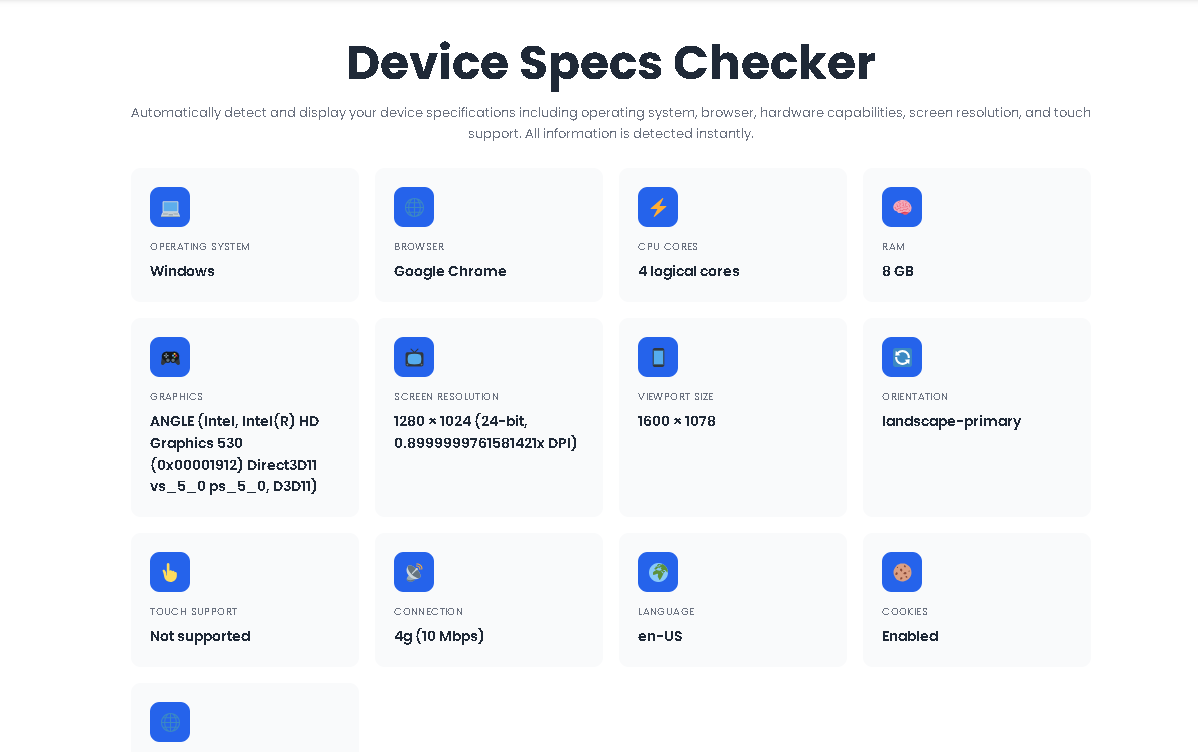
When you land on the page, the Device Specs Checker automatically scans thirteen distinct data points—ranging from operating system and browser identity to GPU renderer and touch capability. The interface presents these findings in a clean, color-coded grid. If you need to keep a record, the tool provides a one‑click text file download containing the full report, including the complete user agent string and a timestamp.
This is not a benchmarking tool. It does not stress test your components or measure performance under load. Instead, it acts as a fast, reliable specification reader—ideal for quick diagnostics, remote support, or simply understanding what hardware your current device is running.
Many users do not know their screen’s exact pixel dimensions, their GPU model, or how many logical cores their processor contains. This information becomes critical when:
Purchasing software – Verifying system requirements before buying a game or professional application.
Troubleshooting performance – Identifying whether low RAM or an older GPU is causing slowdowns.
Remote IT support – Asking a non‑technical user to “check their specs” often results in confusion. Sending them a link to the Device Specs Checker eliminates back‑and‑forth.
Web development – Testing responsive layouts requires accurate viewport and pixel ratio data. This tool provides both instantly.
Because the tool runs client‑side, no data is ever transmitted to a server. Your device information stays on your machine.
Because this tool requires zero input, many users wonder what actually happens when they open the page. Below is a strict, accurate walkthrough based on the actual HTML and JavaScript logic.
The moment the HTML document finishes loading, the window.addEventListener('load', displaySpecs) event fires. There are no buttons to press, no forms to submit, and no permissions to grant. The script immediately begins polling the browser’s built‑in navigator, screen, and window objects.
Thirteen individual detection functions run sequentially:
Operating System – Reads navigator.platform and userAgent to differentiate Windows, macOS, Linux, Android, and iOS.
Browser – Checks for Edge, Chrome, Firefox, Safari, and Opera signatures.
CPU Cores – Uses navigator.hardwareConcurrency to report logical core count.
RAM – Leverages the navigator.deviceMemory API (Chrome/Edge only) to display an estimate in GB.
GPU – Creates a hidden WebGL canvas and requests the unmasked renderer string.
Screen Resolution – Combines screen.width, screen.height, colorDepth, and devicePixelRatio.
Viewport Size – Reads the current window.innerWidth and innerHeight.
Orientation – Checks screen.orientation.type; falls back to portrait/landscape comparison.
Touch Support – Detects ontouchstart presence and reads navigator.maxTouchPoints.
Connection – Accesses the Network Information API to show effectiveType and downlink speed.
Language – Pulls navigator.language.
Cookies – Reads navigator.cookieEnabled.
Online Status – Uses navigator.onLine.
All values are stored in a global specs object for later use.
Once detection finishes, the loading spinner disappears. A grid of spec cards appears instantly. Each card contains an emoji icon, a label (e.g., “CPU Cores”), and the detected value. The grid uses CSS Grid with repeat(auto-fit, minmax(280px, 1fr)), meaning the layout automatically stacks on mobile and expands on desktop.
If you rotate your device or resize the browser window, the Device Specs Checker updates two specific fields in real time: Viewport Size and Orientation. It does this by locating the existing card elements via text content matching and modifying the .spec-value div directly. No page reload is required.
At the bottom of the screen, a blue “Download Report as Text” button appears. Clicking this button:
Constructs a plain text string with all thirteen specs, the full user agent, and a generation timestamp.
Creates a Blob object with MIME type text/plain.
Generates an object URL.
Programmatically clicks a hidden anchor element to trigger the download.
Revokes the object URL to free memory.
The file is saved as device-specs-report.txt and can be opened in any text editor.
1. Zero Friction
No sign‑up forms, no email collection, no paywalls. The tool works the instant the page finishes loading.
2. Universal Accessibility
Because it relies on standard Web APIs, the Device Specs Checker functions on Windows, macOS, Linux, Android, and iOS—including iPadOS which often masks as macOS in user agents.
3. Portable Reporting
The downloadable .txt report is lightweight, human‑readable, and can be attached to support tickets or emails without formatting issues.
4. Clean, Modern Interface
Cards feature subtle hover animations, proper contrast ratios, and responsive typography. The interface does not distract; it simply presents data.
5. No Background Processing
Once the specs are displayed and the download object is created, the script becomes idle. There are no tracking pixels, analytics calls, or hidden resource consumption.
6. Real-Time Accuracy
Viewport and orientation updates happen live. No refresh button needed.
7. Privacy First
No server-side logging. No cookies set by the tool itself. What you see stays in your browser.
| Category | Data Points | Why It Matters |
|---|---|---|
| System | OS, Browser, Language, Online Status | Identifies platform compatibility and regional settings. |
| Hardware | CPU Cores, RAM (estimated), GPU Renderer | Helps determine if your device meets software requirements. |
| Display | Screen Resolution, Viewport Size, Orientation, Pixel Ratio | Essential for designers, gamers, and video editors. |
| Connectivity | Network Type (4G/5G/WiFi), Downlink Speed | Explains slow loading times or streaming issues. |
| Environment | Touch Support (with max points), Cookies | Useful for mobile app developers and privacy checks. |
RAM detection is only accurate in Chromium browsers that support the deviceMemory API. Firefox and Safari will display “Not available.”
GPU information depends on the WEBGL_debug_renderer_info extension. If an extension is blocked (privacy‑focused browsers), the tool defaults to “WebGL supported.”
Connection speed reflects an effective type (slow‑2g, 2g, 3g, 4g) and a downlink estimate, not a precise speed test result.
The tool does not detect battery status, storage capacity, internal temperatures, or motherboard details.
Because everything runs locally, JavaScript must be enabled. No fallback exists for non‑JavaScript environments.
User Agent parsing is pattern-based. Rare or obscure browsers may be misidentified.
Touch point count may report zero on devices with disabled touch input in BIOS or OS settings.
No. The Device Specs Checker runs entirely inside your browser. No data is sent to any external server, logged, or stored. The download feature generates a text file locally on your device—nothing is uploaded anywhere.
The RAM estimate relies on the navigator.deviceMemory property. Currently, this is only implemented in Chromium‑based browsers (Chrome, Edge, Brave, Opera). If you are using Safari or Firefox, the API returns undefined, and the tool cannot provide an estimate. This is a browser limitation, not a tool defect.
Absolutely. The interface is fully responsive, and mobile browsers expose the same Web APIs. You will see touch point counts, orientation, and viewport dimensions specifically tailored to your device. The download feature also works on mobile—the text file saves to your downloads folder.
The tool is provided for public use on Toolota. Replicating the exact functionality requires proper attribution and adherence to the underlying Web APIs. The code structure is visible for educational purposes, but redistribution should respect the original implementation.
Toolota is your all-in-one online tools platform. Fast, simple, and free utilities designed to make everyday digital tasks easier and smarter.
