Data Sorter | The Smart Way to Sort Data Online | Toolota
Table of Contents
What This Tool Does
Tired of manually rearranging lists in spreadsheets or text editors? The Data Sorter is a free, browser-based utility designed to transform disorganized information into perfectly ordered sequences—in seconds. Whether you’re working with student grades, product SKUs, contact names, or numerical datasets, this tool eliminates the friction of manual sorting with a clean, intuitive interface that requires zero technical expertise.
Built by Toolota, the Data Sorter handles both text and numeric values intelligently. Simply paste your raw data (one item per line), select your preferred sort direction, and watch your chaotic list transform into a logically organized output ready for copying, sharing, or further analysis.
How the Works
At its core, the Data Sorter operates on a straightforward principle: it analyzes line-by-line input and reorders entries based on alphanumeric comparison rules. The tool automatically detects whether your data consists primarily of numbers or text strings, applying appropriate sorting logic without requiring manual configuration.
When processing numeric data, the Data Sorter interprets values mathematically—ensuring that “100” correctly follows “99” rather than appearing before “2” (a common issue with basic text sorting). For alphabetical content, it sorts according to standard lexicographical order, respecting capitalization rules where applicable.
The entire sorting operation happens client-side within your browser. This means your data never leaves your device, providing inherent privacy and security for sensitive information like customer lists or internal identifiers.
How This Tool Works: The Most Detailed Section
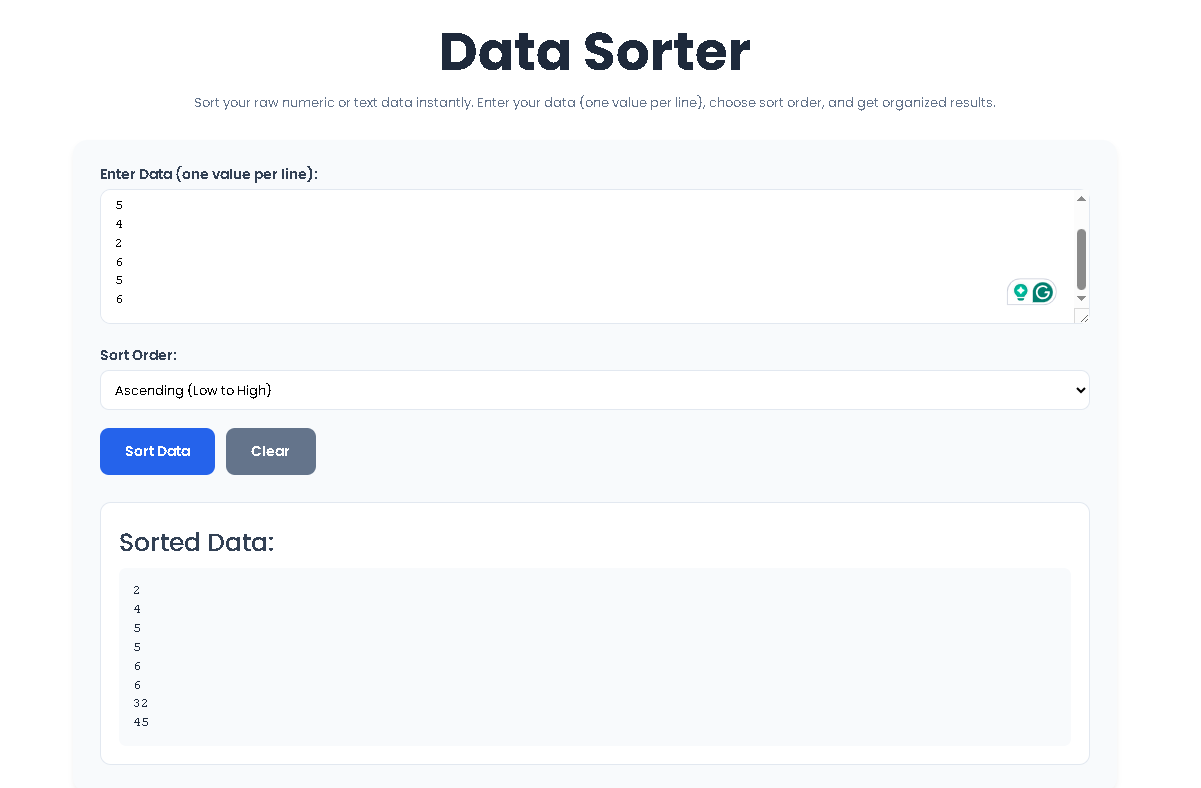
Using the Data Sorter requires no installation, registration, or learning curve. Follow these precise steps based on the tool’s actual interface:
Step 1: Prepare Your Data
Format your information with one value per line. This is critical—each line break signals a separate item for sorting. Acceptable formats include:
- Numbers:
42, 3.14, 1000 - Text strings:
apple, Zebra, user_2024 - Mixed alphanumeric entries:
Item_05, Record-A
Pro tip: Avoid commas, tabs, or spaces as separators. The Data Sorter expects line breaks only.
Step 2: Paste Into the Input Field
Locate the text area labeled “Enter Data (one value per line)” and paste your prepared content. The field accommodates hundreds of entries without performance degradation. No character limits or hidden restrictions apply.
Step 3: Select Sort Order
Choose between two directional options using the radio buttons:
- Ascending (Low to High): Arranges items from smallest to largest (A→Z for text, 1→100 for numbers)
- Descending (High to Low): Reverses the sequence (Z→A for text, 100→1 for numbers)
This selection determines the final arrangement before processing begins.
Step 4: Execute the Sort
Click the “Sort Data” button. The tool instantly processes your input and displays results in the “Sorted Data” section below. No loading spinners or delays—sorting completes in milliseconds even for substantial lists.
Step 5: Use or Export Results
Your organized output appears cleanly formatted beneath the input area. Simply:
- Highlight and copy the sorted results
- Paste directly into documents, spreadsheets, or databases
- Click “Clear” to reset the interface for a new sorting task
Note: The Data Sorter does not auto-save your work. Copy results before navigating away from the page.
Benefits This Tools
⚡ Instant Processing Speed
Unlike spreadsheet software that may lag with large datasets, the Data Sorter delivers results immediately—regardless of list size—thanks to optimized JavaScript algorithms running locally in your browser.
✅ Flawless Accuracy
Eliminate human error from manual reordering. The tool applies consistent sorting rules every time, preventing transposition mistakes that commonly occur during copy-paste operations.
🔒 Complete Privacy
Your data never transmits to external servers. All processing occurs within your browser session, making the Data Sorter safe for confidential information that shouldn’t leave your device.
🌐 Universal Accessibility
No downloads, plugins, or accounts required. Access the Data Sorter on any device with a modern browser—desktop, tablet, or smartphone—through Toolota‘s responsive interface.
🧹 Minimalist User Experience
Stripped of unnecessary features, the tool focuses exclusively on sorting. No confusing menus, export dialogs, or formatting options to navigate—just paste, choose direction, and sort.
Real-World Use Cases
The versatility of the Data Sorter makes it valuable across numerous scenarios:
Academic Settings
Students and educators sort grade lists, bibliographic references, or vocabulary terms alphabetically for study guides and reports.
E-commerce Management
Online sellers organize product IDs, inventory SKUs, or customer order numbers to streamline fulfillment workflows.
Data Cleaning
Analysts preparing datasets for visualization often need quick pre-processing—removing duplicates isn’t handled here, but sorting reveals patterns and outliers efficiently.
Programming & Development
Developers sort API response values, log entries, or configuration parameters during debugging without switching to command-line tools.
Everyday Organization
From grocery lists to contact directories, the Data Sorter brings order to personal information with minimal effort.
Important Conditions & Guidelines for Use
While the Data Sorter delivers reliable performance, understanding its scope ensures optimal results:
- Input Format Matters: Results depend entirely on proper line-break formatting. Commas, semicolons, or spaces between values will be treated as part of the data—not separators.
- Case Sensitivity: Text sorting follows standard Unicode order. Uppercase letters typically sort before lowercase (e.g., “Zebra” appears before “apple”). For case-insensitive ordering, preprocess text to uniform casing before sorting.
- Numeric Interpretation: Pure numbers sort mathematically. However, entries like “10a” or “item_5” are treated as text strings, not numbers—sorting them alphabetically rather than numerically.
- No Duplicate Removal: The Data Sorter arranges existing entries but does not eliminate duplicates. For deduplication, pair this tool with a separate duplicate remover utility.
- Session-Based Operation: Results exist only during your active browser session. Always copy sorted output before closing the tab or refreshing the page.
- Ethical Usage Required: Do not use the tool to process stolen data, harass individuals via sorted contact lists, or facilitate any illegal activity. Toolota tools are intended for legitimate productivity purposes only.
Frequently Asked Questions (FAQ)