
Cover Letter Generator
Create a professional cover letter in seconds. Fill in your details and generate a customized letter.
Your Information
Cover Letter Preview
Your cover letter will appear here...
Create a professional cover letter in seconds. Fill in your details and generate a customized letter.
In today’s competitive job market, a generic cover letter is a surefire way to get your application overlooked. Tailoring each letter to the specific role and company is essential, but it’s also incredibly time-consuming. This is where a specialized tool makes all the difference.
The Cover Letter Generator by Toolota is a free, web-based application designed to eliminate the blank-page anxiety and hours of drafting. It is not a simple template library. It’s an intelligent, form-driven engine that constructs a coherent, professional, and personalized cover letter draft in real-time. By analyzing your specific inputs—like your target job title, the company’s name, your experience level, and key skills—it dynamically assembles a letter that speaks directly to the opportunity at hand. The result is a polished first draft you can refine and own, created in mere seconds instead of hours.
This tool is built with a wide range of professionals in mind:
Job Seekers at Any Level: Whether you’re a recent graduate crafting your first cover letter or a senior executive, the experience-level selector ensures the language matches your career stage.
Career Changers: If you’re pivoting industries, the tool helps frame your transferable skills effectively within a standard professional format.
High-Volume Applicants: For those applying to multiple positions, it provides a consistent, high-quality base draft that can be quickly customized for each company.
Non-Native English Speakers: It ensures grammatical correctness and professional phrasing, which is crucial for making a strong impression.
Anyone Seeking Efficiency: If you value your time and want to streamline the application process without sacrificing quality, this generator is for you.
This section details the exact process based on the tool’s actual interface. Follow these steps to create your letter:
Step 1: Access the Tool
Navigate to the Cover Letter Generator page on Toolota’s website. The tool loads immediately with no login or sign-up required.
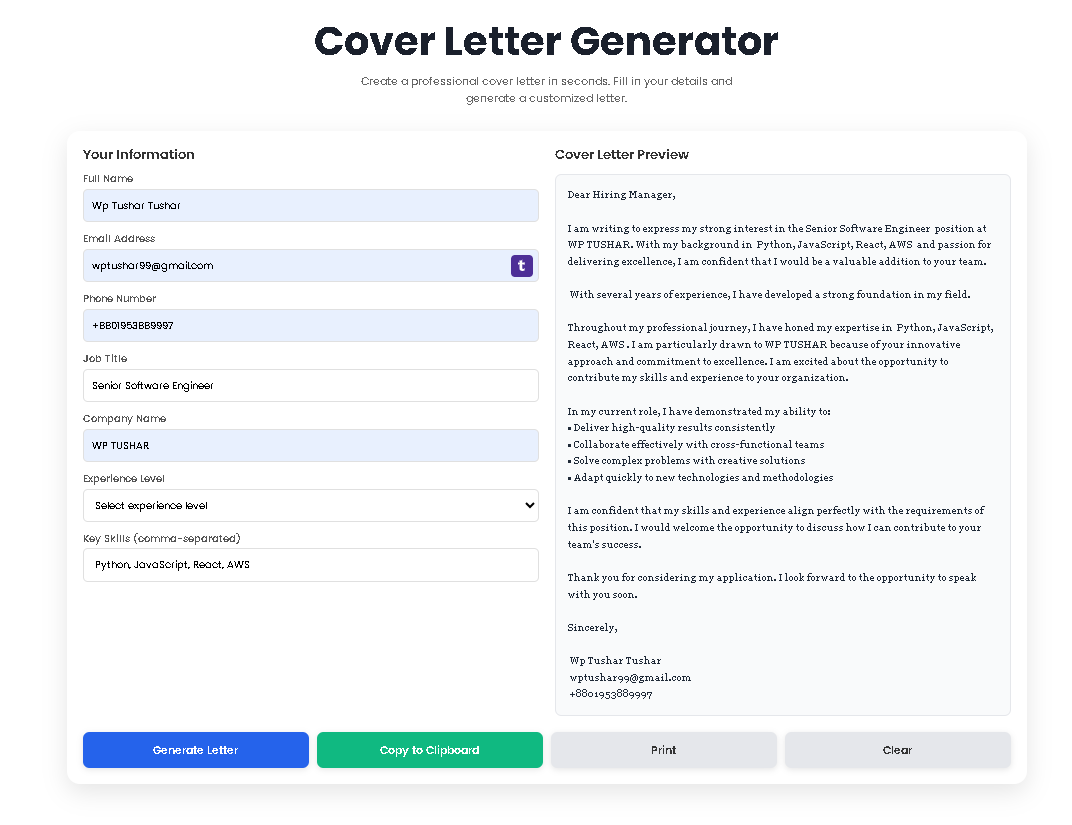
Step 2: Fill in the “Your Information” Form (Left Panel)
This is the core input stage. Carefully complete the following fields:
Full Name: Enter your name as you wish it to appear in the signature.
Email Address & Phone Number: Provide your professional contact details.
Job Title: Input the exact title of the position you are applying for (e.g., “Senior Data Analyst”).
Company Name: Specify the name of the organization. Personalizing this is critical.
Experience Level: Select the option that best matches your career stage from the dropdown menu.
Key Skills: List your most relevant technical and soft skills, separated by commas (e.g., “Python, SQL, Data Visualization, Project Management”).
Step 3: Generate Your Letter
Click the blue “Generate Letter” button. Instantly, the right-hand “Preview” panel will populate with a complete, formatted cover letter. The letter will incorporate all the details you entered, with a unique paragraph reflecting your chosen experience level.
Step 4: Review and Refine
Read through the generated letter carefully. While the structure and core content are provided, you should personalize it further. Add a specific accomplishment, mention a company project you admire, or adjust the phrasing to better match your voice.
Step 5: Take Action
Use the buttons below the preview panel to finalize your document:
Copy to Clipboard: Click this to copy the entire letter text. You can then paste it directly into a Word document, Google Doc, or an email body.
Print: This opens a print-friendly dialog, allowing you to print the letter directly to a physical printer or save it as a PDF.
Clear: Use this to reset the entire form and preview pane if you want to start a new letter for a different application.
Leveraging Toolota’s instant letter maker offers tangible advantages that go beyond simple text generation:
Speed and Efficiency: Transform a 30-60 minute writing task into a 60-second process. Input your details, click generate, and you have a complete draft.
Structural Perfection: Every letter follows a proven, professional format—proper salutation, compelling introduction, skill-highlighting body paragraphs, and a strong call to action—eliminating formatting worries.
Customization by Experience: The tool’s logic tailors a core paragraph based on whether you select Entry, Mid, Senior, or Expert level, ensuring the tone is always appropriate.
Clean, User-Friendly Interface: The two-panel design (input on the left, live preview on the right) is intuitive and requires no learning curve. It’s also fully responsive, working perfectly on desktop, tablet, or phone.
Immediate Actionability: With integrated “Copy to Clipboard” and “Print” buttons, your generated cover letter is ready for immediate use. There’s no export hassle or complicated download process.
Privacy-First Operation: Since the tool runs entirely in your web browser, your personal data (name, contact info) never gets sent to or stored on any server. It stays on your device.
Maximizing the tool’s output depends on high-quality input. Here’s what to consider for each field:
Job Title & Company Name: Accuracy here is non-negotiable. It shows attention to detail. Always double-check the official role and company naming convention from the job posting.
Experience Level: Be honest. Selecting “Senior” when you have 3 years of experience will produce phrasing that an experienced hiring manager will find inauthentic during an interview.
Key Skills Field: This is your strategic lever. Don’t just list every skill you have. Curate 4-6 of the most relevant skills from the job description. The tool seamlessly integrates this list into the letter’s narrative, making your application instantly more targeted.
To set realistic expectations and ensure ethical use, please consider these conditions:
Output Quality Reflects Input Quality: The tool is only as good as the information you provide. Vague inputs lead to a generic letter. Detailed, thoughtful inputs yield a strong, tailored draft.
AI-Assisted, Not AI-Authored: This tool provides a structured draft. The final authority, personal voice, and specific details must come from you. It is an assistant, not a replacement for your judgment.
Human Review is Mandatory: Never send a generated letter without reviewing and personalizing it. This step is what transforms a good draft into a great, authentic application.
Intended for Legal, Professional Use: The tool is designed to help with legitimate job applications. It must not be used for fraudulent, deceptive, or harassing purposes.
Yes, Toolota’s Cover Letter Generator is completely free to use with no hidden costs. There is no requirement to sign up, create an account, or provide any payment information. You can access and use all features immediately.
The tool contains a built-in library of sentences tailored to career stages. When you select “Entry Level,” it inserts text about eagerness and fresh perspectives. Choosing “Senior” triggers text about leading projects and mentoring teams. This ensures the core message of your cover letter aligns with your professional narrative.
No, the preview box is for display purposes only. To edit the content, you should use the “Copy to Clipboard” function and paste the text into your preferred word processor (like Microsoft Word or Google Docs). There, you can freely refine, add, or delete any content to perfect your letter.
No, it does not. The tool operates with full client-side processing. This means all data you enter remains within your own web browser session. Nothing is transmitted to or stored on Toolota’s servers. Refreshing or closing the page will clear all data, which is why the “Copy” function is provided.
Toolota is your all-in-one online tools platform. Fast, simple, and free utilities designed to make everyday digital tasks easier and smarter.