Calculate Pearson correlation coefficient to measure the strength of linear relationship between two datasets. Values range from -1 to +1.
The Correlation Calculator is a free, web-based statistical tool designed to compute the Pearson correlation coefficient (r) between two sets of data. This coefficient is the standard measure for assessing the strength and direction of a linear relationship between two variables, X and Y. Ranging from -1 to +1, the result gives you a quantifiable snapshot of how closely your data points fit a straight line. Unlike manual calculations or complex spreadsheet formulas, this Correlation Calculator automates the entire process, delivering not just the raw number but also a clear visual and textual interpretation. Developed by Toolota, it transforms a fundamental yet intricate statistical operation into a task that takes mere seconds, making data analysis more accessible to everyone.
This utility is crafted for anyone who works with pairs of data and needs to understand their connection. Its intuitive design serves a wide audience:
Students & Educators: Perfect for homework, lab reports, or teaching introductory statistics without getting bogged down in computational details.
Researchers & Analysts: A quick-check tool for early-stage data exploration, hypothesis testing, or validating findings before deep-dive modeling.
Business Professionals: Useful for examining potential relationships between metrics like marketing spend and sales, customer satisfaction and retention, or price and demand.
Data Science Enthusiasts: A handy tool for initial exploratory data analysis (EDA) on new datasets.
Anyone Curious About Data: If you’ve ever wondered if two trends in your life or work are connected, this Correlation Calculator provides a data-driven starting point for your inquiry.
Let’s walk through exactly how the tool works, based on its actual interface. Following these steps will ensure you get accurate results every time.
Step 1: Prepare Your Data
Have your two related datasets ready. For example, this could be:
X: Hours Studied (e.g., 1, 3, 4, 6, 8)
Y: Test Scores (e.g., 55, 65, 70, 85, 90)
Ensure each X value has a corresponding Y value, creating paired observations.
Step 2: Enter X Values
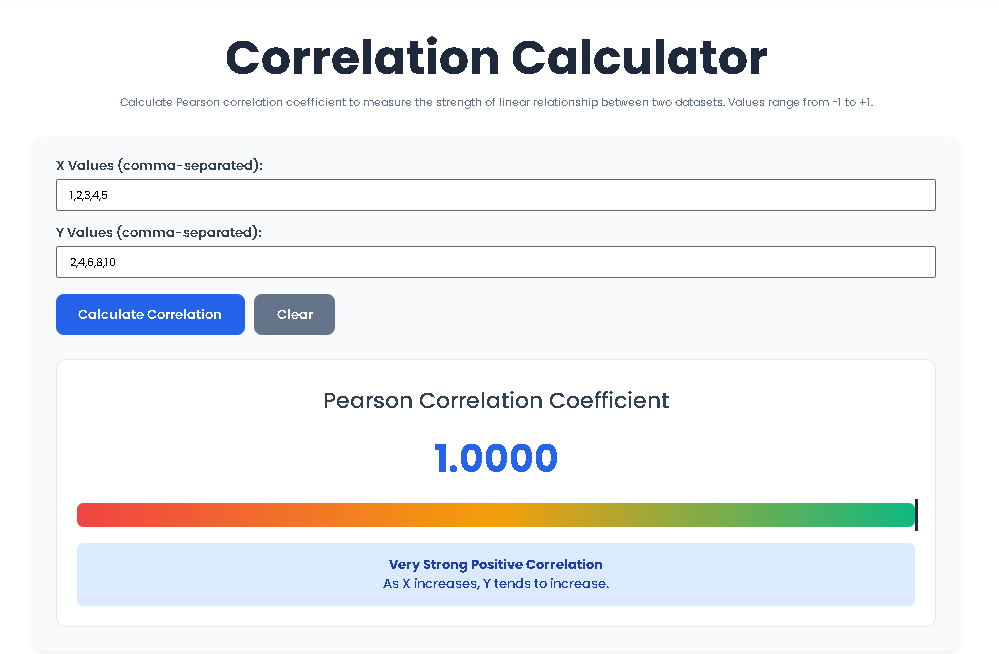
Locate the first input field labeled “X Values (comma-separated):”. Type or paste your first set of numbers, separating each value with a comma. You can include spaces for readability (e.g., 1, 3, 4, 6, 8). The placeholder shows a sample sequence.
Step 3: Enter Y Values
Move to the second field labeled “Y Values (comma-separated):”. Enter your second dataset in the same order as the first, ensuring each Y value is paired with the X value in the same position. (e.g., 55, 65, 70, 85, 90).
Step 4: Initiate the Calculation
Click the blue “Calculate Correlation” button. The JavaScript in the page will now:
Parse your input strings into arrays of numbers.
Validate that both lists have numbers, are of equal length, and contain at least 2 pairs.
Perform the Pearson correlation calculation using the formula detailed in Section 6.
Step 5: Interpret the Results
If your input is valid, the results panel will appear. You will see:
The Coefficient: A large, prominently displayed number (e.g., 0.9864). This is your Pearson’s r.
The Strength Indicator: A horizontal gradient bar (red-amber-green) with a vertical marker. The marker’s position visually represents where your r value falls on the spectrum from -1 to +1.
The Interpretation Box: A text box stating the strength (Very Weak, Weak, Moderate, Strong, Very Strong) and direction (Positive, Negative, No) of the correlation, along with a simple explanation (e.g., “As X increases, Y tends to increase”).
Step 6: Clear or Recalculate
To perform a new analysis, simply click the grey “Clear” button. This will empty both input fields and hide the result panel, allowing you to start fresh.
Why choose this specific tool for your analysis? The benefits are built directly into its design:
Speed & Efficiency: Get your Pearson’s r value instantly. No software to download, no complex formulas to write—just input and click.
Pinpoint Accuracy: The tool performs the precise mathematical operations required for the Pearson coefficient, eliminating human calculation errors.
Clear, Actionable Output: It doesn’t just spit out a decimal. The Correlation Calculator provides a color-coded strength bar and a plain-English interpretation (e.g., “Strong Positive Correlation”), so you immediately understand what the number means.
Seamless User Experience: The clean, modern interface with a focused input field design prevents confusion. The workflow is logical: enter data, calculate, interpret.
Zero Cost & No Hassle: Completely free with no registration required. Your data is processed in your browser and never stored on a server.
Built-in Validation: The tool checks for common errors like mismatched data pairs, non-numeric entries, or insufficient data, providing helpful error messages to guide you.
While you don’t need to know the math to use the tool, understanding the process adds depth to your analysis. The Correlation Calculator uses the standard formula for Pearson’s r:
r = Σ[(Xᵢ - X̄)(Yᵢ - Ȳ)] / √[Σ(Xᵢ - X̄)² * Σ(Yᵢ - Ȳ)²]
Here’s what happens after you click “calculate”:
Calculate Means: The tool finds the average of your X values (X̄) and the average of your Y values (Ȳ).
Find Deviations: For each pair, it calculates how much each X value deviates from the X mean (Xᵢ – X̄) and how much each Y value deviates from the Y mean (Yᵢ – Ȳ).
Compute the Numerator: It multiplies each X deviation by its corresponding Y deviation and sums all these products together. This sum reflects the co-variation of X and Y.
Compute the Denominator: It squares each X deviation and sums them to get the total variation in X. It does the same for Y deviations. It then multiplies these two sums and takes the square root. This normalizes the coefficient.
Final Division: Dividing the numerator by the denominator scales the result to the standard -1 to +1 range.
This precise calculation is what makes this Correlation Calculator a reliable alternative to doing it by hand.
To get the most from the Correlation Calculator, keep these best practices in mind:
Check for Linearity: Before calculating, create a simple scatter plot of your data (X vs. Y). The Pearson coefficient is only valid for linear trends. Curved patterns will give misleadingly low r values.
Beware of Outliers: A single extreme outlier can dramatically inflate or deflate your correlation coefficient. Examine your data for unusual points.
Ensure Paired Data: Every X value must have one and only one corresponding Y value. The order matters—the first X pairs with the first Y, and so on.
More Data is Better: While the tool works with as few as 2 pairs, results based on small samples (n < 10) can be unstable. Use larger datasets (20+ pairs) for more reliable conclusions.
Don’t Mix Scales: The calculation is based on deviations from the mean, so it can handle different units (e.g., hours vs. test scores). Just ensure the pairing is correct.
Use the Clear Function: Start each new analysis with a clean slate using the “Clear” button to avoid accidentally mixing old and new data.
This Correlation Calculator specifically computes the Pearson product-moment correlation coefficient (r). It is designed to measure the strength and direction of a linear (straight-line) relationship between two continuous variables. It is the most common and widely used type of correlation analysis.
An r value of 0.85 indicates a strong positive correlation. According to the tool’s interpretation scale, this falls into the “Strong” category (0.7 to 0.9). It means there is a high likelihood that as your X variable increases, your Y variable also increases in a relatively consistent, linear fashion. The visual strength indicator would be positioned far to the right on the green portion of the bar.
No, the current Correlation Calculator is built to analyze the relationship between exactly two variables (X and Y) at a time. This is the fundamental scope of bivariate Pearson correlation. To analyze multiple variables simultaneously (e.g., a correlation matrix), you would need multivariate statistical software. However, you can use this tool repeatedly to examine different pairs of variables from your dataset.
This error occurs when the denominator in the Pearson formula is zero. It happens if all the values in your X dataset are identical (e.g., 5, 5, 5) and/or all the values in your Y dataset are identical. With zero variance, there is no variation to measure a relationship against. Check your data entry to ensure you haven’t accidentally input a constant value, as correlation requires variability in both sets of numbers.
Toolota is your all-in-one online tools platform. Fast, simple, and free utilities designed to make everyday digital tasks easier and smarter.
