
File Metadata Viewer
Upload your documents to instantly view detailed metadata properties and export them as JSON.
Drop files or browse here
Upload your documents to instantly view detailed metadata properties and export them as JSON.
Drop files or browse here
Selected Files
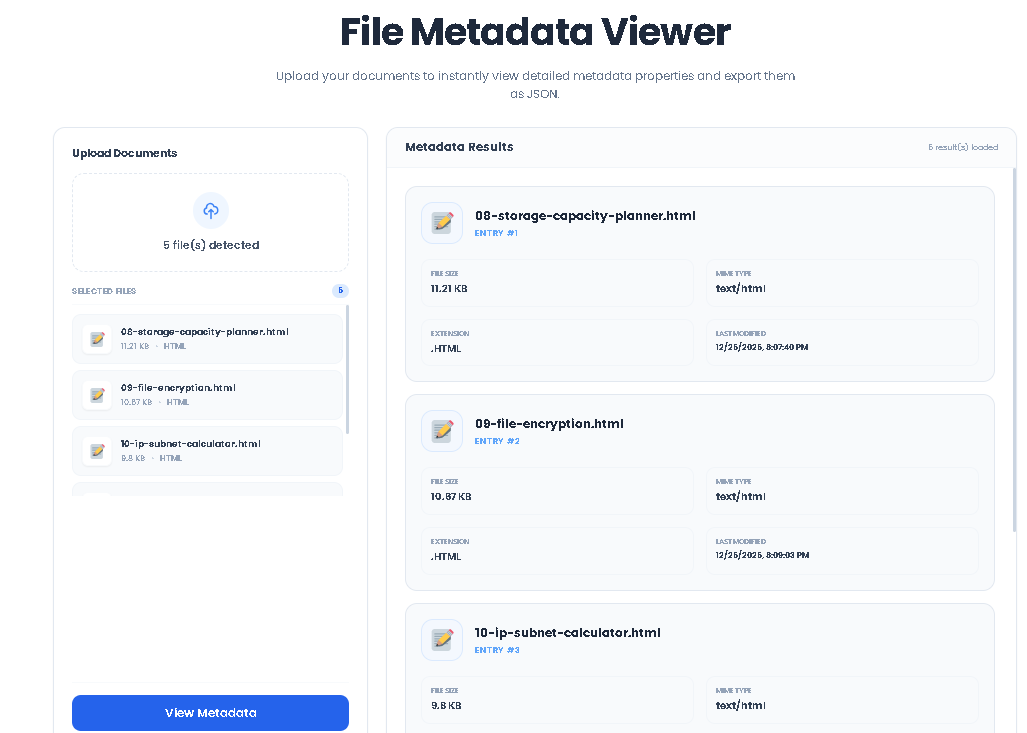
0The File Metadata Viewer is a free, web-based utility designed to give you instant, detailed insights into the properties of your digital files. In the simplest terms, file metadata is “data about data”—the hidden information that describes a file’s characteristics without being part of its actual content. This includes fundamental details like the file name, its size in bytes, the type of file (MIME type), its extension, and when it was last modified.
Unlike many online tools that require you to upload your files to a remote server—posing potential privacy and security risks—our File Metadata Viewer operates entirely within your web browser. Your files never leave your computer. This client-side processing ensures complete privacy, making it a safe and reliable choice for inspecting sensitive documents, personal photos, or work-related assets. Developed by Toolota, this tool combines powerful functionality with a clean, intuitive interface, making advanced file inspection accessible to everyone.
This versatile tool is built for a wide range of users:
Developers & IT Professionals: Quickly verify file properties before deployment, debug file upload functionalities, or log metadata for scripts.
Digital Marketers & Content Creators: Check image sizes and formats for web optimization, ensure video specs meet platform requirements, or organize asset libraries.
Students & Researchers: Document the properties of research files, images, or datasets for papers and reports.
General Computer Users: Understand why a file won’t attach to an email (likely too large), identify an unknown file type, or simply organize a cluttered downloads folder by seeing detailed file information.
Administrators & Organizers: Batch-check properties of multiple files to ensure consistency across projects or archives.
Each metadata card presented by the File Metadata Viewer provides key pieces of information:
File Name: The full name of the file, including its extension.
File Size: Displayed twice for clarity: first in a human-friendly format (e.g., “2.45 MB”) and secondly as the exact byte count (e.g., “2,567,890 bytes”). This is crucial for understanding upload limits and storage impact.
MIME Type: The official media type of the file (e.g., image/jpeg, application/pdf). This tells software and web browsers how to handle the file.
Extension: The suffix at the end of the filename (e.g., .jpg, .pdf, .docx), which typically indicates the file format.
Last Modified: The date and time the file was last changed, presented in your local system’s format. This helps track the most recent version of a document.
Using the File Metadata Viewer is a straightforward, three-step process. Follow these instructions precisely to get the most accurate results.
Step 1: Select Your File(s)
Locate the file input field labeled “Select File(s)” on the tool’s interface. Click on it to open your system’s file explorer dialog. You can select a single file for analysis or hold Ctrl (or Cmd on Mac) to choose multiple files from different folders. The tool supports all standard file types—images, documents, videos, audio, archives, etc.
Step 2: Click “View Metadata”
After selecting your desired files, click the blue “View Metadata” button. This action triggers the tool’s JavaScript engine to read the properties of each selected file directly via the browser’s File API. If you haven’t selected any files, a prompt will remind you to do so.
Step 3: Review and Export Your Results
Instantly, the results area will populate with individual metadata cards for each file you selected.
Review: Examine the details in each card: File Name, Size (in both formatted and byte count), MIME Type, Extension, and Last Modified date.
Export (Optional): If you wish to save this data, the green “Export as JSON” button will now be visible. Clicking it will generate and automatically download a .json file containing all the metadata in a structured format.
Clear: To start a new analysis, use the “Clear” button. This will reset the file input and remove all metadata cards from the display.
Leveraging the Toolota File Metadata Viewer offers distinct advantages:
Speed and Efficiency: Get comprehensive file details in seconds, far faster than navigating through multiple right-click property menus, especially for batch files.
Unmatched Accuracy: The tool pulls data directly from the file’s core properties, ensuring the information you see is precise and reliable.
Enhanced Privacy & Security: The client-side, no-upload model is the core benefit. You can inspect confidential business documents or personal files with absolute certainty that they are not being transmitted or stored elsewhere.
User-Friendly Design: The clean layout, visual icons, and clear grouping of information make data easy to digest, even for non-technical users.
Portable Convenience: As a web tool, it’s accessible from any modern browser on any operating system (Windows, macOS, Linux, ChromeOS). There’s nothing to install.
Data Portability: The JSON export function transforms visual data into a portable, machine-readable format that can be imported into spreadsheets, databases, or other analysis tools.
Input Determines Output: The accuracy and completeness of the metadata are dependent on the properties stored within the file itself by the creating application or operating system.
Browser Limitations: The tool relies on the standard web File API. Extremely large files (e.g., multi-gigabyte videos) may cause slight delays in processing, though the metadata reading itself is typically swift.
No Content Analysis: This File Metadata Viewer examines descriptive properties only. It does not read, analyze, or display the actual internal content of the file (e.g., image pixels, document text).
Absolutely. This is the primary advantage of our File Metadata Viewer. It operates 100% client-side, meaning your files are processed within your browser’s memory and are never uploaded to any server. You can inspect sensitive documents with complete confidence in your privacy.
The Toolota File Metadata Viewer can analyze any file type you can select on your computer—images (JPG, PNG, GIF), documents (PDF, DOCX, TXT), videos (MP4, AVI), audio files (MP3, WAV), archives (ZIP, RAR), and more. It reads the universal metadata properties common to all files.
Yes. During the file selection step, simply select multiple files. The tool will then generate a separate, detailed metadata card for each file you selected, allowing you to review and compare their properties side-by-side efficiently.
The JSON export creates a structured data file containing all metadata from your session. This is useful for creating inventories, generating reports, importing data into other applications for further analysis, or simply keeping a digital record of file properties for your projects.
Toolota is your all-in-one online tools platform. Fast, simple, and free utilities designed to make everyday digital tasks easier and smarter.