Estimate migration timeline, one‑time effort, recurring costs, risk level, and ROI for moving data/apps to cloud providers. Includes milestones and team planning.
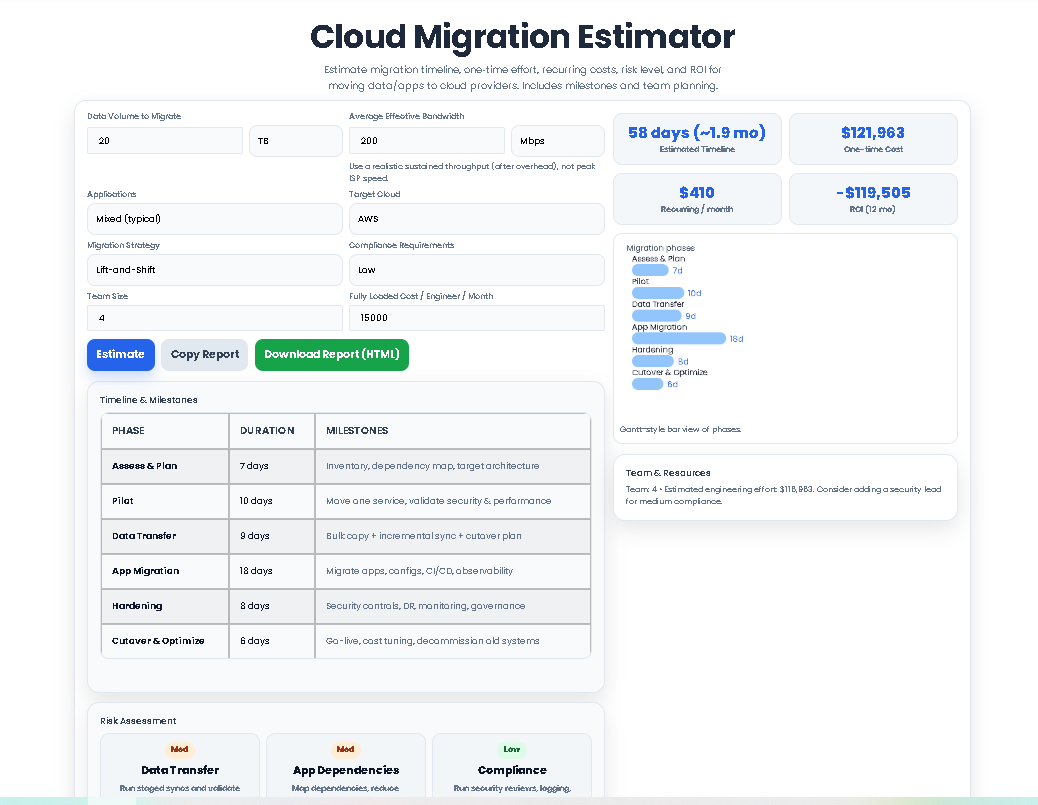
| Phase | Duration | Milestones |
|---|
Navigating the financial and logistical complexities of moving your digital infrastructure to the cloud can feel overwhelming. How long will it take? What will it cost upfront? What will our monthly bill look like, and when will we see a return on investment? The Cloud Migration Estimator by Toolota is a powerful, free web-based tool designed to answer these critical questions instantly.
This interactive calculator is not just another spreadsheet template. It’s a sophisticated yet intuitive application that lets you model your migration scenario by inputting real variables like data volume, network bandwidth, application complexity, and team composition. With a single click, it processes these inputs through industry-informed algorithms to deliver a comprehensive forecast. You receive a detailed breakdown of the projected timeline, one-time engineering and compliance costs, recurring monthly cloud spend, and a clear 12-month ROI calculation. Furthermore, it outlines a phased migration plan with milestones and provides a visual risk assessment, transforming a daunting planning process into a clear, actionable strategy.
The Toolota Cloud Migration Estimator is an indispensable resource for a wide range of professionals involved in digital transformation initiatives:
IT Directors & CIOs: Quickly build a high-level business case and budget proposal for executive stakeholders.
Cloud Architects & Solutions Engineers: Model different migration strategies (lift-and-shift vs. replatform) to compare their impact on timeline and cost.
DevOps & Infrastructure Teams: Plan resource allocation and understand the engineering effort required for each migration phase.
Project & Program Managers: Develop realistic project timelines, identify key milestones, and proactively flag potential risks.
Finance & Procurement Teams: Gain visibility into the capital expenditure (one-time cost) and operational expenditure (recurring cloud spend) associated with the migration.
Whether you’re exploring a move to AWS, Google Cloud, Azure, or a multi-cloud environment, this tool provides the foundational data you need to start your planning with confidence.
The tool’s interface is designed for clarity and immediate use. Follow these steps to generate your personalized migration estimate:
Step 1: Input Your Core Infrastructure Metrics
Data Volume to Migrate: Enter the total amount of data you need to transfer. Use the dropdown to select units (GB, TB, PB). Be as accurate as possible, as this is a primary driver for transfer time and storage costs.
Average Effective Bandwidth: Input your realistic, sustained network throughput (in Mbps or Gbps). The tool includes a helpful hint: use the throughput you can consistently achieve after accounting for network overhead, not your ISP’s advertised peak speed.
Step 2: Define Your Migration Profile
Applications: Select the complexity of your application portfolio—Simple (few dependencies), Mixed (typical), or Complex (many interconnected services). This affects the planning and migration effort.
Target Cloud: Choose your intended cloud provider: AWS, Google Cloud, Azure, or Multi-Cloud.
Migration Strategy: Select your approach: Lift-and-Shift (fastest, minimal changes), Replatform (some optimization for the cloud), or Refactor (re-architecting for cloud-native services). This choice significantly impacts duration and cost.
Compliance Requirements: Indicate the level of regulatory oversight: Low, Medium (e.g., SOC 2), or High (e.g., HIPAA, PCI DSS). Higher compliance levels add time for security controls and reviews.
Step 3: Configure Your Team & Costs
Team Size: Enter the number of engineers you can allocate to the migration project.
Fully Loaded Cost / Engineer / Month: Input the average total monthly cost per team member (including salary, benefits, tools, etc.). This is used to calculate the total engineering effort cost.
Step 4: Generate and Explore Your Estimate
Click the “Estimate” button. All results update in real-time as you adjust any input field.
Review the Key Performance Indicators (KPIs) for Estimated Timeline, One-time Cost, Recurring Monthly Cost, and 12-Month ROI.
Examine the detailed “Timeline & Milestones” table, which breaks the project into six phases (Assess & Plan, Pilot, Data Transfer, etc.) with individual durations and key activities.
Study the “Risk Assessment” matrix, which evaluates risks for Data Transfer, App Dependencies, and Compliance, providing actionable mitigation tips.
View the simple Gantt chart for a visual representation of the project timeline.
Step 5: Export and Share Your Findings
Use the “Copy Report” button to instantly copy a text summary of the core metrics to your clipboard for easy pasting into emails or documents.
Click “Download Report (HTML)” to generate and save a professionally formatted, standalone HTML report that includes all details, perfect for sharing with stakeholders or including in project documentation.
The value of the Cloud Migration Estimator lies in its detailed output. Let’s decode what each section means for your planning:
Timeline: This is the total estimated duration from project kick-off to optimization. It’s a sum of all phased activities. A result like “~3.2 months” helps set realistic expectations and plan business cutovers.
One-time Cost: This figure represents your upfront investment. It combines the total cost of your engineering team’s time across the project lifespan and adds estimated overhead for compliance-related activities (security reviews, tooling, audits).
Recurring / Month: This is the projected ongoing monthly cost to operate your workload in the cloud. The tool calculates this based on your data volume and the selected migration strategy, providing a baseline for your new cloud budget.
ROI (12 mo): Perhaps the most crucial metric for business justification. This calculates your net financial position after one year. It compares the savings from reduced on-premises costs against your new cloud spend and the one-time migration investment. A positive number indicates net savings within the first year.
Phases & Milestones: This is your high-level project plan. Each phase (e.g., “Hardening”) includes specific, actionable milestones that guide your team’s focus and deliverables.
Risk Assessment: This proactive analysis helps you anticipate challenges. A “High” risk on Data Transfer, for example, is a clear signal to investigate data acceleration services or a more phased transfer approach.
For the most reliable results from the Cloud Migration Estimator, please consider the following:
The Toolota Cloud Migration Estimator provides a highly accurate high-level projection based on standard industry multipliers for complexity, strategy, and compliance. It is designed for feasibility studies, initial budgeting, and comparative analysis (“what-if” scenarios). For a finalized project plan, detailed discovery and architecture design with your cloud provider are essential.
Absolutely. While you can select a single provider like AWS or Azure, choosing the “Multi-Cloud” option in the Target Cloud field allows you to model a strategy that involves more than one cloud. The tool’s calculations for effort and cost will adapt to account for the increased complexity of managing multiple environments.
A negative 12-month ROI indicates that, based on your inputs, the first-year cloud operating costs plus migration investment may exceed your current on-premises spend. This is a valuable insight! Use the tool to experiment: try a “Lift-and-Shift” strategy to reduce one-time cost, adjust the data volume if possible, or revisit your team size. It may reveal that a particular workload isn’t financially viable to migrate without optimization.
he tool performs a direct mathematical calculation. It converts your data volume into bits, divides it by your provided effective bandwidth (also converted to bits per second), and then translates the result into days. This gives you a pure network transfer duration, which is then factored into the overall “Data Transfer” phase, which also includes time for incremental syncs and cutover planning.
Toolota is your all-in-one online tools platform. Fast, simple, and free utilities designed to make everyday digital tasks easier and smarter.
