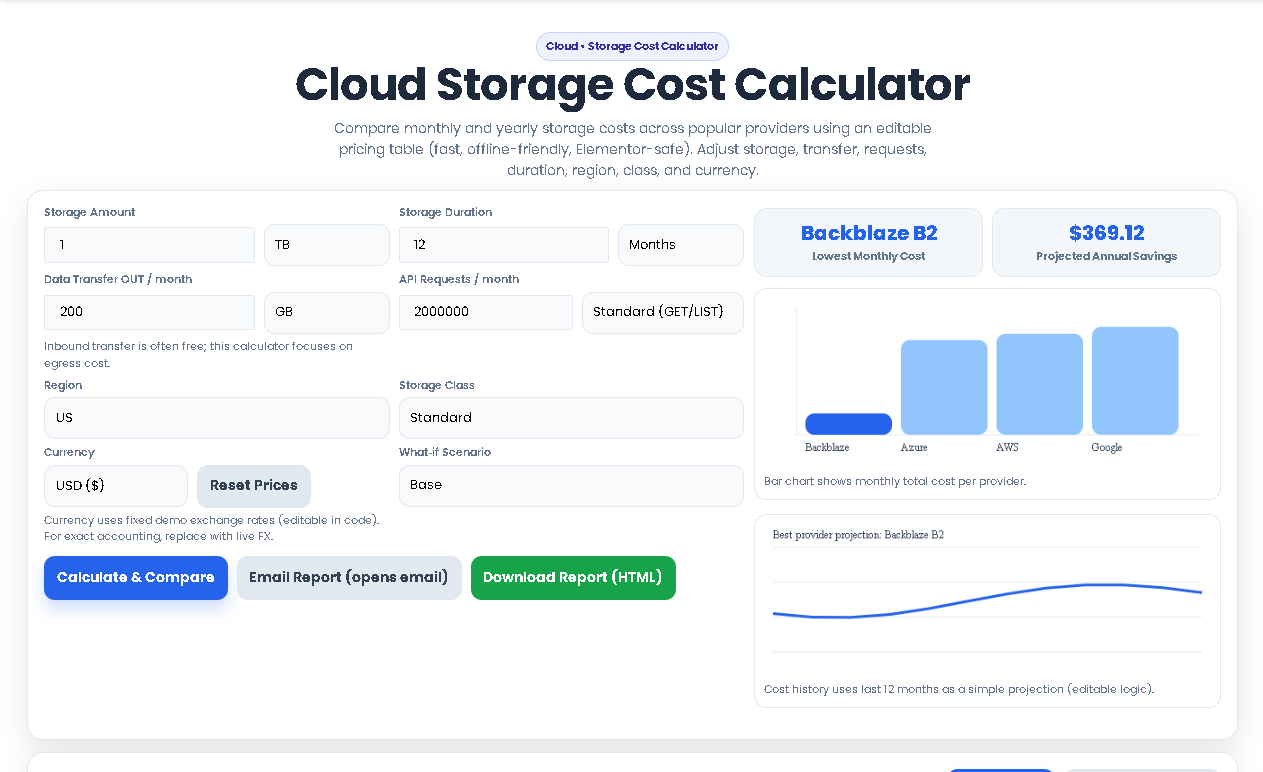
Compare monthly and yearly storage costs across popular providers using an editable pricing table (fast, offline-friendly, Elementor-safe). Adjust storage, transfer, requests, duration, region, class, and currency.
Costs are computed from the pricing table below. Edit prices anytime (no external calls).
| Provider | Storage | Egress | Requests | Total / month | Total / year | Notes |
|---|
| Provider | Region | Class | Storage ($/GB-mo) | Egress ($/GB) | GET/LIST ($ per 10k) | PUT/COPY ($ per 10k) |
|---|
Tip: Click a number to edit. Values are examples—replace with your preferred pricing.
A cloud storage cost calculator is an essential digital tool designed to demystify the often complex and opaque pricing of cloud storage services. For IT managers, DevOps engineers, startup founders, and financial planners, predicting monthly and annual cloud expenses can feel like guesswork. Between variable costs for storage capacity, data transfer (egress), API requests, and different service tiers (Standard, Infrequent Access, Archive), manually comparing providers like AWS S3, Google Cloud Storage, Microsoft Azure Blob, and Backblaze B2 is a time-consuming and error-prone task.
This is where Toolota’s precise cloud storage cost calculator becomes indispensable. It’s not just a simple estimator; it’s a dynamic, interactive platform that uses real, editable pricing data to provide a side-by-side financial analysis. By inputting your specific usage patterns, you move from rough estimates to data-driven forecasts, empowering you to make informed decisions that directly impact your company’s bottom line. The core problem it solves is eliminating budgetary surprises and identifying the most cost-effective storage strategy for your unique needs. This specialized cloud storage cost calculator eliminates the guesswork from cloud budgeting, providing precise financial forecasts that traditional spreadsheets cannot match.
Our cloud storage cost calculator stands out due to its depth, flexibility, and user-centric design. It’s built for professionals who need more than a basic quote.
Multi-Provider Comparison: Instantly compare all-in costs across four major players: Amazon Web Services (AWS S3), Google Cloud Storage, Microsoft Azure Blob, and Backblaze B2. See who offers the best price for your specific scenario.
Editable Live Pricing Table: The backbone of our tool is a fully editable pricing matrix. While pre-loaded with standard public rates, you can click on any cost cell—be it storage ($/GB/month), egress ($/GB), or request fees—and update it with your organization’s negotiated enterprise discounts or the latest price list. This ensures your calculation reflects real-world costs.
Comprehensive Input Parameters: Go beyond just storage size. Model your true costs by including:
Data Egress: The cost of data downloaded from the cloud, often a major expense.
API Operations: Factor in the cost of millions of GET, PUT, and LIST requests.
Storage Class & Region: Compare costs for Standard, Infrequent Access, and Archive tiers across US, EU, and Asia-Pacific regions.
Currency Support: View costs in USD, EUR, GBP, INR, or JPY with built-in forex rates.
“What-If” Scenario Planner: Plan for growth and change. Test scenarios like “Egress +25%” or “Storage +25%” to understand how cost fluctuations in one area impact your total bill. Model the impact of a negotiated “All Costs -10%” discount.
Visual Data & Instant Insights: Results are presented in clear bar charts for quick comparison and a projection chart showing cost trends. The tool instantly highlights the “Best” and “Alternative” providers and calculates your projected annual savings if you switch.
Actionable Reporting: Generate downloadable HTML reports, copy comparison tables to clipboard, or instantly create an email summary to share with your team—all with one click.
Follow this precise workflow to get the most accurate cost comparison. The interface mirrors these steps from top to bottom.
Step 1: Define Your Storage Profile
In the “Storage Amount” field, enter the total volume of data you plan to store. Use the dropdown to select the unit (GB, TB, or PB). Next, specify the “Storage Duration” in months or years. This tells the calculator over what period to amortize the costs. When setting up your profile in any cloud storage cost calculator, accuracy in these foundational inputs determines the reliability of your entire cost projection.
Step 2: Model Your Data Activity
Input your estimated monthly “Data Transfer OUT” (egress). This is crucial, as cloud providers typically charge for data retrieval. Then, define your monthly “API Requests” and select whether they are primarily read operations (GET/LIST) or write operations (PUT/COPY).
Step 3: Configure Service Parameters
Choose your preferred “Region” (US, Europe, Asia Pacific), as prices vary geographically. Select the appropriate “Storage Class” (Standard for hot data, Infrequent Access for cooler data, Archive for long-term retention). Choose your “Currency” for the final quote.
Step 4: (Optional) Edit Core Pricing
Click the “Show/Hide Pricing” button. A detailed table will appear. This is where you achieve pinpoint accuracy. If you have custom rates from a provider, simply click on any number in the table—such as the storage cost for AWS S3 Infrequent Access—and type in your negotiated rate. The calculator updates in real-time. This customization capability distinguishes our cloud storage cost calculator from static estimators that cannot adapt to enterprise pricing scenarios.
Step 5: Run Calculations & Analyze
Click the “Calculate & Compare” button. In milliseconds, the tool will:
Populate the Provider Comparison Table with a line-by-line, provider-by-provider breakdown of Storage, Egress, and Request costs, culminating in a clear Total per month and Total per year.
Generate a bar chart visualizing the monthly total cost for each provider.
Display a history/projection chart based on the best provider’s cost.
Reveal the “Lowest Monthly Cost” provider and your “Projected Annual Savings.”
Provide a list of “Optimization Suggestions” tailored to your inputs (e.g., “If egress is high, consider keeping analytics in the same cloud region.”).
Step 6: Export and Share
Use the “Copy Table” button to paste the data into a spreadsheet. Click “Download Report (HTML)” for a formatted, standalone file. Use “Email Report” to generate a pre-filled email with the results.
Precision Over Guesswork: Replace spreadsheet formulas and manual web searches with an automated, consistent calculation engine that accounts for all cost variables simultaneously.
Proactive Budget Management: The scenario planner allows you to stress-test your budget against future growth in data or traffic, preventing unexpected bills and facilitating more accurate forecasting.
Negotiation Power: Walking into a contract negotiation with a detailed, multi-provider breakdown generated by a cloud storage cost calculator gives you concrete data to leverage for better discounts.
Time and Efficiency: What would take an analyst hours to research and compile is delivered in seconds, freeing up valuable time for strategic work rather than data gathering.
Informed Architectural Decisions: The insights help answer critical questions: Should we use a hotter storage tier for performance or a colder one for savings? Is the cost of multi-region redundancy justified? The tool provides the financial context for these technical decisions.
Benchmarking Standardization: Using the same cloud storage cost calculator across departments and projects creates consistent financial benchmarks. This standardization ensures that all teams evaluate storage options using identical parameters and pricing logic, making cross-project comparisons valid and actionable.
The cloud storage cost calculator comes pre-loaded with standard, public pricing for AWS, Google Cloud, Azure, and Backblaze B2. Its unique value is the editable pricing table. You are encouraged to—and should—overwrite these default values with your own negotiated rates or the latest prices from provider websites to get a personalized, accurate comparison.
Absolutely. This is one of its core strengths. You can run the calculation multiple times with different parameters (e.g., calculating the cost of hot data in AWS Standard vs. archive data in Google Cloud Archive). By comparing the separate reports, you can financially model a strategy that uses different providers for different workloads to optimize overall spend.
Because for many real-world applications, especially those with public users or data-intensive processing, the charges for moving data out of the cloud (egress) and accessing it millions of times (API requests) can equal or even exceed the pure storage fee. A tool that only looks at storage volume would give a dangerously incomplete and inaccurate picture of your total cost of ownership (TCO).
Completely. The entire cloud storage cost calculator runs in your web browser (client-side). No usage data, input figures, or custom pricing you enter is ever sent to our servers or stored online. All calculations happen on your device. You can even save the HTML file and run it offline without an internet connection, ensuring full data privacy.
Toolota is your all-in-one online tools platform. Fast, simple, and free utilities designed to make everyday digital tasks easier and smarter.
