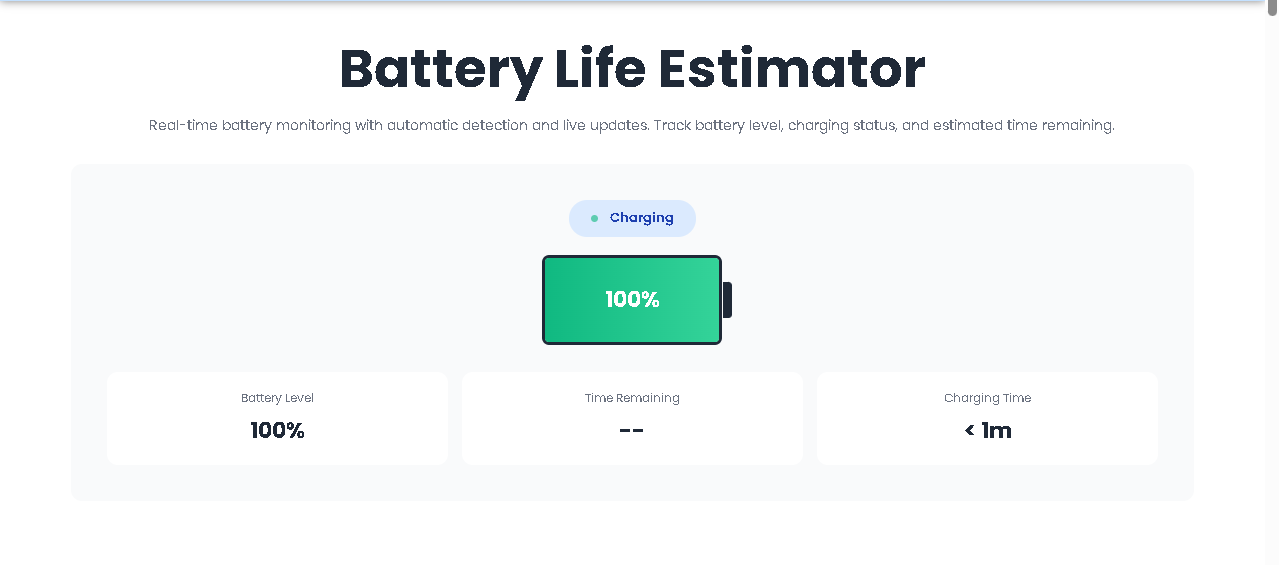
Real-time battery monitoring with automatic detection and live updates. Track battery level, charging status, and estimated time remaining.
The Battery Life Estimator is a client-side web tool that connects directly to your device’s Battery Status API. Unlike generic countdown timers or manual input forms, this estimator requires zero clicks to operate. The moment you land on the page, it silently asks your browser: “How much power is left? Are you plugged in? How long until empty? How long until full?”
Built by Toolota, this tool strips away the complexity of system settings. Instead of digging through Windows, macOS, or Chromebook menus, you get a clean, visual battery card that updates in real time. There are no buttons to press, no sliders to drag, and no forms to submit. If your device supports the API, the data appears automatically.
Behind the scenes, the Battery Life Estimator listens to four specific events:
levelchange (battery percentage goes up or down)
chargingchange (plugged in or unplugged)
chargingtimechange (estimated time to full)
dischargingtimechange (estimated time to empty)
Every time one of these values shifts, the interface refreshes. This is not a screenshot of your battery; it is a live mirror.
Chrome, Edge, and Brave (desktop) currently offer the most consistent support for the Battery Status API. If you are a remote worker moving between desk and couch, this Battery Life Estimator gives you a second opinion against your system tray.
When diagnosing a user’s device remotely, asking them to navigate system settings can be frustrating. Sharing a link to the Battery Life Estimator provides an instant, visual readout without requiring admin rights or complex navigation.
If you are building a PWA or a power-sensitive web application, this tool serves as a clean reference implementation. You can open the Battery Life Estimator side-by-side with your own code to verify event listeners and formatting logic.
Some users do not understand what “12,400 mWh” means. The Battery Life Estimator abstracts the technical jargon into a simple “2h 15m” format. It answers the only question that matters: How long do I have?
This section is written by closely analyzing the HTML, CSS, and JavaScript interactions. No imaginary features have been added.
When a user opens the Battery Life Estimator, the script immediately runs initBattery(). It checks if the navigator.getBattery method exists. This is the gatekeeper.
If supported: The tool requests a BatteryManager object.
If not supported: The interface instantly switches to “Unsupported” mode. The battery fill turns gray, the status badge reads “Desktop / Not Supported,” and all stat cards display N/A.
There is no manual override. The user does not select their device model or enter wattage numbers. The tool either works or gracefully fails.
Once the battery object is obtained, the Battery Life Estimator extracts three critical numbers:
Level: A decimal between 0 and 1. Multiplied by 100 to show a percentage.
Charging: A boolean (true or false).
Time values: dischargingTime and chargingTime, both measured in seconds.
The Battery Life Estimator does not simply dump raw numbers onto the screen. It applies a decision tree to make the data meaningful:
Battery Fill Width: The width of the green bar inside the battery icon matches the percentage exactly. If the battery is at 63%, the bar stretches to 63% width.
Color Coding:
Critical Red: Level ≤ 20% AND not charging.
Warning Orange: Level between 21% and 50% AND not charging.
Standard Green: All other states (charging or above 50%).
Status Badge:
Green pulse + “On Battery” when unplugged.
Blue pulse + “Charging” when plugged in.
Red background + “Desktop / Not Supported” when API is missing.
Raw seconds are confusing. The Battery Life Estimator converts seconds into hours and minutes using the formatTime() function.
7,200 seconds becomes 2h 0m.
450 seconds becomes 7m.
Values under 60 seconds become < 1m.
If the API returns Infinity or NaN, the tool displays Calculating... or --.
A unique behavioral feature of this Battery Life Estimator is the conditional tip section. The tips are hidden by default. They only appear when:
Battery level ≤ 30%
AND the device is not charging.
This tells the user: “You are running low and you are not replenishing power. Here is how to stretch what is left.”
A small green dot pulses on the status badge when the API is active. This confirms the Battery Life Estimator is polling live data, not showing cached information.
The gradient shift from green → orange → red is not random. It matches universal battery anxiety levels. Users do not need to read the number to know they are in the danger zone; the red bar communicates urgency instantly.
Many battery tools only show time remaining on battery. The Battery Life Estimator dynamically swaps the third stat card:
When charging: Shows “Charging Time” (time until 100%).
When on battery: Shows “Time Remaining” (time until 0%).
The stats cards stack vertically on phones and expand horizontally on tablets/desktops. This ensures the Battery Life Estimator is usable regardless of screen size.
Chrome, Edge, and Brave (desktop) currently offer the most consistent support for the Battery Status API. If you are a remote worker moving between desk and couch, this Battery Life Estimator gives you a second opinion against your system tray.
When diagnosing a user’s device remotely, asking them to navigate system settings can be frustrating. Sharing a link to the Battery Life Estimator provides an instant, visual readout without requiring admin rights or complex navigation.
If you are building a PWA or a power-sensitive web application, this tool serves as a clean reference implementation. You can open the Battery Life Estimator side-by-side with your own code to verify event listeners and formatting logic.
Some users do not understand what “12,400 mWh” means. The Battery Life Estimator abstracts the technical jargon into a simple “2h 15m” format. It answers the only question that matters: How long do I have?
While the Battery Life Estimator is a powerful diagnostic tool, it operates strictly within browser sandbox restrictions.
Browser Support: As of 2025, Mozilla Firefox and Safari no longer support the Battery Status API due to fingerprinting concerns. The tool works best on Chrome, Edge, and Chromium-based browsers.
Desktop Only: Most mobile browsers have deprecated this API. The tool will show “Not Supported” on iOS and Android devices.
Estimation Accuracy: The API reports what the OS estimates. If your battery calibration is off, the displayed time may be inaccurate.
No Historical Tracking: This version of the Battery Life Estimator is a snapshot tool. It does not log your battery drain rate over time.
User Responsibility: Always save your work when the critical red indicator appears. The estimator is a warning system, not a guarantee.
You do not need to start anything. Simply open the webpage. The Battery Life Estimator automatically requests battery data from your browser. If your device supports the API, you will see your current battery percentage and time estimates within one second.
This usually happens right after you plug or unplug your device. The operating system needs a few seconds to re-calculate the remaining time. The Battery Life Estimator displays Calculating... during this brief window. If it stays on this message, your battery driver may not be providing time estimates.
No. The tool is read-only. It queries the Battery Status API, which is a software interface. It does not stress the battery, perform charge cycles, or modify system settings. Using the Battery Life Estimator consumes a negligible amount of CPU power.
No. When your device enters sleep mode, the browser suspends JavaScript execution. The Battery Life Estimator will resume and refresh the data immediately when you wake your device and return to the tab.
Toolota is your all-in-one online tools platform. Fast, simple, and free utilities designed to make everyday digital tasks easier and smarter.
