Estimate upload/download time for one or many files, compare connection presets (DSL/Cable/Fiber/4G/5G), and see data‑cap usage.
| Type | Speed | Time |
|---|
A Bandwidth Calculator is an essential digital tool that eliminates the guesswork from network planning. In simple terms, it answers the critical question: “How long will it take to move my data from point A to point B over the internet?” Unlike manual calculations that require you to juggle between bits, bytes, megabits, and gigabytes, a dedicated calculator like the one from Toolota automates this complex conversion and division, delivering clear, actionable insights in real-time.
At its core, the Toolota Bandwidth Calculator performs the fundamental equation of Time = Data Size / Transfer Speed. However, it goes far beyond this basic math by integrating real-world variables such as batch file counts, monthly data limits, metered connection costs, and even target completion deadlines. This transforms it from a simple converter into a comprehensive planning suite for anyone whose work or leisure depends on reliable data transfer.
This tool is engineered for a wide spectrum of users, from technology professionals to everyday internet consumers. If you fall into any of the following categories, this calculator is designed for you:
IT Administrators & Network Engineers: Planning server migrations, cloud backups, or software deployments across the network.
Remote Teams & Digital Agencies: Estimating upload times for large video files, design assets, or batch reports to clients or cloud storage.
Gamers & Streaming Enthusiasts: Calculating how long a new 80GB game will take to download or whether a 4K movie stream will impact the household data cap.
Students & Researchers: Managing the upload of large thesis documents or datasets to university servers or collaborative platforms.
Home Users: Understanding why a photo backup is taking so long, or monitoring monthly ISP data cap usage to avoid overage fees.
Project Managers: Creating realistic timelines for data-dependent project phases and setting accurate client expectations.
Follow this detailed walkthrough to harness the full power of the calculator. The steps mirror the exact layout and functionality of the live tool.
Step 1: Define Your File Size
In the first input field, enter the total size of the data you want to transfer. Use the dropdown menu immediately to its right to select the correct unit: Megabytes (MB), Gigabytes (GB), or Terabytes (TB). For example, a Blu-ray movie might be 25 GB.
Step 2: Set Your Bandwidth Speed
Enter your internet connection’s upload or download speed in the next field. Select the corresponding unit, either Megabits per second (Mbps) or Gigabits per second (Gbps), from the adjacent dropdown. Crucial Note: Internet Service Providers (ISPs) advertise speeds in Mbps. Ensure your input matches this.
Step 3: Choose Transfer Direction
Select “Download” or “Upload” from the Direction dropdown. This is a critical distinction, as many connections (like cable internet) have significantly slower upload speeds compared to download.
Step 4: (Optional) Apply a Connection Preset
Instead of manually entering a speed, you can use the Connection Type Presets dropdown. Selecting an option like “Fiber (500 Mbps)” will automatically populate the speed field for you, providing a useful benchmark.
Step 5: (Optional) Add Batch Files
If you are transferring multiple files of the same size, enter the number in the “Batch: Number of Files” field. The calculator will multiply the file size by this count for the total data calculation.
Step 6: (Optional) Input Data Cap & Cost
For users with capped internet plans:
Enter your monthly data allowance and its unit (GB/TB).
If your ISP charges overage fees, enter the cost per GB in the “Metered Cost” field to see a potential cost estimate for the transfer.
Step 7: (Optional) Set a Target Time
Need the transfer done before a meeting? Input a deadline in minutes in the “Target Time” field. The tool will then calculate the minimum sustained bandwidth speed required to meet that goal.
Step 8: Generate & Analyze Results
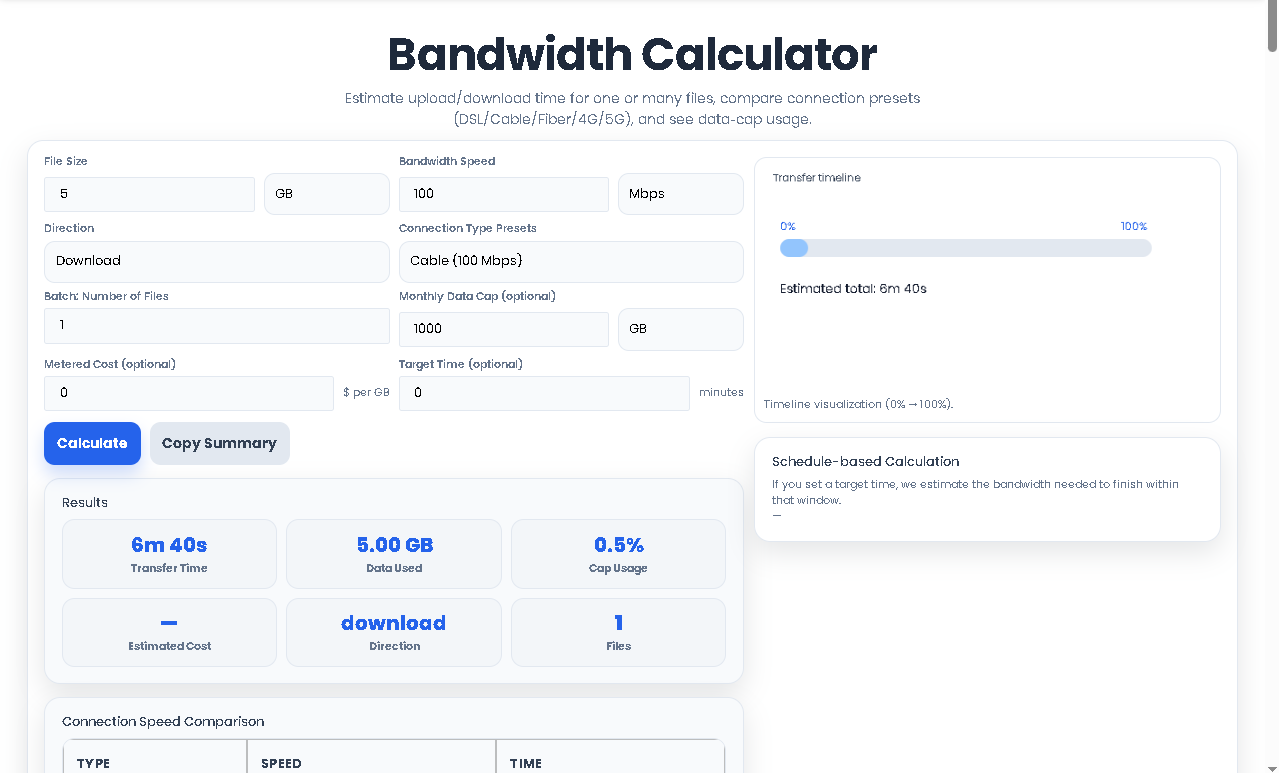
Click the blue “Calculate” button. Instantly, the Results card, Comparison Table, and Timeline Visualization will populate with your personalized data. Use the “Copy Summary” button to easily paste your KPIs into a project plan or report.
Leveraging Toolota’s tool provides distinct advantages over manual estimation or simpler calculators:
Speed and Instant Results: Get answers in milliseconds. Change an input, and all results—transfer time, cost, cap usage—update immediately without a page refresh.
Pinpoint Accuracy: The calculator handles all unit conversions (MB, GB, TB, Mbps, Gbps) with precision, removing human error from the equation.
Comprehensive Metric Analysis: It doesn’t just tell you the time. You get a dashboard view of Data Used, Cap Usage Percentage, Estimated Cost, and Direction, all in one glance.
Informed Decision-Making: The built-in Connection Speed Comparison table lets you instantly see how upgrading from DSL to Fiber would slash your transfer time, providing a powerful justification for infrastructure investments.
Forward & Reverse Planning: Uniquely, you can work both ways. Find the time for a given speed, or input a target deadline to discover the required bandwidth speed—perfect for mission-critical transfers.
Clean, Intuitive UI: The interface is designed for clarity, grouping related inputs, visualizing progress on a timeline, and offering one-click copying of your results summary.
Input Quality Dictates Output Accuracy: The accuracy of the Bandwidth Calculator is directly dependent on the accuracy of the inputs you provide. Always verify your actual network speed and exact file sizes.
Theoretical vs. Actual Speeds: The tool calculates theoretical maximum transfer times. Real-world factors like network congestion, server throttling, Wi-Fi interference, and system performance will result in actual times that are slightly longer.
Purpose of Estimates: The results are intended for planning, estimation, and comparison purposes. They provide a reliable benchmark but should not be used for mission-critical, down-to-the-second scheduling without a buffer.
Ethical Use: This tool is provided to assist with legitimate network planning and personal education. It must not be used to plan or facilitate unauthorized data access or transfers.
Our Bandwidth Calculator is uniquely comprehensive. Beyond basic time estimation, it factors in batch file counts, data cap impact, monetary cost, and target deadlines. Its side-by-side comparison of five internet types and visual timeline provides a holistic view no basic calculator offers, making it the best tool for both quick checks and detailed project planning.
The tool has a dedicated “Direction” selector. By choosing “Upload,” you are instructing the calculator to use your connection’s upload speed for the computation. Since upload speeds are often 5-10 times slower than download speeds, this ensures a realistic and often sobering estimate for sending large files to the cloud or clients.
Absolutely. This is one of its core functions. After entering your file size and monthly data cap, the “Cap Usage” KPI immediately shows the percentage of your allowance the transfer will consume. This allows you to make informed decisions to avoid overage fees from your ISP.
This is the powerful “Target Time” feature. Instead of asking “how long?” you ask “how fast?” Input your desired completion time in minutes. The calculator will then reverse the formula and display the required sustained bandwidth speed in the results panel, telling you precisely what connection capability you need to meet your schedule.
Toolota is your all-in-one online tools platform. Fast, simple, and free utilities designed to make everyday digital tasks easier and smarter.
