
ATS Resume Checker
Check how well your resume matches the job description. Get a compatibility score and identify missing keywords.
0%
Check how well your resume matches the job description. Get a compatibility score and identify missing keywords.
The ATS Resume Checker is a free online tool developed by Toolota that helps job seekers optimize their resumes for Applicant Tracking Systems (ATS). These systems are used by approximately 75% of companies to screen resumes before human eyes ever see them. The ATS Resume Checker bridges the gap between your qualifications and how ATS software interprets them, providing immediate feedback on how well your resume aligns with specific job descriptions.
At its core, the ATS Resume Checker performs keyword analysis between two text inputs: your resume content and your target job description. The tool extracts meaningful keywords from the job description, compares them against your resume, and calculates a compatibility percentage. This instant analysis reveals exactly which keywords you’re missing and which ones you’ve successfully included, giving you actionable data to improve your resume’s ATS performance.
Unlike complex software that requires downloads or subscriptions, Toolota’s ATS Resume Checker operates entirely in your browser with no registration required. The interface is clean and intuitive—two text areas side by side, a check score button, and clear visual results. This simplicity belies the powerful function: helping you pass the digital gatekeeper that stands between your resume and human recruiters.
The modern job application process has become increasingly digital, and understanding ATS optimization isn’t just advantageous—it’s essential. Consider these statistics: the average corporate job opening attracts 250 resumes, but only 4-6 candidates get interviewed. The primary filter determining who makes that cut? Applicant Tracking Systems.
ATS software works by parsing resume content, extracting key information, and scoring resumes based on how well they match the job description. When you use the ATS Resume Checker, you’re essentially previewing what the ATS sees when it scans your application. This pre-screening capability is invaluable because resumes that fail to meet minimum keyword match thresholds are automatically rejected, regardless of the candidate’s actual qualifications.
Many qualified candidates unknowingly sabotage their chances with ATS-unfriendly resume formats. Creative designs, graphics, unusual fonts, or tables that look beautiful to human eyes can become unreadable gibberish to ATS software. The ATS Resume Checker helps you avoid these pitfalls by focusing on the content that matters most: the keywords and phrases that demonstrate your relevance for the position.
Beyond just getting past initial screenings, optimizing for ATS has secondary benefits. Resumes that score well in ATS systems are often ranked higher when presented to recruiters. Some systems even highlight matched keywords, making your qualifications immediately visible. By using the ATS Resume Checker, you’re not just avoiding rejection—you’re positioning yourself for preferential treatment throughout the hiring process.
Using the ATS Resume Checker is straightforward, but following these steps will ensure you get the most accurate and helpful results:
Step 1: Prepare Your Materials
Before visiting the ATS Resume Checker, have both your resume and target job description ready as plain text. If your resume is in PDF or Word format, copy the entire content into a plain text editor first to remove any hidden formatting that might interfere with analysis. For the job description, copy the full text from the job posting, including requirements, responsibilities, and preferred qualifications.
Step 2: Access the Toolota Platform
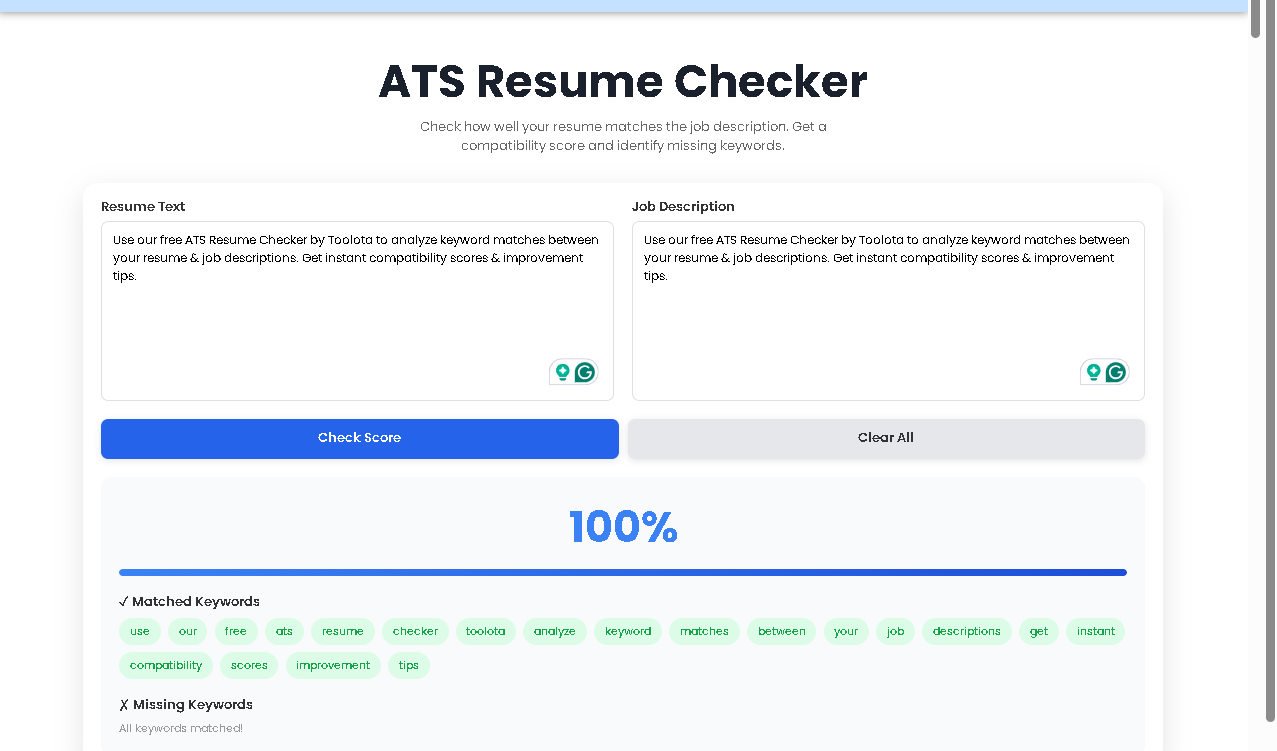
Navigate to Toolota‘s website and locate the ATS Resume Checker tool. The clean interface will immediately present you with two large text areas labeled “Resume Text” and “Job Description.” The symmetrical design emphasizes the comparison nature of the tool.
Step 3: Input Your Content
Paste your prepared resume text into the left textarea. Be thorough—include your entire professional summary, work experience, skills, education, and any certifications. Then paste the complete job description into the right textarea. The ATS Resume Checker analyzes everything you provide, so completeness matters.
Step 4: Initiate Analysis
Click the prominent “Check Score” button. The ATS Resume Checker will immediately process both texts. Behind the scenes, it’s performing several operations: converting text to lowercase, removing common stop words (like “the,” “and,” “is”), eliminating punctuation, and identifying unique keywords with more than two characters.
Step 5: Review Your Results
Within seconds, the results panel activates below the input areas. You’ll see three main components:
A percentage score showing overall compatibility
A progress bar visualizing that percentage
Two keyword lists: matched (green badges) and missing (red badges)
Step 6: Implement Improvements
This is where the real work begins. Examine the missing keywords list carefully. These are terms the ATS will be looking for that aren’t currently in your resume. Strategically incorporate relevant missing keywords into your resume where they authentically fit your experience and skills.
Step 7: Iterate and Refine
After making changes to your resume, paste the updated version back into the ATS Resume Checker and run the analysis again. Track how your score improves with each optimization pass. Many users achieve 20-40% score improvements through targeted keyword integration.
Instant Feedback Loop
The most significant advantage of the ATS Resume Checker is immediacy. Within seconds of pasting your texts, you receive actionable data. This rapid turnaround enables iterative improvement—you can make a change, check the score, and see immediate impact. Traditional resume reviews might take days or cost hundreds of dollars; this tool delivers value instantly and freely.
No Technical Expertise Required
Unlike some ATS optimization tools that require understanding complex algorithms or terminology, the ATS Resume Checker presents information simply and clearly. The interface requires no training—if you can copy, paste, and click, you can use this tool effectively. This accessibility democratizes ATS optimization, making it available to job seekers at all technical levels.
Completely Free Access
Toolota provides the ATS Resume Checker without cost, registration, or usage limits. You can check as many resume-job description pairings as needed throughout your job search. This freedom allows for comprehensive optimization across multiple target positions without financial barriers.
Privacy-First Design
Your resume and job description data never leave your browser. The ATS Resume Checker processes everything locally using JavaScript, meaning sensitive career information isn’t transmitted to external servers. This privacy protection is increasingly important in an era of data concerns.
Visual Learning Aid
The color-coded keyword badges create immediate cognitive understanding. Green = good, red = needs improvement. This visual shorthand helps users quickly identify patterns and priorities without parsing through dense analysis reports.
Educational Value
Beyond just scoring, the ATS Resume Checker teaches users about ATS mechanics. By seeing which keywords match and which don’t, users develop intuition about what ATS software values. This knowledge transfer extends beyond single applications, building skills that serve throughout one’s career.
Cross-Platform Compatibility
The responsive design of the ATS Resume Checker means it works seamlessly on desktop, tablet, or mobile devices. Job seekers can optimize resumes anywhere—during commute time, between interviews, or while researching companies at coffee shops.
The ATS Resume Checker provides several data points that require proper interpretation to be truly useful:
The Compatibility Percentage
This number represents what percentage of the job description’s keywords appear in your resume. A score of 70% means 70% of the unique keywords from the job description were found in your resume. While higher is generally better, context matters. Some job descriptions include niche terms or proprietary software names that might not be relevant to include unless you have specific experience with them.
The Progress Bar Visualization
The blue progress bar provides immediate visual feedback on your score. This quick-reference element helps you gauge your standing at a glance during multiple optimization passes. Watching the bar extend further right with each improvement can be satisfying and motivating.
Matched Keywords (Green Badges)
These are your successes—keywords that appear in both your resume and the job description. The ATS Resume Checker displays these in distinctive green badges, making them easy to identify at a glance. Review this list to ensure you’re highlighting your strongest matches effectively. Consider whether these keywords appear prominently enough in your resume (particularly in the top third, which receives the most attention).
Missing Keywords (Red Badges)
This is your improvement checklist. The ATS Resume Checker shows up to 20 missing keywords—terms present in the job description but absent from your resume. Prioritize these based on:
Frequency in the job description (terms mentioned multiple times are usually more important)
Position in the job description (requirements listed first often carry more weight)
Relevance to your actual experience (only incorporate keywords you can genuinely support)
Keyword Context Considerations
The ATS Resume Checker focuses on exact keyword matches. This means “project management” and “project manager” are considered different keywords. When reviewing results, consider:
Singular vs. plural forms
Hyphenated vs. non-hyphenated terms
Abbreviations vs. full terms (e.g., “CRM” vs. “Customer Relationship Management”)
Industry-specific variations
ATS software often weights keywords differently based on their location. The ATS Resume Checker doesn’t show this weighting, but you should know: keywords in your professional summary, job titles, and the first few bullet points of each position typically carry more weight. Place your most important matches in these high-impact areas.
Addressing Partial Matches
When the ATS Resume Checker shows a missing keyword, consider:
Is it part of a compound term you already have? (“machine learning” vs. “learning”)
Can you add it naturally nearby? (“Proficient in Python for machine learning applications”)
Is it an abbreviation you should spell out? (Add “Customer Relationship Management (CRM)” if you only have “CRM”)
Leveraging Multiple Job Descriptions
For roles you’re particularly interested in, gather 3-5 similar job descriptions from different companies. Run each through the ATS Resume Checker separately, then compile a master list of frequently appearing keywords across all descriptions. Optimize your resume for this aggregated keyword set to create a versatile document that performs well across multiple applications.
Balancing Specificity and Flexibility
Create a “master resume” with comprehensive keyword coverage, then tailor copies for specific applications using the ATS Resume Checker guidance. This approach maintains both depth (your full experience) and specificity (optimized for each application).
Timing Your Optimization
Use the ATS Resume Checker at multiple stages:
Initial creation: Ensure fundamental keyword coverage
Before each application: Tailor for specific positions
Periodically: Update as you gain new skills or as industry terminology evolves
Complementary Tools
While the ATS Resume Checker excels at keyword analysis, consider combining it with:
Grammar checkers for readability
Format validators for ATS compatibility
Readability analyzers for appropriate complexity level
Plagiarism checkers if using template language
The ATS Resume Checker performs keyword extraction and comparison between your resume text and job description text. It removes common stop words (like “the,” “and,” “is”), converts everything to lowercase, eliminates punctuation, and identifies unique words with more than two characters. It then compares these keyword sets to determine matches and calculate a compatibility percentage. The tool doesn’t analyze formatting, design, structure, or semantic meaning—it focuses purely on keyword presence.
The ATS Resume Checker provides a reliable approximation of how commercial ATS systems evaluate keyword matches. However, real ATS software varies by vendor and company configuration. Some systems use more sophisticated natural language processing, consider keyword density, or weight certain sections more heavily. Think of the ATS Resume Checker as an excellent diagnostic tool that identifies potential issues—if you score well here, you’ll likely perform well in most ATS systems, but perfect correlation isn’t guaranteed.
Absolutely. The ATS Resume Checker is industry-agnostic and works equally well for entry-level positions, senior executive roles, technical positions, creative fields, and everything between. The fundamental principle remains the same across contexts: match your resume’s keywords to the job description’s keywords. The specific terminology will vary by field, but the optimization process using the ATS Resume Checker remains consistent and effective.
Toolota‘s ATS Resume Checker operates with a privacy-first design. All processing happens locally in your browser—your resume and job description data never leave your device or get transmitted to external servers. This local processing means you maintain complete control over your sensitive career information while still benefiting from powerful analysis. The tool requires no registration, collects no personal data, and leaves no digital footprint of your usage.
Toolota is your all-in-one online tools platform. Fast, simple, and free utilities designed to make everyday digital tasks easier and smarter.