A/B Test Calculator – Get 100% Free Precise Stats | Toolota
Table of Contents
What This Tool Does
In the data-driven world of digital marketing, product development, and user experience design, guessing is not a strategy. When you run an A/B test—comparing a control version (A) against a variant (B)—the central question is always: “Is the difference I’m seeing real, or is it just random chance?” This is where a dedicated A/B Test Calculator becomes indispensable. It is a specialized statistical tool designed to analyze the results of your experiment, moving beyond simple conversion rate comparisons to deliver a mathematically sound verdict on significance.
At its core, an A/B Test Calculator automates complex statistical hypothesis testing. Instead of manually crunching numbers through formulas, you input your raw data: the number of visitors and conversions for both versions. The calculator instantly processes this, employing a two-proportion Z-test to compute key metrics like the Z-score and P-value. These metrics objectively tell you whether the observed lift in your variant’s performance is statistically significant or likely occurred by random fluctuation. Toolota‘s version of this tool is built for clarity and speed, transforming raw data into actionable insights without requiring a degree in statistics.
Why Choose Toolota
Making business decisions based on inconclusive A/B test results is a costly gamble. Implementing a change that isn’t truly better can waste resources and even hurt performance. Conversely, dismissing a winning variant because you weren’t confident in the data means leaving money on the table. The A/B Test Calculator from Toolota eliminates this uncertainty by providing a clear, confidence-backed answer.
Our tool stands out because it’s built with the practitioner in mind. It strips away the complexity of statistical software and presents everything in a clean, intuitive interface. You don’t need to know how to calculate a pooled standard error; you just need to know your test numbers. Within seconds, you receive a definitive conclusion—marked as “Significant Result” or “Inconclusive”—alongside the precise numerical evidence. This empowers marketers, product managers, and founders to validate their experiments quickly and proceed with confidence, ensuring that every change is informed by reliable data. By using this A/B Test Calculator, you’re not just looking at numbers; you’re making data-driven decisions.
How This Tool Works: The Most Detailed Section
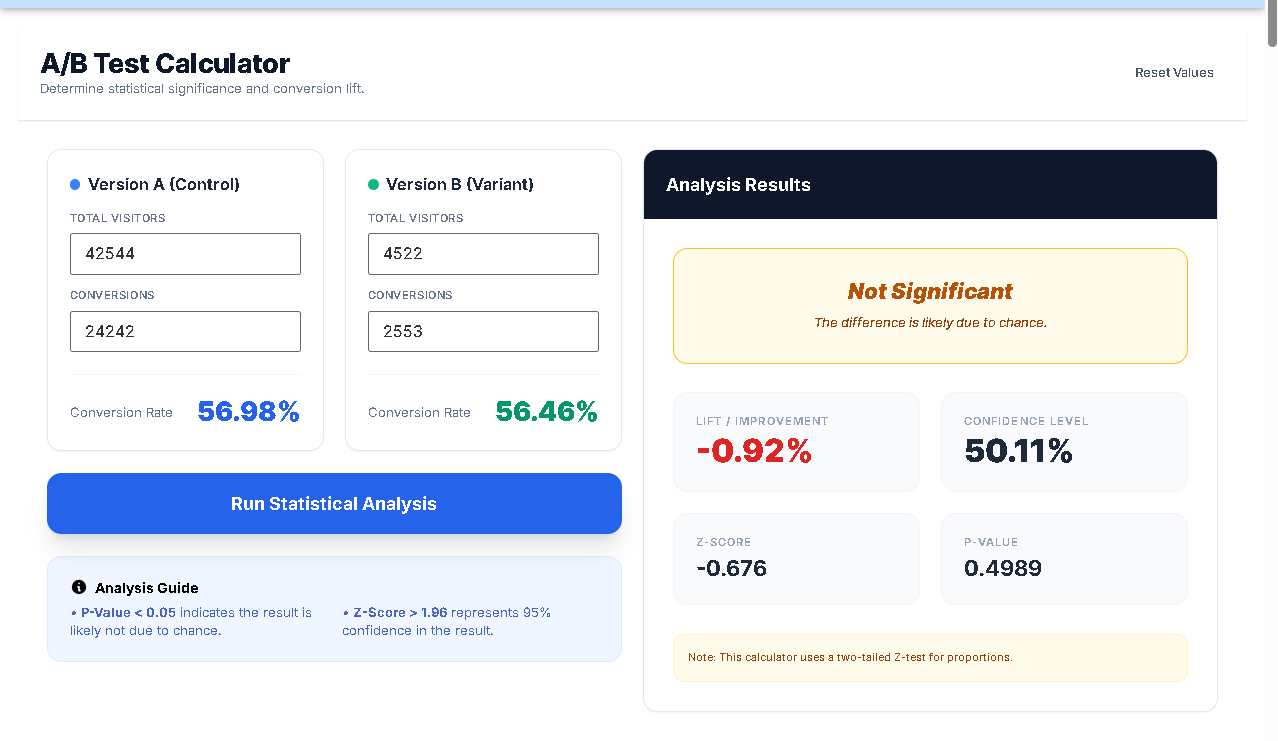
Using the Toolota calculator is a straightforward, four-step process designed for maximum efficiency. Follow these steps exactly as they appear in the tool’s interface for accurate results.
Step 1: Enter Data for Version A (Control)
Locate the blue “Version A” card. In the “Total Visitors” field, input the total number of users or sessions that were exposed to your original page, email, or feature. In the “Conversions” field, enter the number of those visitors who completed your desired goal (e.g., made a purchase, signed up, clicked a button). The tool will instantly compute and display the conversion rate to the right.
Step 2: Enter Data for Version B (Variant)
Move to the green “Version B” card. Input the total visitors and conversions for your test variant. This is the new version you are comparing against the control. Again, watch the conversion rate update in real-time, giving you an immediate visual comparison of the two rates.
Step 3: Run the Statistical Analysis
Once both sets of data are entered, click the large blue button labeled “Run Statistical Analysis.” This action triggers the A/B Test Calculator to perform all the underlying statistical computations. The tool validates your inputs first; if conversions exceed visitors or values are missing, a clear error message will prompt you to correct them.
Step 4: Interpret the Analysis Results
Instantly, the right-hand results panel becomes active and visually prominent. Here, you will find the complete output of the analysis:
Lift/Improvement: The percentage change in conversion rate from Version A to B.
Confidence Level: The statistical confidence that the difference is real (e.g., 95.4%).
Z-Score & P-Value: The core statistical outputs determining significance.
Conclusion Box: A plain-English verdict. A “Significant Result” with a green theme means one version is a clear winner. An “Inconclusive” result with an amber theme means more data is likely needed.
4. Understanding Your Results: Z-Score, P-Value, Confidence & Lift
The power of this A/B Test Calculator lies in its detailed output. Understanding these four metrics is key to interpreting your test.
Lift/Improvement: This is the most straightforward metric. It shows the relative percentage increase (or decrease) in the conversion rate of Version B compared to Version A. A positive number indicates improvement; negative means performance dropped. While exciting, lift alone doesn’t prove anything—it must be validated by statistical significance.
Z-Score: This is the engine of the test. It represents how many standard deviations the observed difference between your two conversion rates is away from zero (no difference). A higher absolute Z-score (typically above 1.96 for 95% confidence) indicates the difference is less likely to be due to random sampling error.
P-Value: This is the probability of observing a result as extreme as the one you got, assuming there is actually no difference between Version A and B (the null hypothesis is true). The industry-standard threshold is 0.05. If the P-Value is less than 0.05, your result is statistically significant. The A/B Test Calculator uses this exact rule to color-code its conclusion.
Confidence Level: Derived from the P-Value, this tells you the degree of confidence you can have that the observed lift is real and not a fluke. It is calculated as (1 – P-Value) * 100. A 95% confidence level is the gold standard, meaning there’s only a 5% risk the result is due to chance.
Benefits This Tools
Why choose Toolota‘s tool over manual calculation or a spreadsheet? The benefits are direct and impactful:
Speed & Instantaneity: Gone are the days of manual formula entry. Get from raw data to a statistically valid conclusion in under 30 seconds. This rapid turnaround allows for faster iteration and decision-making.
100% Accuracy: Eliminates human error in complex statistical calculations. The algorithms behind this A/B Test Calculator are rigorously tested, ensuring the Z-scores and P-values you rely on are mathematically correct.
Clarity & No Jargon: The tool translates complex statistics into a clear, color-coded conclusion. The “Significant” or “Inconclusive” verdict, combined with the key metrics, makes the result understandable regardless of your statistical background.
Clean, Focused UI: The interface is designed to guide you naturally through the workflow. With no distracting ads or unnecessary features, you can focus entirely on analyzing your test.
Completely Free with No Limits: This is a fully functional, professional-grade A/B Test Calculator offered by Toolota at no cost. You can use it as often as you need, for any number of tests.
Important Conditions & Guidelines for Use
This A/B Test Calculator is a versatile tool for anyone who makes decisions based on comparative data.
Digital Marketers: Testing different email subject lines, landing page headlines, call-to-action buttons, or ad creatives.
Product Managers & UX Designers: Evaluating feature changes, onboarding flows, user interface elements, or pricing page layouts.
E-commerce Managers: Comparing different product page designs, checkout processes, or promotional banners.
Content Creators & CRO Specialists: Testing blog post titles, content formats, or lead magnet offers.
Founders & Startups: Making data-informed decisions about product changes with limited resources and a need for high confidence.
Essentially, if you’re running any experiment where one group sees one version and another group sees a different version, this calculator is for you.
Frequently Asked Questions (FAQ)