Canonical Tag Generator | Create Canonical URL Fast
Table of Contents
What This Tool Does
A Canonical Tag Generator is a specialized tool designed to create properly formatted HTML canonical link tags without requiring users to memorize syntax or worry about formatting errors. When you’re managing a website, duplicate content can silently damage your search engine rankings. The Canonical Tag Generator solves this problem by producing accurate, ready-to-use code that tells search engines which version of a page you consider the primary source.
Think of the Canonical Tag Generator as your syntax insurance policy. Instead of manually typing <link rel="canonical" href="https://example.com/page" /> and risking a missing quotation mark or incorrect formatting, this tool handles the technical details automatically. You simply provide the URL, and the Canonical Tag Generator delivers a perfectly structured tag every single time.
For SEO professionals and website owners alike, the Canonical Tag Generator eliminates the guesswork from one of technical SEO’s most fundamental tasks. Whether you’re dealing with product pages that have multiple sorting options or managing content syndication across domains, having a reliable Canonical Tag Generator at your fingertips ensures consistency and accuracy in your SEO implementation.
How the Canonical Tag Generator Works
The Canonical Tag Generator follows a straightforward three-step process that任何人都 can master in seconds. Understanding exactly how this tool operates helps you appreciate its value and use it more effectively.
Input Validation Logic
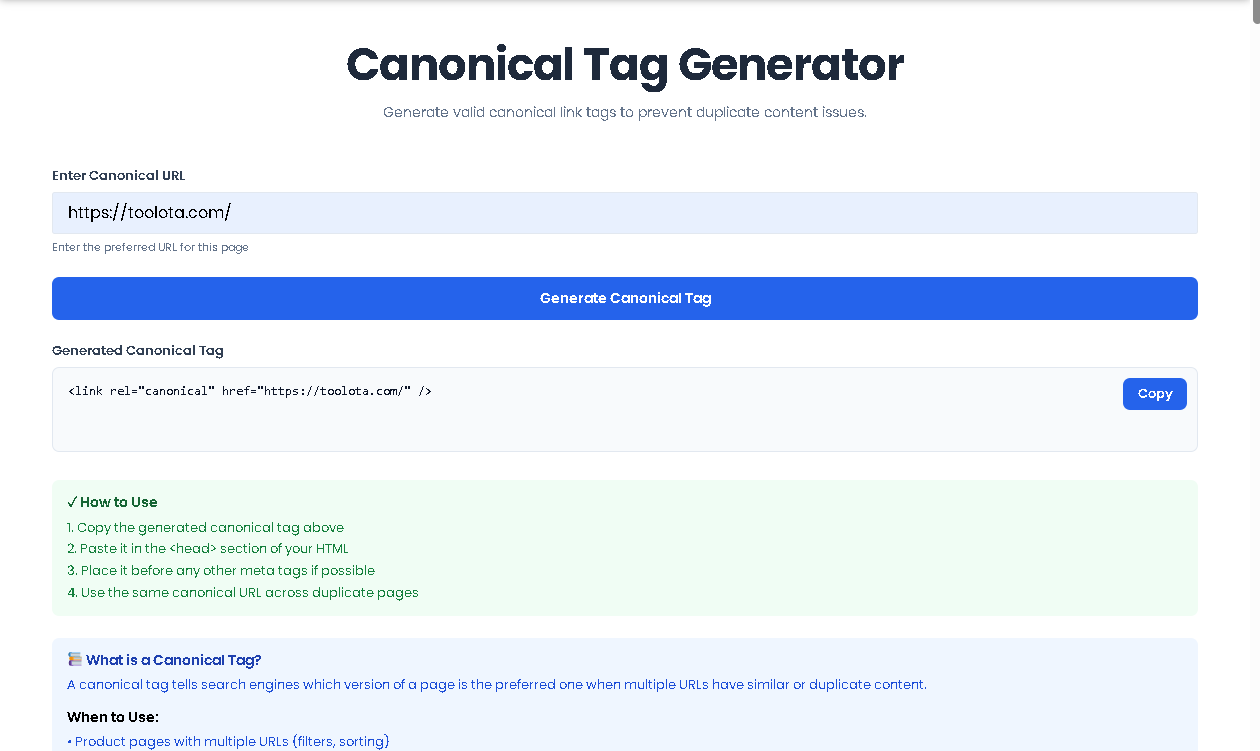
When you first encounter the Canonical Tag Generator, you’ll see a clean interface with a single input field labeled “Enter Canonical URL.” This simplicity is intentional. The Canonical Tag Generator focuses on doing one thing exceptionally well: creating canonical tags.
Behind the scenes, the Canonical Tag Generator performs sophisticated URL validation. It checks whether your entered URL includes the required protocol (http:// or https://) and follows proper URL formatting standards. If you accidentally type “example.com” without the protocol, the Canonical Tag Generator won’t generate a tag until you correct this. This validation prevents you from creating canonical tags that point to invalid URLs, which would confuse search engines and potentially harm your SEO efforts.
Tag Generation Process
Once you click the prominent “Generate Canonical Tag” button, the Canonical Tag Generator springs into action. It takes your validated URL and wraps it in the proper HTML syntax. The Canonical Tag Generator adds the opening <link rel="canonical" href=" prefix, inserts your URL exactly as provided, and appends the closing " /> to complete the tag.
What makes the Canonical Tag Generator particularly valuable is its handling of special characters. If your URL contains ampersands, question marks, or other symbols that need HTML escaping, the Canonical Tag Generator automatically processes these to ensure the final tag remains valid HTML. This attention to detail means the code you copy from the Canonical Tag Generator will work immediately when pasted into your website’s <head> section.
Copy and Implementation Features
After generation, the Canonical Tag Generator displays your tag in a read-only textarea with a convenient “Copy” button positioned nearby. Clicking this button copies the complete canonical tag to your clipboard, and a subtle notification confirms the action. This thoughtful design means you never have to manually select text or worry about copying only part of the tag. The Canonical Tag Generator ensures you get the complete, properly formatted tag every time.
Why Canonical Tags Matter for SEO {#why-matters}
Understanding why you need a Canonical Tag Generator requires appreciating the problem canonical tags solve. Search engines strive to provide diverse search results, showing different websites rather than multiple pages from the same domain. When your site contains duplicate or very similar content accessible through different URLs, search engines face a dilemma about which version to display.
The Duplicate Content Problem
Consider an e-commerce product page accessible through multiple URLs:
https://example.com/products/blue-widget
https://example.com/products/blue-widget?color=blue
https://example.com/products/blue-widget?utm_source=email
Each URL displays identical product information, but search engines see them as separate pages. Without a canonical tag pointing to the preferred version, search engines might:
Split ranking signals across all versions, weakening each page’s authority
Choose the “wrong” version to display in search results
Waste crawl budget indexing multiple copies of the same content
Flag your site for duplicate content issues
How Canonical Tags Solve This
When you use the Canonical Tag Generator to create tags for these pages, you consolidate all signals to a single URL. By placing <link rel="canonical" href="https://example.com/products/blue-widget" /> on all three versions, you tell search engines:
This is the master version of this content
Please attribute all ranking signals to this URL
Show this URL in search results, not the parameterized versions
Focus crawling resources on discovering new content instead of revisiting duplicates
The Canonical Tag Generator makes implementing this SEO best practice effortless, ensuring you reap these benefits without technical hurdles.
How This Tool Works: The Most Detailed Section
Let me walk you through exactly how to use the Canonical Tag Generator effectively. Following these steps ensures you get maximum value from this tool.
Step 1: Prepare Your Preferred URL
Before opening the Canonical Tag Generator, decide which URL version should serve as your canonical master. This decision deserves careful thought because changing it later can cause temporary ranking fluctuations. Consider factors like:
Which URL format do you consistently use in internal links?
Does your site prefer www or non-www versions?
Are you using HTTPS across your entire site?
Which URL structure aligns with your information architecture?
Once you’ve chosen your preferred URL, copy it to your clipboard. Ensure the URL includes the full protocol (https://) and follows your desired format consistently.
Step 2: Enter the URL in the Generator
Open the Canonical Tag Generator and locate the input field labeled “Enter Canonical URL.” Paste or type your preferred URL here. The Canonical Tag Generator accepts any valid URL, whether it’s a simple homepage or a complex URL with multiple parameters.
Take a moment to verify your entry. The Canonical Tag Generator displays your input clearly, making it easy to spot typos or formatting issues before generation.
Step 3: Generate Your Tag
Click the blue “Generate Canonical Tag” button, or simply press Enter while focused on the input field. The Canonical Tag Generator immediately processes your URL and displays the complete HTML tag below. You’ll see something like:
<link rel="canonical" href="https://example.com/your-chosen-page" />
The Canonical Tag Generator formats this tag exactly as search engines expect, with proper spacing, attribute ordering, and self-closing syntax.
Step 4: Copy Your Tag
Find the “Copy” button positioned at the top-right corner of the output area. Clicking this button copies the entire canonical tag to your clipboard. The Canonical Tag Generator shows a subtle notification confirming the copy action, giving you confidence that the tag is ready to use.
Step 5: Implement on Your Page
Navigate to the HTML file for the page you’re canonicalizing. Open the <head> section and paste the tag from your Canonical Tag Generator. Place it before other meta tags when possible, though its position within the <head> section doesn’t significantly impact functionality.
Repeat this process for every page version that should point to your canonical master. The Canonical Tag Generator makes this repetition quick and error-free.
Common Scenarios for Canonical Tags {#scenarios}
The Canonical Tag Generator proves valuable across numerous real-world situations. Understanding these scenarios helps you recognize when to reach for this tool.
E-commerce Product Variations
Online stores frequently generate multiple URLs for the same product through filtering, sorting, and tracking parameters. A product might appear at:
https://store.com/shoes/running-shoe (canonical master)
https://store.com/shoes/running-shoe?size=10
https://store.com/shoes/running-shoe?color=black
https://store.com/shoes/running-shoe?sort=price
Each variation displays essentially the same product information. Using the Canonical Tag Generator to create tags pointing all these versions to the master URL preserves your SEO equity.
If your site recently migrated to HTTPS or standardized on a particular domain format, you might have legacy URLs still indexed. The Canonical Tag Generator helps you signal your preferred version:
By generating canonical tags for the non-preferred versions pointing to your chosen format, you accelerate search engines’ understanding of your site’s structure.
Syndicated and Republished Content
When you syndicate content to other platforms or republish articles across your own network, canonical tags prevent duplicate content penalties. The Canonical Tag Generator creates tags pointing syndicated copies back to your original publication, ensuring you receive credit for the content you created.
Benefits This Tools
Speed and Efficiency
The Canonical Tag Generator transforms a multi-step manual process into a two-second operation. Instead of typing tags from scratch or copying templates and replacing URLs, you simply paste your URL and click generate. For sites with dozens or hundreds of canonical tags, this efficiency compounds significantly.
Error Prevention
Manual tag creation invites errors: missing quotation marks, incorrect attribute spelling, forgetting the self-closing slash, or accidentally adding spaces. The Canonical Tag Generator eliminates these risks entirely. Every tag it produces follows exact HTML specifications, giving you confidence in your implementation.
Clean User Interface
The Canonical Tag Generator presents a distraction-free interface focused solely on its core function. No advertisements, no confusing options, no unnecessary features. This simplicity means you can generate canonical tags even while distracted or working quickly.
Copy Convenience
The integrated copy button with visual feedback streamlines your workflow. You don’t need to manually select text, right-click, and choose copy. One click copies the complete tag, and the notification confirms success without interrupting your flow.
Understanding Your Text Similarity Analyzer Results
It’s important to have realistic expectations about what this Bar Chart Generator provides:
Output Quality: The chart is rendered as a bitmap on an HTML Canvas. While perfectly clear on screen, the resolution is fixed (900×500 pixels). For very high-resolution prints, it may appear pixelated if enlarged significantly.
Input Dependency: The accuracy and usefulness of the chart are entirely dependent on the accuracy of the data you input. The tool visualizes what you provide.
Chart Type Limitation: This is specifically a Bar Chart Generator. It does not create pie charts, line graphs, scatter plots, or other chart types.
Customization Limits: The color scheme, font, and basic layout are pre-set for consistency and ease of use. Advanced customization (like custom colors or bar styles) is not part of this tool’s scope.
Saving Your Chart: While the tool itself doesn’t have a “download” button, you can save the generated chart. On most computers, right-clicking directly on the canvas will bring up a context menu with an option like “Save image as…” to save the chart as a PNG file to your device.
Best Practices for Canonical Tag Implementation
Consistency Across Your Site
Use the Canonical Tag Generator to maintain consistent URL formatting across your entire site. If you prefer trailing slashes, include them consistently. If you exclude www, ensure all canonical tags reflect this preference. Consistency helps search engines understand your URL patterns.
Self-Referencing Canonicals
Even pages that serve as canonical masters benefit from including a canonical tag pointing to themselves. The Canonical Tag Generator can create these self-referencing tags just as easily as cross-page tags. This practice reinforces your intention and prevents confusion if parameters accidentally get added to the master URL.
Regular Audits
Periodically review your implemented canonical tags. Use the Canonical Tag Generator to recreate tags for comparison, ensuring no implementation errors crept in during updates or site migrations. Regular audits catch issues before they impact rankings.
Frequently Asked Questions (FAQ)