Safe JavaScript minification - removes comments and whitespace without changing logic.
A JavaScript Minifier is an essential tool in modern web development that compresses JavaScript code by removing all unnecessary characters without changing its functionality. These unnecessary characters include comments, whitespace, newlines, and extra spaces that developers use to make code readable but are not required for execution.
When you write JavaScript code, you naturally add spaces, indentations, line breaks, and comments to make it understandable for yourself and other developers. However, web browsers don’t need these formatting elements to execute your code. They only need the actual instructions. This is where a JavaScript Minifier becomes invaluable.
Toolota’s JavaScript Minifier takes your beautifully formatted, human-readable code and transforms it into a streamlined, production-ready version. The result is significantly smaller in size while maintaining 100% of the original functionality. You can achieve up to 70% reduction in file size, which directly translates to faster website loading times.
Understanding why you need a JavaScript Minifier requires looking at the bigger picture of website performance. Every byte of JavaScript on your website must be downloaded by visitors’ browsers before your site becomes fully interactive. Larger files mean longer download times, which leads to slower page loads.
Website speed isn’t just about user experience—it’s a critical ranking factor for search engines. Google and other search engines prioritize fast-loading websites in their search results. When you use a JavaScript Minifier, you’re not just optimizing code; you’re actively improving your SEO performance. Every kilobyte you save brings you closer to that perfect PageSpeed score.
Consider this real-world example: A typical JavaScript file with proper formatting might be 100KB. After passing through our JavaScript Minifier, that same file could shrink to just 30KB. For a user on a mobile connection, that 70KB difference means your website becomes interactive seconds faster. Those seconds matter enormously for user engagement, bounce rates, and ultimately, conversions.
Mobile users, who now represent more than half of all web traffic, benefit the most from minification. Their connections are often slower and less reliable than desktop connections. A JavaScript Minifier ensures they get the smallest possible file, giving them the best possible experience on your site regardless of their connection quality.
Using our JavaScript Minifier is incredibly straightforward. The interface is designed with simplicity in mind, yet it provides powerful functionality. Let me walk you through the exact process:
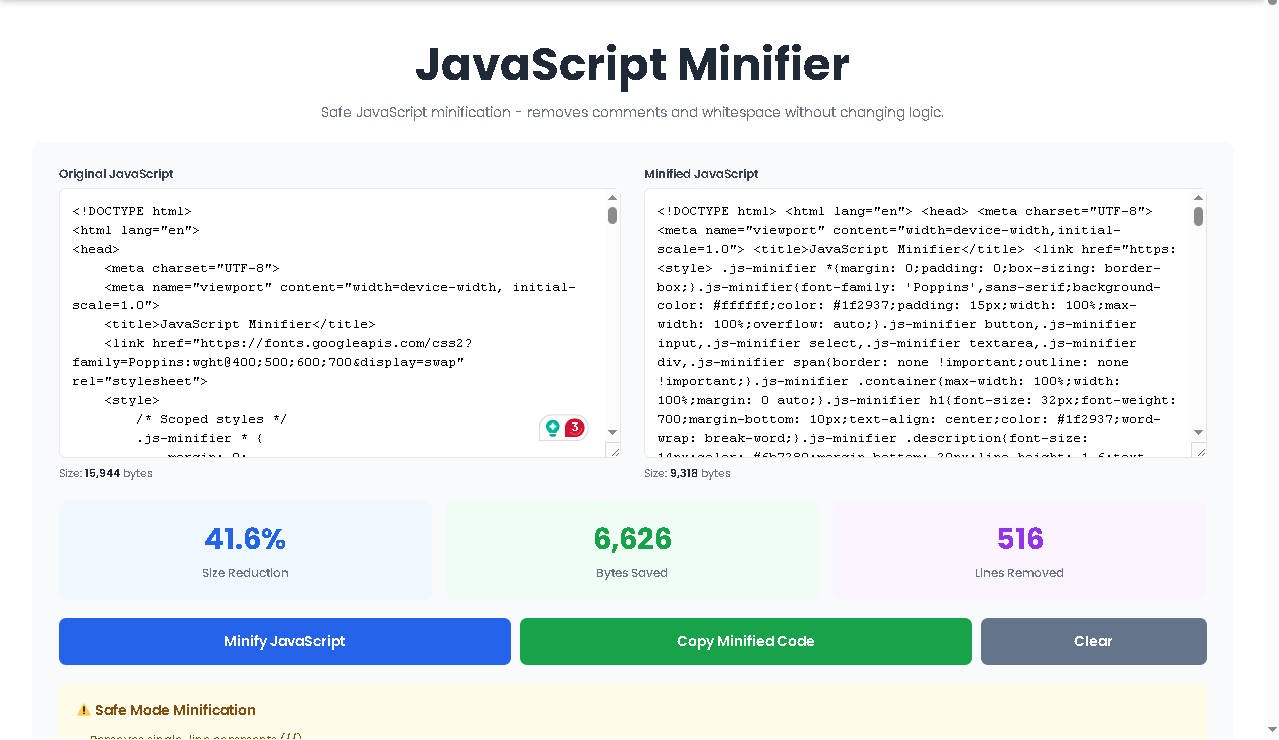
Start by pasting your raw, unminified JavaScript code into the left textarea labeled “Original JavaScript.” This field accepts any JavaScript code, whether it’s a small function or an entire library. Our JavaScript Minifier handles code of any length efficiently.
As you paste your code, you’ll immediately notice the “Size” indicator below the textarea updating in real-time. It shows you exactly how many bytes your original code occupies. This real-time feedback gives you a baseline measurement before minification begins.
Once your code is in place, click the prominent blue “Minify JavaScript” button. This triggers our intelligent minification algorithm to process your code instantly. The processing happens entirely in your browser—nothing is uploaded to any server, ensuring your code remains private and secure.
Our algorithm performs several operations in sequence:
First, it identifies and removes all single-line comments (//). These comments, which developers use to explain code logic, are completely unnecessary for execution. Second, it strips out multi-line comments (/* */) regardless of how many lines they span. Third, it compresses all whitespace—multiple spaces become single spaces, tabs disappear, and line breaks vanish. Finally, it carefully adjusts spacing around special characters like brackets {}, parentheses (), semicolons ;, commas ,, and equals signs = to achieve maximum compression without breaking your code.
The right textarea, labeled “Minified JavaScript,” instantly displays your compressed code. This is your production-ready JavaScript—smaller, cleaner, and optimized for fast downloading. You can scroll through it, though you’ll notice it’s now a continuous stream of code without the original formatting.
Below the editor boxes, our JavaScript Minifier presents three important statistics:
The “Size Reduction” percentage shows you exactly how much smaller your file has become. This number often reaches 50-70% for heavily commented and formatted code. “Bytes Saved” tells you the actual file size reduction in absolute terms. “Lines Removed” counts how many lines of code were eliminated through comment removal and whitespace compression.
These statistics give you concrete evidence of your optimization success. You can see immediately how much faster your website will load with this minified code.
Finally, you have two options for your minified code. Click the green “Copy Minified Code” button to copy everything to your clipboard. A notification will appear confirming the copy was successful. You can then paste this optimized code directly into your production files.
If you want to start over, the gray “Clear” button resets both textareas and all statistics, ready for your next minification task.
Our JavaScript Minifier stands out because of its carefully designed feature set. Every aspect has been built with developers in mind:
Safety is our top priority. Unlike aggressive minifiers that rename variables and restructure code, our JavaScript Minifier uses a conservative approach. It only removes elements that are guaranteed safe to remove—comments and whitespace. Your variable names, function names, and code structure remain exactly as you wrote them. This means your minified code will behave identically to your original code, eliminating the risk of introducing bugs during optimization.
Knowledge is power, and our JavaScript Minifier gives you complete knowledge of your optimization results. The statistics update instantly when you minify your code, showing you exactly what you’ve achieved. The three-stat display gives you both relative (percentage) and absolute (bytes) measurements, plus a line count comparison.
We understand that developers value efficiency. That’s why we included a one-click copy button that places your minified code directly onto your clipboard. No selecting, no right-clicking, no keyboard shortcuts—just one click and your optimized code is ready to paste wherever you need it.
The interface of our JavaScript Minifier focuses entirely on what matters: your code. There are no distracting ads, no confusing options, no unnecessary elements. The two-panel layout lets you see original and minified code side by side, making comparison easy. The color-coded statistics cards provide immediate visual feedback on your results.
Whether you’re working on a desktop computer, a tablet, or even a phone, our JavaScript Minifier adapts perfectly. The interface reorganizes itself for optimal viewing on any screen size. On larger screens, you get the side-by-side editor view. On mobile devices, the editors stack vertically for easy scrolling and typing.
The statistics panel in our JavaScript Minifier provides three key metrics that tell you everything you need to know about your optimization. Let me explain what each one means and why it matters.
This percentage shows the relative reduction in file size. If your original file was 100KB and your minified file is 30KB, you’ll see a 70% reduction. This is the headline number—the one that shows you at a glance how effective the minification was. For heavily commented code or code with extensive formatting, this percentage can be impressively high.
While percentages are helpful, absolute numbers matter too. The bytes saved tells you exactly how much data you’re removing from every page load. If your site gets 10,000 visitors per month and you save 70KB per visitor, that’s 700MB of bandwidth saved monthly. For high-traffic sites, these savings translate directly to lower hosting costs and faster experiences for users.
This count shows how many lines of code were eliminated. Every comment line and every blank line contributes to this number. While lines themselves don’t directly affect file size as much as characters do, this metric gives you a sense of how much cleaner your code has become. Removing hundreds of lines of comments means your production files contain only what’s necessary for execution.
The effectiveness of our JavaScript Minifier depends partly on your input code. Code with extensive comments and consistent formatting will see greater reductions than already-minified code. For best results, maintain clean, well-commented code in your development files.
While our JavaScript Minifier is extremely reliable, we always recommend testing minified code in a staging environment before deploying to production. This is good practice with any optimization tool and ensures everything works as expected.
Our JavaScript Minifier is designed for legitimate JavaScript optimization. Please use it responsibly and only on code you have permission to modify. Respect intellectual property rights and licensing terms.
For the best experience, ensure your JavaScript is syntactically correct before minifying. The tool works with valid JavaScript code and produces valid JavaScript output.
Yes, absolutely. Our JavaScript Minifier is completely free with no hidden costs, no registration requirements, and no usage limits. You can minify as much code as you need, as often as you need. The JavaScript Minifier runs entirely in your browser, so we don’t incur server costs that would require charging users.
No, our JavaScript Minifier uses safe mode minification only. It removes comments and compresses whitespace but never renames variables, functions, or alters your code structure. This ensures your minified code works exactly like your original code. Some aggressive minifiers do rename variables, but we prioritize safety over maximum compression.
Most users achieve between 30% and 70% reduction with our JavaScript Minifier. The exact percentage depends on how much commenting and formatting your original code contains. Heavily commented code with extensive whitespace will see the greatest reductions. The statistics panel shows you exactly what you achieved with each minification.
Absolutely secure. Our JavaScript Minifier processes everything locally in your browser. Your code never leaves your device, never gets uploaded to any server, and never passes through our systems. This means sensitive code, proprietary algorithms, and confidential logic remain completely private throughout the minification process.
Toolota is your all-in-one online tools platform. Fast, simple, and free utilities designed to make everyday digital tasks easier and smarter.
