Compress CSS code safely by removing comments and unnecessary whitespace.
If you’ve ever written CSS code, you know how messy stylesheets can become. Between the comments you leave for yourself, the spacing you add for readability, and all those line breaks, your CSS file might be carrying a lot of extra weight. That’s exactly where a CSS Minifier becomes your best friend.
A CSS Minifier is a tool that takes your beautifully formatted but bloated CSS code and compresses it into the smallest possible size. It strips away everything the browser doesn’t actually need to render your page—comments, unnecessary whitespace, indentation, and extra line breaks. The result? Clean, compact CSS that works exactly the same way but loads much faster.
Think of it like packing a suitcase. When you’re organizing at home, you spread everything out neatly. But when it’s time to travel, you compress, fold, and pack tightly to save space. A CSS Minifier does the same thing with your code—it packs it tight for the journey to your user’s browser.
Toolota brings you this powerful CSS Minifier with a clean, intuitive interface that shows you exactly what’s happening to your code. You don’t just get minified output—you get real-time statistics showing exactly how many bytes you saved and how much cleaner your code became.
The utility of a straightforward Bar Chart Generator spans numerous fields and expertise levels. This tool is specifically designed for:
Students & Educators: Perfect for creating visuals for school projects, theses, or classroom presentations without needing advanced software.
Bloggers & Content Creators: Ideal for enhancing articles, blog posts, or social media content with custom data visuals that engage readers.
Small Business Owners & Entrepreneurs: Great for visualizing sales figures, website traffic, customer feedback scores, or budget allocations for quick internal reviews or investor updates.
Marketers & Analysts: Useful for swiftly charting campaign metrics, A/B test results, or market research data for reports and dashboards.
Freelancers & Consultants: An efficient way to include professional-looking charts in client deliverables without investing in graphic design.
Anyone Needing a Quick Visual: If you have a list of numbers and categories that you want to see compared visually, this generator is for you. No technical expertise is required.
Let me walk you through exactly how to use this CSS Minifier. The interface is designed to be straightforward, but understanding every element will help you get the most out of it.
Step 1: Access the Tool
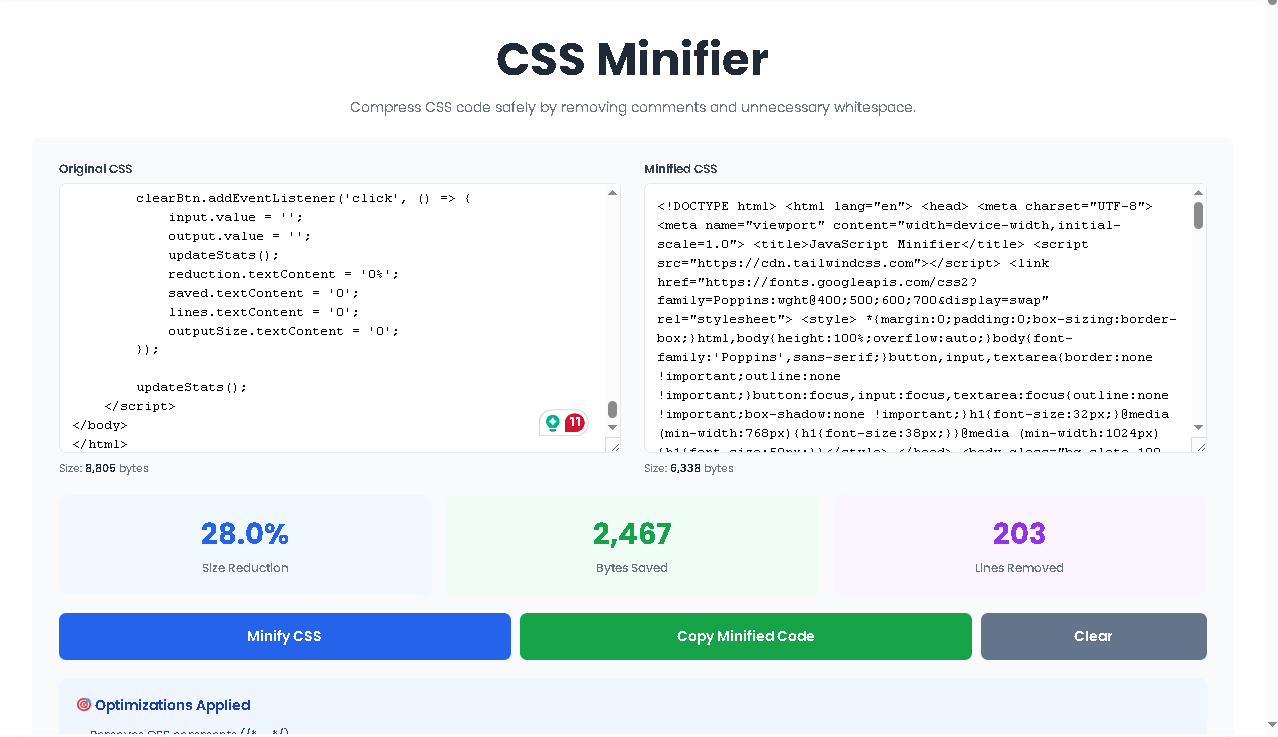
When you open the CSS Minifier, you’ll see a clean, two-panel interface. The left side is labeled “Original CSS” and the right side shows “Minified CSS” (initially empty). Above both panels, you’ll notice size counters that start at zero.
Step 2: Paste Your CSS Code
Take any CSS code you want to minify—whether it’s from your project files, a client’s website, or even a CSS framework—and paste it into the left textarea. The tool accepts any amount of code, from a few lines to thousands of lines.
As soon as you paste, watch the “Size” indicator below the left panel. It immediately calculates and displays exactly how many bytes your original code contains. This real-time feedback helps you understand the scale of your CSS file before minification.
Step 3: Click the Minify Button
Once your code is in place, click the blue “Minify CSS” button. This triggers the compression engine to process your code instantly. The right panel will populate with your minified CSS, and several important things happen at once.
Step 4: Review Your Minified Code
The right textarea now contains your compressed CSS. Notice how all comments are gone, all extra spaces have been eliminated, and the entire stylesheet is now one continuous block or a few compact lines. The code looks different, but every selector, property, and value remains intact.
Step 5: Analyze the Statistics
Look at the three statistic cards above the buttons. They tell you:
Size Reduction – The percentage of space you saved
Bytes Saved – The actual number of bytes removed
Lines Removed – How many lines of code disappeared
These numbers give you concrete proof of how much leaner your CSS became.
Step 6: Copy Your Minified Code
If you’re happy with the result, click the green “Copy Minified Code” button. This instantly copies the compressed CSS to your clipboard. A notification will pop up in the bottom-right corner confirming the copy was successful.
Step 7: Clear and Start Over
Need to minify another file? Click the gray “Clear” button to reset both textareas and all statistics to zero. You can then paste new CSS and repeat the process.
Real-Time Size Tracking
As you type or paste code into the left panel, the size counter updates instantly. You always know exactly how much data you’re working with before minification begins.
Comprehensive Comment Removal
The CSS Minifier aggressively strips out every CSS comment, whether they’re single-line or multi-line. Those notes you left for yourself? Gone. The explanations you wrote for your team? Removed. The browser doesn’t need them, so the tool eliminates them completely.
Whitespace Elimination
Every unnecessary space, tab, and line break gets removed. The tool collapses multiple spaces into single spaces where syntax requires them, but otherwise compresses everything tight.
Syntax Preservation
Despite all this compression, the tool never breaks your CSS. It understands CSS syntax perfectly, so it knows where spaces are actually required (like between selectors and brackets) and preserves only what’s necessary.
Three Statistical Insights
Most minifiers just give you the output. This CSS Minifier shows you reduction percentage, actual bytes saved, and lines removed—giving you a complete picture of your optimization.
One-Click Copy with Visual Confirmation
The copy button includes a notification system that confirms when your code has been copied, eliminating uncertainty.
Mobile-Responsive Interface
Whether you’re on desktop, tablet, or phone, the two-panel layout adjusts to give you the best possible experience.
Size Reduction Percentage
This number shows the proportion of your original file size that was eliminated. A 70% reduction means your minified file is less than one-third the size of your original. The higher this number, the more bloated your original code was.
Bytes Saved
This is the raw number of characters (bytes) removed from your file. If your original CSS had 10,000 bytes and your minified version has 3,000 bytes, you saved 7,000 bytes. This gives you a concrete sense of the weight you removed.
Lines Removed
CSS developers often format code with each property on its own line for readability. When minified, all those line breaks vanish. This number shows you exactly how many lines disappeared during compression.
Output Quality Depends on Input Quality
The CSS Minifier works with whatever CSS you provide. If your original code contains syntax errors, the minified version will still contain those errors. The tool compresses code but doesn’t fix broken CSS.
Comments Are Permanently Removed
Once you minify your CSS, all comments are gone forever from that version. Always keep an unminified development copy if you need to preserve notes for future editing.
Readability Is Sacrificed
Minified CSS is nearly impossible for humans to read and edit. That’s intentional—it’s meant for browsers, not developers. Always maintain your original formatted version separately.
No Undo Function
The tool doesn’t store your code or provide a way to revert minification. If you close the browser or clear the tool, your minified code is gone. Copy it immediately after generation.
Free to Use With No Limits
Toolota provides this CSS Minifier completely free with no usage restrictions. Minify as many files as you need, as often as you want.
No, a CSS Minifier only removes comments and unnecessary whitespace. It never alters selectors, properties, or values, so your styles behave exactly the same way after minification.
No, minification is a one-way process. The removed comments and formatting cannot be restored. Always keep a separate copy of your original formatted CSS.
Yes, the CSS Minifier works with any valid CSS code, including framework files, custom stylesheets, and inline styles copied from anywhere.
Toolota processes everything locally in your browser. No code is sent to any server, so your confidential CSS never leaves your computer.
Toolota is your all-in-one online tools platform. Fast, simple, and free utilities designed to make everyday digital tasks easier and smarter.