Compress HTML code by removing comments and unnecessary whitespace safely.
An HTML Minifier is a specialized tool designed to compress HTML code by removing unnecessary characters without altering its functionality. When developers write HTML code, they typically include indentation, line breaks, and comments to make the code readable and maintainable. While these elements are helpful during development, they add extra bytes to the file size that aren’t needed for the browser to render the page correctly.
The HTML Minifier from Toolota solves this problem by intelligently stripping away:
HTML comments (<!-- ... -->)
Extra whitespace between tags
Unnecessary line breaks and indentation
Multiple spaces collapsed into single spaces
The result is a leaner, faster-loading HTML file that retains 100% of its original functionality. For website owners and developers focused on performance optimization, this simple step can make a noticeable difference in page load times and overall user experience.
The HTML Minifier serves a wide range of users across different technical backgrounds:
If you build websites professionally, you know that clean code matters. The HTML Minifier helps you prepare client projects for deployment, ensuring every file is optimized without manual cleanup.
Page speed directly impacts search rankings. SEO professionals can use the HTML Minifier to squeeze every possible performance gain from the websites they optimize.
Anyone who occasionally edits website code in a CMS can benefit. Before publishing new HTML content, running it through the HTML Minifier ensures you’re not accidentally bloating your site with unnecessary characters.
Understanding the difference between development code and production code is an important lesson. The HTML Minifier visually demonstrates how much “extra” code exists in typical HTML documents.
Even simple blogs benefit from optimization. Using the HTML Minifier on custom HTML snippets or embedded content keeps page loads snappy for readers.
Understanding exactly how the HTML Minifier operates helps you get the most out of it. Based on our analysis of the actual tool interface, here’s the complete step-by-step workflow:
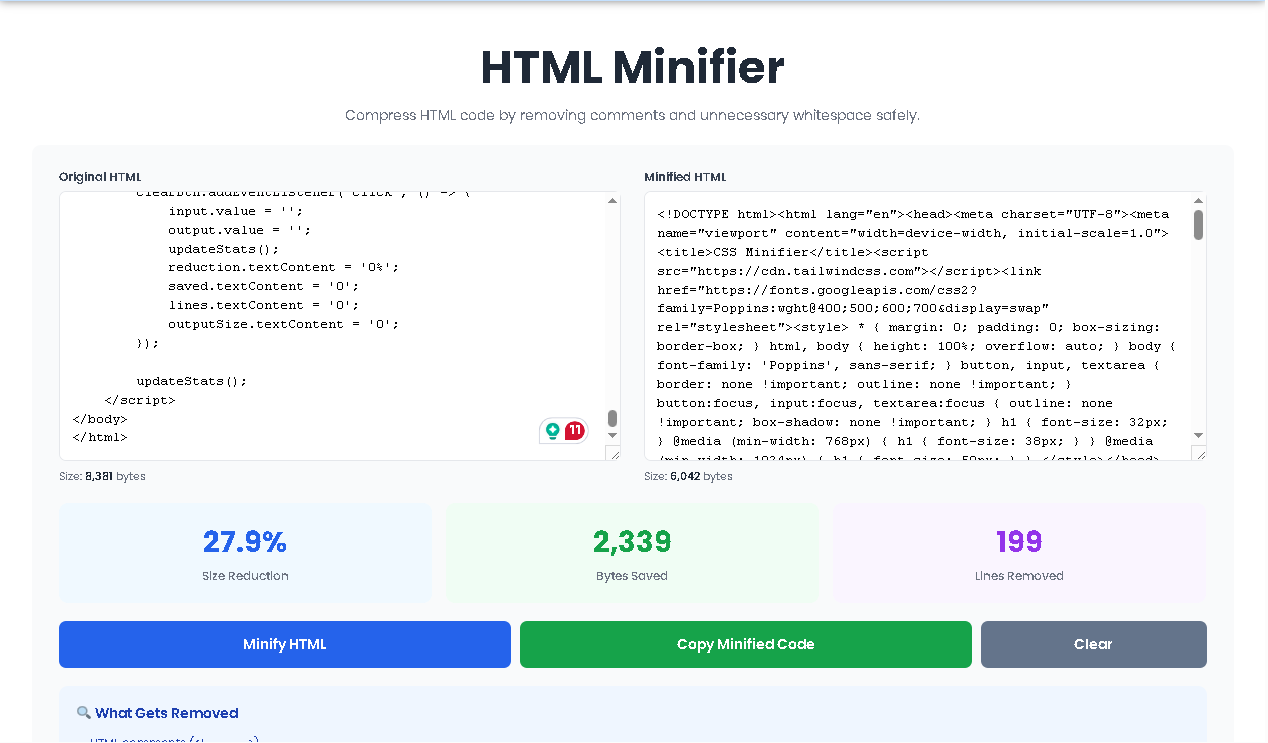
When you land on the HTML Minifier page, you’ll immediately notice a clean, split-screen interface. The left panel is labeled “Original HTML” and features an empty text area where you’ll paste your code. The right panel, labeled “Minified HTML,” displays your compressed output after processing.
Copy your HTML code from your editor or source file and paste it into the left text area. The tool accepts any valid HTML, from small snippets to entire document structures. As soon as you paste or type, you’ll notice the “Size” indicator beneath the input field updates in real-time, showing you exactly how many bytes your original code occupies.
Once your code is in place, click the prominent blue “Minify HTML” button. Behind the scenes, the HTML Minifier immediately processes your code through several cleaning algorithms:
It scans for and removes every HTML comment block
It collapses all unnecessary whitespace between tags
It eliminates extra line breaks and indentation spaces
It trims any leading or trailing whitespace
This entire process happens instantly in your browser—no server uploads, no waiting, no file size limits.
The cleaned code appears automatically in the right panel. But what makes the HTML Minifier particularly useful is the detailed statistics panel that appears below the text areas:
Size Reduction Percentage: See exactly how much smaller your code became
Bytes Saved: A precise count of the bytes eliminated
Lines Removed: How many lines of code were consolidated
These metrics give you tangible proof of your optimization efforts.
With your minified code ready, you have two options:
Click the green “Copy Minified Code” button to instantly copy everything to your clipboard—a green notification confirms success
If you need to start over, the gray “Clear” button resets both panels and all statistics
The entire workflow takes seconds, making it practical to minify HTML files repeatedly as you make changes to your codebase.
Every byte counts when it comes to web performance. By removing comments and unnecessary whitespace, the HTML Minifier reduces the amount of data browsers must download before rendering your page. Smaller files mean faster downloads, which translates directly to improved loading times and better user experiences.
Search engines like Google consider page speed as a ranking factor. Websites that load faster often receive better search engine positions. Using the HTML Minifier gives your site a small but meaningful speed advantage that contributes to your overall SEO strategy.
For high-traffic websites, the bandwidth savings add up quickly. Every unnecessary byte multiplied by thousands or millions of page views represents real server costs. The HTML Minifier helps reduce these expenses by ensuring your HTML files are as lean as possible.
While indentation and comments are essential during development, they have no place in production. The HTML Minifier acts as a bridge between developer-friendly code and browser-optimized code, automatically handling the cleanup so you don’t have to manually strip comments before deployment.
Unlike many minifiers that simply output compressed code, the HTML Minifier provides immediate feedback on your savings. Seeing the exact bytes saved and percentage reduction helps you understand the impact of minification and encourages good optimization habits.
There are no settings to adjust, no options to configure, and no learning curve. Paste, click, copy—the HTML Minifier works perfectly with sensible defaults that match what 99% of users need.
Because everything runs entirely in your browser, your code never leaves your computer. There are no server calls, no data logging, and no privacy concerns. This makes the HTML Minifier safe to use with sensitive or proprietary code.
The HTML Minifier provides three key metrics that deserve explanation:
This number represents the proportion of your original file size that was removed. A 25% reduction means your minified file is three-quarters the size of the original—significant savings from simply removing comments and whitespace.
This absolute number tells you exactly how much data was stripped. While percentages provide context, actual byte counts matter for understanding real-world impact. Saving 5,000 bytes might not sound like much, but on a slow mobile connection, every kilobyte contributes to faster rendering.
HTML files often contain dozens or hundreds of lines during development, with each line representing an indentation level or logical break. After minification, the code compresses into a single line (or far fewer lines). The lines removed metric shows how much vertical space your code occupied versus how compact it became.
To get the most from the HTML Minifier, follow these simple guidelines:
Always maintain your original, well-formatted HTML files with comments and indentation. These are your source files for future editing. Only deploy the minified versions to production.
Make minification part of your deployment workflow. Run every HTML file through the HTML Minifier before uploading to your server or CDN.
HTML minification works best alongside CSS and JavaScript minification. Consider using complementary tools for a comprehensive optimization strategy.
While the HTML Minifier preserves functionality, it’s always wise to test your minified pages in browsers to ensure everything renders as expected.
Yes, the HTML Minifier works with any valid HTML, including HTML5, older doctypes, and even malformed HTML that browsers might still render. The minification process focuses on removing comments and whitespace without validating or correcting your markup structure.
No, the HTML Minifier only affects HTML content. Any JavaScript or CSS embedded within <script> or <style> tags remains completely unchanged. The tool removes whitespace between tags but preserves the actual content inside those tags exactly as written.
Savings vary based on how you write your original code. Heavily commented files with lots of indentation might see 20-40% size reductions. Minimal code with few comments might only save 5-10%. The statistics panel shows your exact savings instantly.
Because the HTML Minifier runs entirely in your browser, the only practical limit is your browser’s memory and processing capabilities. Very large HTML files (hundreds of kilobytes or even megabytes) may take a moment to process, but the tool handles them without artificial restrictions.
Toolota is your all-in-one online tools platform. Fast, simple, and free utilities designed to make everyday digital tasks easier and smarter.
