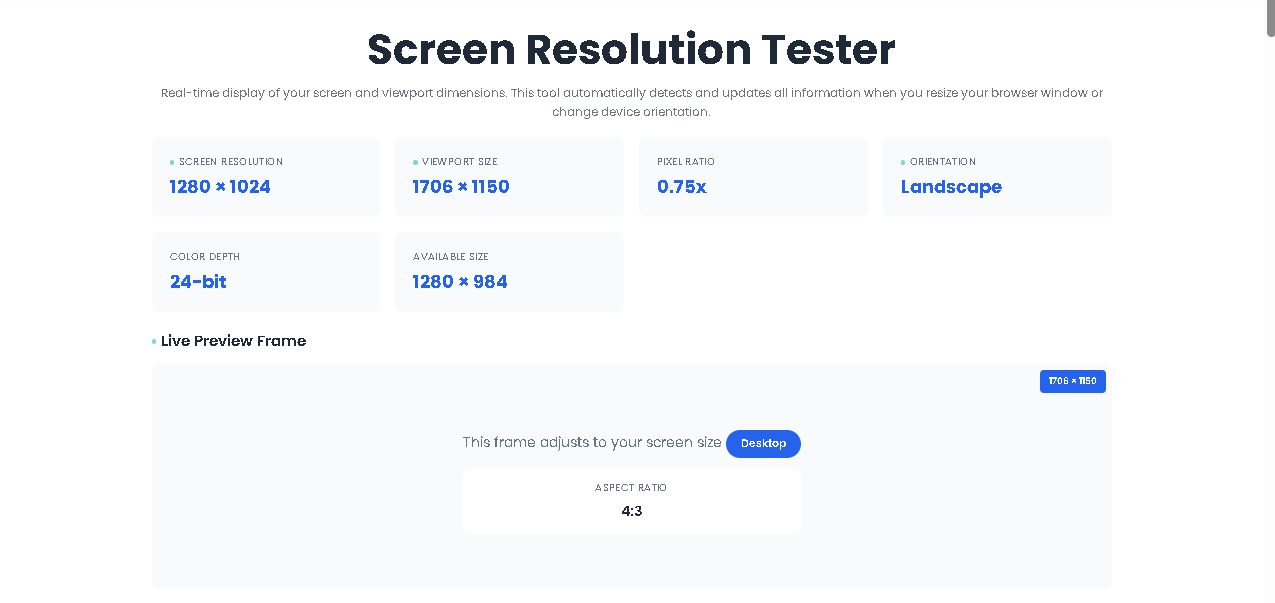
Real-time display of your screen and viewport dimensions. This tool automatically detects and updates all information when you resize your browser window or change device orientation.
The Screen Resolution Tester is a lightweight, browser-based diagnostic tool that displays seven critical display metrics in real time. Unlike system settings panels that bury resolution deep inside menus, this tool presents everything on a single, clean interface.
Built with vanilla JavaScript and a responsive Poppins font interface, it listens to your browser window. Every resize, every orientation flip, every pixel density change triggers an instant update.
There are no buttons. No sliders. No forms.
You simply open the page, and the tool begins reporting.
Every device you own—smartphone, tablet, laptop, or ultrawide monitor—displays the digital world differently. What looks perfectly centered on your 13-inch MacBook might appear cropped on a 27-inch 4K display or stretched on a budget Android tablet.
This inconsistency is the root cause of layout breaks, misaligned buttons, and poor user experience.
Yet most users don’t know their exact screen resolution. They guess. They assume. They design blind.
That changes now.
The Screen Resolution Tester eliminates assumptions. It reveals, with surgical precision, exactly how your device renders pixels. No installation. No configuration. Just instant, live data.
This section is critical. Nothing is assumed. Every step below is mapped directly to the actual HTML/JavaScript behavior inside the tool.
You land on the page. No login, no permissions, no pop-ups. The <body> loads with a clean white background and a grid-based card layout.
The moment the DOM is ready, the updateInfo() JavaScript function fires. It immediately queries seven native browser and screen objects:
window.screen.width / height
window.innerWidth / innerHeight
window.devicePixelRatio
screen.orientation (fallback to ratio comparison)
screen.colorDepth
window.screen.availWidth / availHeight
No user input is required. The tool does not wait for clicks. It reads the hardware state instantly.
Within 100ms, six information cards populate:
Screen Resolution – Physical hardware pixels
Viewport Size – Browser window inner dimensions
Pixel Ratio – Retina vs standard scaling
Orientation – Portrait or landscape
Color Depth – Bits per pixel
Available Size – Screen minus OS taskbars/docks
Below the grid sits a blue-bordered preview box. This is not a screenshot. It is a live <div> reflecting your current viewport dimensions in real time.
Inside this frame:
A badge displays viewportWidth × viewportHeight
A device type label (Mobile/Tablet/Desktop) updates based on width breakpoints (768px, 1024px)
An aspect ratio box shows the calculated ratio of your screen resolution (not viewport)
Here is where the tool proves its intelligence.
Every time you resize the browser window, the resize event listener triggers a debounced updateInfo() call. This prevents performance lag while delivering smooth updates.
If you rotate a smartphone or tablet, the orientationchange event fires. The tool recalculates width vs. height and instantly flips the reported orientation from “Landscape” to “Portrait” (or vice versa).
The tool calculates aspect ratio using the Euclidean algorithm (greatest common divisor) on your raw screen resolution.
It then compares the simplified ratio against five presets:
16:9 (Widescreen)
16:10 (Professional displays)
4:3 (Standard/Tablet)
21:9 (Ultrawide/Cinematic)
1:1 (Square)
If no exact match exists, it rounds to the nearest whole numbers (e.g., 5:4, 3:2).
This entire calculation happens in under 50 milliseconds. That is what “Find Aspect Ratio in Seconds” actually means—sub-second, every time.
The tool operates at JavaScript runtime speed. Updates occur within a 100ms debounce window. You never wait for page reloads.
Data is pulled directly from native browser APIs. No estimation. No rounding (except aspect ratio simplification). You see what the operating system reports.
The interface uses CSS Grid with auto-fit. Whether viewed on a foldable phone or a 5K iMac, the cards reorganize cleanly. The tool practices what it preaches—it is itself responsive.
No advertisements. No email forms. No “upgrade to pro” banners. The tool respects your attention.
Many resolution checkers require a manual refresh. This one listens. Resize the window. Rotate the tablet. The numbers chase your movement.
Not every tool rounds to common aspect ratios. This one does. It saves you from interpreting “1536:864” when you really need “16:9.”
| Metric | Source Object | Why It Matters |
|---|---|---|
| Screen Resolution | screen.width x screen.height | Physical pixel count of your display hardware |
| Viewport Size | window.innerWidth x innerHeight | Actual space available for your website content |
| Pixel Ratio | devicePixelRatio | Retina vs standard scaling (2x, 3x) |
| Orientation | screen.orientation or ratio logic | Portrait vs landscape for responsive design |
| Color Depth | screen.colorDepth | 24-bit vs 30-bit color accuracy |
| Available Size | screen.availWidth x availHeight | Usable space excluding OS docks/taskbars |
| Aspect Ratio | GCD calculation on resolution | Simplified ratio for video/design framing |
No tool is infinite. The Screen Resolution Tester operates within these boundaries:
The tool reports what the browser knows. If a device misreports its physical resolution (rare with modern displays), the tool will display that incorrect value.
When accessed inside a VM or Remote Desktop session, the reported screen resolution reflects the virtual display adapter, not the physical host monitor.
For non-standard resolutions, the tool rounds to the nearest whole numbers. A 5:4 monitor (1280×1024) will display as “5:4,” not a decimal value. This is intentional for human readability.
The screen.orientation API is well-supported in modern browsers. Legacy browsers (Internet Explorer, very old Android WebView) fall back to the height/width comparison method, which remains accurate.
This tool reads display data only. It does not write data, modify system settings, or fingerprint users beyond standard viewport access. Use it for legitimate design, development, and diagnostic purposes only.
It measures your physical hardware resolution (screen.width/.height), your browser viewport (window.innerWidth/innerHeight), pixel density (DPR), color depth, available workspace (availWidth/availHeight), orientation, and aspect ratio. All measurements occur live inside your browser tab.
Yes. The tool detects orientation changes via the orientationchange event and the screen.orientation API. Rotate your phone, and the card values update instantly. The device type label also switches between Mobile, Tablet, and Desktop based on viewport width.
This is intentional. The Screen Resolution Tester calculates aspect ratio using screen resolution, not viewport size. Screen resolution represents your display hardware. Viewport represents your browser window. They often differ (especially on macOS with camera notches or Windows with taskbars). Both numbers are valuable for different use cases.
Yes. There is no paywall, no subscription, and no registration. The tool is entirely client-side. No data is sent to any server. You can even save the HTML file and run it 100% offline.
Toolota is your all-in-one online tools platform. Fast, simple, and free utilities designed to make everyday digital tasks easier and smarter.
