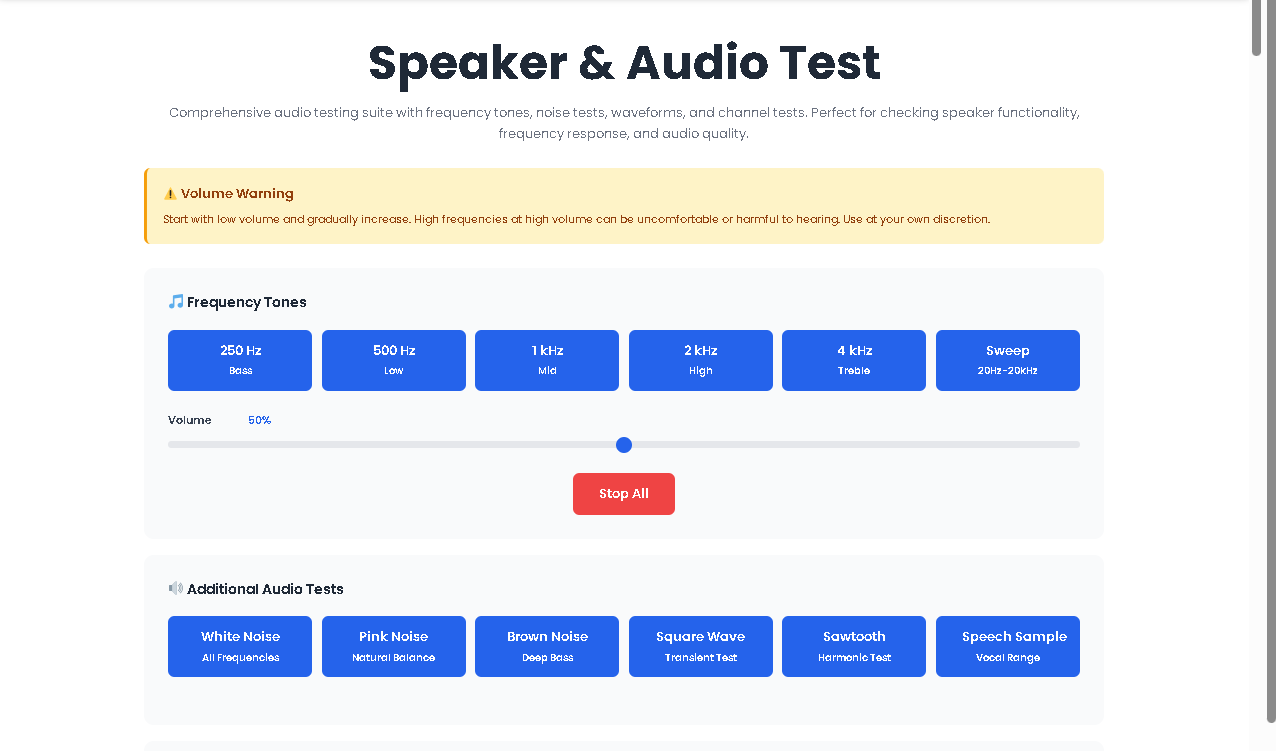
Comprehensive audio testing suite with frequency tones, noise tests, waveforms, and channel tests. Perfect for checking speaker functionality, frequency response, and audio quality.
We have all been there. You plug in a new pair of speakers, turn on your favorite song, and something just feels… off. Maybe the left channel is quieter. Maybe the bass sounds muddy, or the highs are piercing.
Relying solely on music to diagnose audio hardware is like using a Swiss Army knife to build a house. It works, but it is inefficient and inaccurate. Music is mastered with compression, reverb, and artistic EQ curves. It hides distortion rather than revealing it.
This is precisely why a dedicated Speaker & Audio Test is essential. It removes the guesswork. Instead of wondering if your subwoofer is underperforming, you feed it a pure 250Hz tone. Instead of guessing if your tweeter is blown, you listen to a 4kHz sine wave.
Toolota has built one of the cleanest, most browser-native versions of this tool available. It requires no installation, no sign-ups, and no credit card. It is just you, your speakers, and science.
This tool is not just for audiophiles with thousand-dollar headphones. It solves real problems for real people.
1. IT Professionals & System Administrators
When deploying 50 workstations, you cannot listen to a song on each one. A quick sweep using this Speaker & Audio Test verifies hardware functionality in under 30 seconds.
2. Content Creators & Podcasters
If your microphone sounds great but your monitor speakers have a frequency null at 1kHz, you will over-EQ your voice and ruin the mix. This test calibrates your listening environment.
3. Gamers
Competitive shooters rely on footsteps. If your right channel is 3dB quieter than your left, you are at a disadvantage. The channel test confirms perfect balance.
4. General Consumers
Bought a used speaker on Facebook Marketplace? Run this Speaker & Audio Test immediately. A blown driver is immediately obvious with a square wave test.
To get the most accurate results, follow this workflow in the exact order presented. Skipping steps may lead to incorrect diagnosis or discomfort.
Turn your physical speaker knobs to 20%.
Locate the Volume Slider in the interface (default is 50%).
Slide it down to 10%. This is non-negotiable. The 4kHz tone at high volume is genuinely painful and can damage cheap tweeters.
Click 250 Hz. Listen for bass resonance and cabinet rattle.
Click 500 Hz. This is the low-mid range. Should feel warm, not boxy.
Click 1000 Hz. The heart of vocal range. Should be clear.
Click 2000 Hz. Presence range. Harshness here indicates a peak.
Click 4000 Hz. Treble clarity. If this is silent, your tweeter may be dead.
Click Sweep. The tool will glide from 20Hz to 20,000Hz over 10 seconds. Listen for sudden drops in volume—these are frequency nulls.
White Noise: Tests overall system linearity. Sounds like static.
Pink Noise: Equal energy per octave. Sounds balanced. Great for room EQ.
Brown Noise: Deep rumbling. Tests subwoofer extension.
Square Wave: Contains odd harmonics. Excellent for detecting transient distortion.
Sawtooth Wave: Contains even and odd harmonics. Tests harmonic accuracy.
Speech Sample: Simulates the human voice using formant synthesis (200Hz fundamental + harmonics).
Click Test Left. You should hear sound exclusively from the left speaker.
Click Test Right. You should hear sound exclusively from the right speaker.
If you hear sound from both sides during these tests, your balance is off, or your cable is wired incorrectly.
Always click Stop All when finished. This clears the AudioContext and prevents background tabs from consuming resources.
✅ Speed & Accuracy
Results are instant. There is no buffering. The sweep takes exactly 10 seconds. The channel test lasts 3 seconds.
✅ Browser-Based Convenience
No software installation. No administrator privileges required. Works on Chromebooks, Windows, macOS, Linux, and Android.
✅ Clean UI/UX
The interface uses a dedicated #audio-test-app wrapper. This prevents CSS conflicts with platforms like Elementor. Buttons are large, tactile, and clearly labeled.
✅ Hardware Safety
Unlike random YouTube test tones, this Speaker & Audio Test starts with a volume warning and allows granular 0-100% gain control. You are in charge of the volume, not an advertisement.
✅ No Data Collection
All audio synthesis happens locally. Your hardware data never leaves your machine.
To truly master this Speaker & Audio Test, you must understand what you are listening for.
Sine Waves (Pure Tones)
These are the simplest sounds. No harmonics. If a sine wave sounds distorted or fuzzy on your speaker, the driver is physically damaged or the amplifier is clipping. A clean sine wave should sound smooth and boring.
Frequency Ranges Explained:
20Hz – 60Hz (Sub-bass): You feel this more than you hear it. If your speakers cannot reproduce 60Hz, you are missing the punch of a kick drum.
60Hz – 250Hz (Bass): The warmth of music. Too much here sounds muddy.
250Hz – 2000Hz (Midrange): Vocals, guitars, and pianos live here. This Speaker & Audio Test emphasizes this area because it is where human hearing is most sensitive.
2000Hz – 6000Hz (Presence): Consonants and attack. If this range is recessed, vocals sound distant.
6000Hz – 20000Hz (Brilliance): Air and sparkle. Most people over 25 cannot hear above 16kHz. That is normal.
Noise Colors:
White: Equal energy per Hertz. Sounds aggressive.
Pink: Equal energy per Octave. Sounds smooth.
Brown: Energy drops 6dB per octave. Sounds like a jet engine or heavy rain.
While this Speaker & Audio Test is powerful, it has constraints based on the actual HTML/JavaScript code analyzed.
1. No Visual Graphing
The current version of this tool does not include a spectrum analyzer or oscilloscope. It is purely auditory. You must trust your ears. If you need visual confirmation of frequency response, you require an RTA (Real-Time Analyzer) app.
2. Browser Dependency
The Web Audio API is standard, but specific implementations vary. Some older versions of Safari may have slightly higher latency. Always test in an up-to-date browser.
3. Output Quality Depends on Hardware
This Speaker & Audio Test is only as good as your Digital-to-Analog Converter (DAC). If your sound card is low-quality, the sine wave may contain harmonic distortion. This is not the tool’s fault.
4. No Illegal or Harmful Use
This tool is designed for diagnosis. Do not use high-volume frequencies to intentionally damage equipment or disturb others. You accept full responsibility for your volume levels.
5. Manual Review Required
The “Speech Sample” is a synthesized approximation of voice. It is not a recording of a human. It is useful for testing formant response, but it does not simulate sibilance or plosives accurately.
Music is mastered with compression and dynamic range reduction. A record producer may have intentionally boosted the 200Hz region to make a bass guitar sound “fat.” This masks speaker flaws. A Speaker & Audio Test uses mathematically pure tones. If a speaker distorts on a 1kHz sine wave, it is objectively defective, regardless of how it handles music.
Click the 250 Hz button. If you hear sound clearly, your subwoofer is working. However, subwoofers specialize in lower frequencies. Click the Brown Noise button. If you feel air movement or a deep rumble, the driver is active. For a true test, use the Sweep function and listen specifically between 20Hz and 80Hz.
Crackling during a pure sine wave test indicates mechanical damage or debris on the speaker cone. It can also indicate that the amplifier is being pushed beyond its clean power limit. Lower the volume immediately. If the crackling persists at low volume, the voice coil may be scraped or the surround may be torn.
No. This is strictly a diagnostic tool, not a repair tool. It identifies symptoms (no right channel, no bass, distortion) but does not install drivers or change system settings. If the test reveals an issue, you must address it through your operating system’s audio settings, cable replacement, or hardware repair.
Toolota is your all-in-one online tools platform. Fast, simple, and free utilities designed to make everyday digital tasks easier and smarter.