
Text Similarity Analyzer
Compare two texts and discover their similarity percentage based on word overlap and content analysis.
Similarity Score
0%
0
Common Words
0
Unique to A
0
Unique to B
0
Total Words
Compare two texts and discover their similarity percentage based on word overlap and content analysis.
Similarity Score
0%
0
Common Words
0
Unique to A
0
Unique to B
0
Total Words
In the digital age, where content is king, ensuring the uniqueness and originality of your writing is paramount. Whether you’re a student verifying the originality of an essay, a blogger checking for accidental self-plagiarism, or an SEO specialist analyzing competitor content, having a reliable tool to measure textual overlap is essential. This is where Text Similarity Analyzer comes in.
Toolota‘s Text Similarity Analyzer is a sophisticated, yet remarkably user-friendly, web-based application designed to compare two pieces of text and calculate their degree of similarity. It goes beyond a simple word-for-word match by employing the Jaccard similarity coefficient—a proven statistical method—to provide a precise percentage score. This tool instantly identifies shared vocabulary, highlights words unique to each text, and delivers clear, actionable insights, all within a clean, intuitive interface. It’s your instant detective for uncovering content matches, powered by intelligent algorithms right in your browser.
The versatility of the Text Similarity Analyzer makes it a valuable asset for a wide range of professionals and individuals:
Students & Academics: Perfect for checking essays, research papers, and theses for potential plagiarism or improper citation before submission.
Content Writers & Bloggers: Essential for ensuring blog posts, articles, and marketing copy are original and to avoid duplicate content penalties from search engines.
SEO Specialists & Digital Marketers: Analyze competitor content, audit website pages for internal duplication, and optimize content for uniqueness to improve search rankings.
Editors & Proofreaders: Quickly compare different drafts of a document to track changes in wording and thematic consistency.
Researchers & Journalists: Useful for comparing source materials, verifying quotes, and analyzing language patterns across different documents.
Using the tool is intentionally simple. Follow these steps to perform a complete analysis:
Navigate to the Tool: Go to the Text Similarity Analyzer page on the Toolota website.
Input Your First Text (Text A): Locate the first text box labeled “Text A.” Click inside it and paste or type the first document, paragraph, or text snippet you wish to analyze. This could be your original article, a student’s submission, or a competitor’s webpage content.
Input Your Second Text (Text B): Directly below, find the “Text B” text box. Enter the second text you want to compare against the first.
Initiate the Comparison: With both texts entered, click the prominent blue “Compare Texts” button. The tool will now process your input.
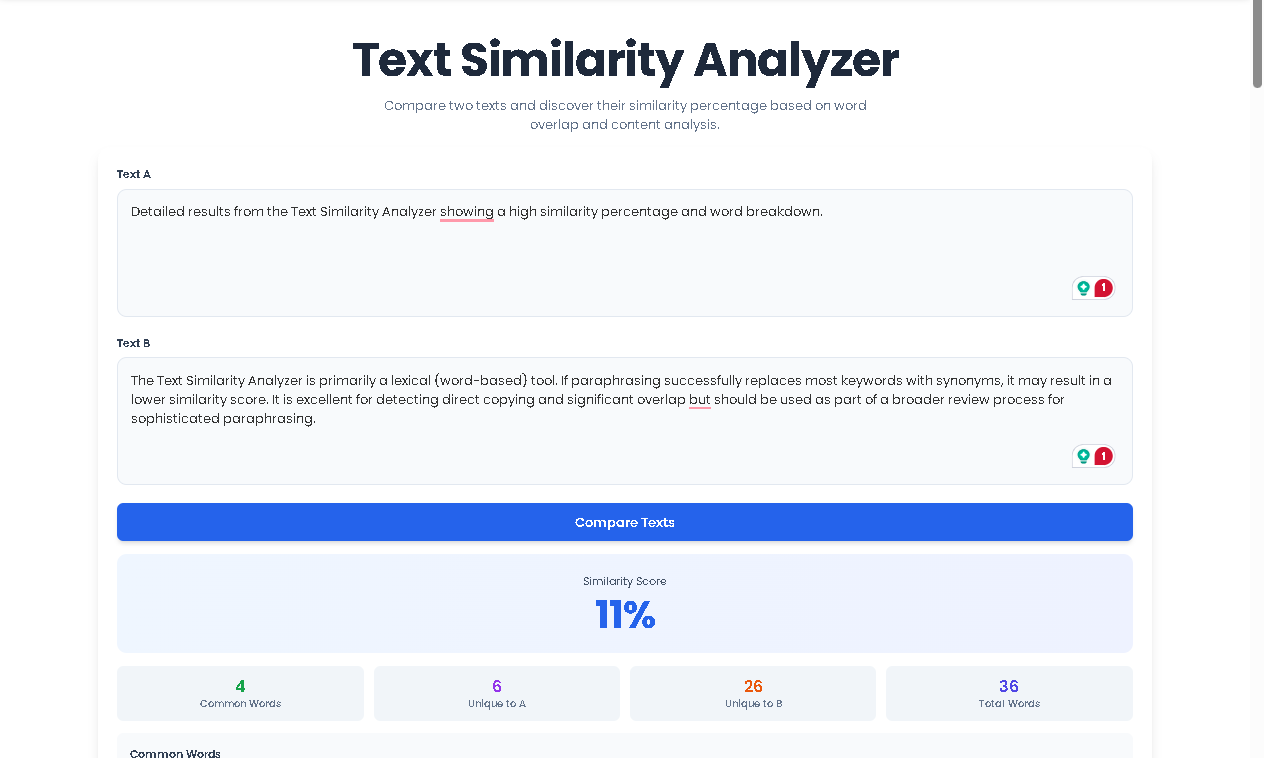
Review the Results Panel: Instantly, a new results section will appear below the button. This panel contains all the calculated data from the Text Similarity Analyzer.
Analyze the Output: Examine the key metrics:
The large, central Similarity Score (e.g., “65%”) gives you the overall match percentage.
The statistical boxes show counts for Common Words, Unique to A, Unique to B, and Total Unique Words.
The Common Words List displays the actual shared terms as interactive badges.
The Explanation paragraph summarizes the findings in plain English.
Image Suggestion 1: A screenshot of the Text Similarity Analyzer interface with two filled text areas and the “Compare Texts” button highlighted.
Alt Text: Toolota Text Similarity Analyzer interface ready for comparing two text documents.
Choosing Toolota‘s Text Similarity Analyzer offers distinct advantages that streamline your workflow and enhance accuracy:
Lightning-Fast & Real-Time Analysis: Get your similarity results in mere seconds. Simply paste your texts and click “Compare”—no lengthy uploads or processing waits.
High Accuracy with Jaccard Similarity: We move beyond basic matching. Our tool uses the Jaccard index, which compares the sets of unique words, providing a mathematically robust and meaningful similarity percentage that truly reflects content overlap.
SEO-Optimized Content Creation: Directly supports SEO efforts by helping you create unique content that stands out to search engines, a critical factor for ranking.
Clean, Distraction-Free User Interface: Built with a focus on user experience (UX), the tool features a minimalist design that makes the process straightforward, even for first-time users.
Detailed, Actionable Breakdown: Receive more than just a percentage. The tool breaks down the why behind the score with counts of common words, words unique to each text, and a visual list of shared terms.
Complete Data Privacy: Since all processing happens locally in your web browser, your sensitive texts are never sent to or stored on any external server.
Interpreting the output correctly is crucial for taking the right action.
The Similarity Percentage: This is the Jaccard similarity score. A 0% means no unique words are shared, while 100% indicates identical vocabulary sets (excluding common stopwords like “the,” “is,” etc.). A score between 10-30% might indicate thematic similarity, while scores above 50% suggest significant overlap that may require review.
Common Words Count: This number shows how many distinct, non-trivial words appear in both texts. A high count here directly contributes to a higher similarity score.
Unique Words to A/B: These metrics are incredibly valuable. They show you what each text brings to the table independently. For writers, this highlights your original contributions. For editors, it shows what was added or removed between versions.
Total Unique Words: This represents the size of the combined vocabulary universe of both texts, which is the denominator in the Jaccard calculation.
The Common Words List: Scanning this list helps you understand the nature of the overlap. Are they generic topic words, or unique technical terms? This qualitative insight complements the quantitative score.
To ensure you get the most accurate and useful results from the Text Similarity Analyzer, please consider:
Input Quality Determines Output: The analysis is based on the text you provide. Ensure copied text is clean and complete for a representative score.
Stopwords Are Filtered: Common function words (e.g., “the,” “and,” “in”) are automatically ignored, focusing the analysis on meaningful, content-bearing words.
Context is Key: The tool analyzes word overlap, not semantic meaning or paraphrasing. Two texts with different sentences but the same keywords will show similarity.
For Legal & Ethical Use: This tool is designed to aid in originality checking and content improvement. It must not be used for unethical plagiarism or to infringe on copyrights.
The Text Similarity Analyzer measures lexical overlap using the Jaccard similarity coefficient. It compares the sets of unique, meaningful words (excluding common stopwords) from two texts and calculates what percentage of the combined vocabulary is shared. It provides a statistical measure of word-for-word similarity.
A high similarity score indicates a significant overlap in vocabulary. For students, it may flag potential plagiarism. For content creators, it could mean duplicate content issues for SEO. However, context matters—some shared terminology is expected in technical fields. Use the “Common Words List” to see if the overlap is in generic or specific terms.
Absolutely. Toolota‘s Text Similarity Analyzer is a client-side tool. All calculations are performed directly within your own web browser. The text you paste is never uploaded to our servers or stored anywhere, guaranteeing complete privacy and security for your documents.
The Text Similarity Analyzer is primarily a lexical (word-based) tool. If paraphrasing successfully replaces most keywords with synonyms, it may result in a lower similarity score. It is excellent for detecting direct copying and significant overlap but should be used as part of a broader review process for sophisticated paraphrasing.
Toolota is your all-in-one online tools platform. Fast, simple, and free utilities designed to make everyday digital tasks easier and smarter.