Text Readability Analyzer – Readability Checker | Toolota
Table of Contents
What This Tool Does
In today’s digital landscape, clear communication is paramount. Whether you’re crafting a blog post, an academic paper, a business report, or web copy, your message must be accessible to your intended audience. This is where the Text Readability Analyzer from Toolota becomes an indispensable tool. It is a free, web-based application designed to instantly evaluate how easy or difficult a piece of text is to read.
At its core, the Text Readability Analyzer uses the renowned Flesch Reading Ease test, a reliable and widely accepted formula developed by Rudolf Flesch. The tool goes beyond a simple score; it provides a comprehensive breakdown of your writing’s structure. By analyzing factors like sentence length and word complexity, it gives you actionable data to refine your content, ensuring it resonates with readers and meets your communication goals, whether that’s educating, persuading, or informing.
Who Choose Toolota
The Text Readability Analyzer serves a diverse range of users who rely on clear written communication:
Content Writers & Bloggers: To ensure posts are engaging and accessible to their target readership, improving dwell time and SEO.
SEO Specialists & Digital Marketers: To optimize website copy and landing pages for both user experience and search engine algorithms that favor readable content.
Educators & Students: To check the appropriateness of teaching materials or to refine essays and theses for clarity.
Editors & Proofreaders: To provide data-driven feedback to writers, moving beyond subjective opinions about “clunky” text.
Business Professionals: To craft reports, emails, and proposals that are persuasive and easy for colleagues, clients, or stakeholders to understand.
Non-Native English Speakers: To gauge the complexity of their writing and ensure it aligns with their intended communication level.
How This Tool Works: The Most Detailed Section
Using the Text Readability Analyzer is a straightforward, three-step process. You don’t need to sign up, download software, or have any technical expertise. The entire analysis happens in real-time within your web browser.
Step 1: Input Your Text
Navigate to the Text Readability Analyzer page. You will see a large, clearly marked text box with the placeholder text, “Paste your text here to analyze its readability…” Simply click inside this box and paste (or type) the content you wish to analyze. There is no character limit, making it suitable for everything from short paragraphs to lengthy articles.
Step 2: Initiate the Analysis
Once your text is in place, click the prominent blue “Analyze Readability” button. The tool’s JavaScript engine will immediately process your input. It begins by segmenting your text into sentences (using periods, exclamation points, and question marks as boundaries) and then into individual words. It then performs a syllable-counting algorithm on each word to assess complexity.
Step 3: Review Your Detailed Results
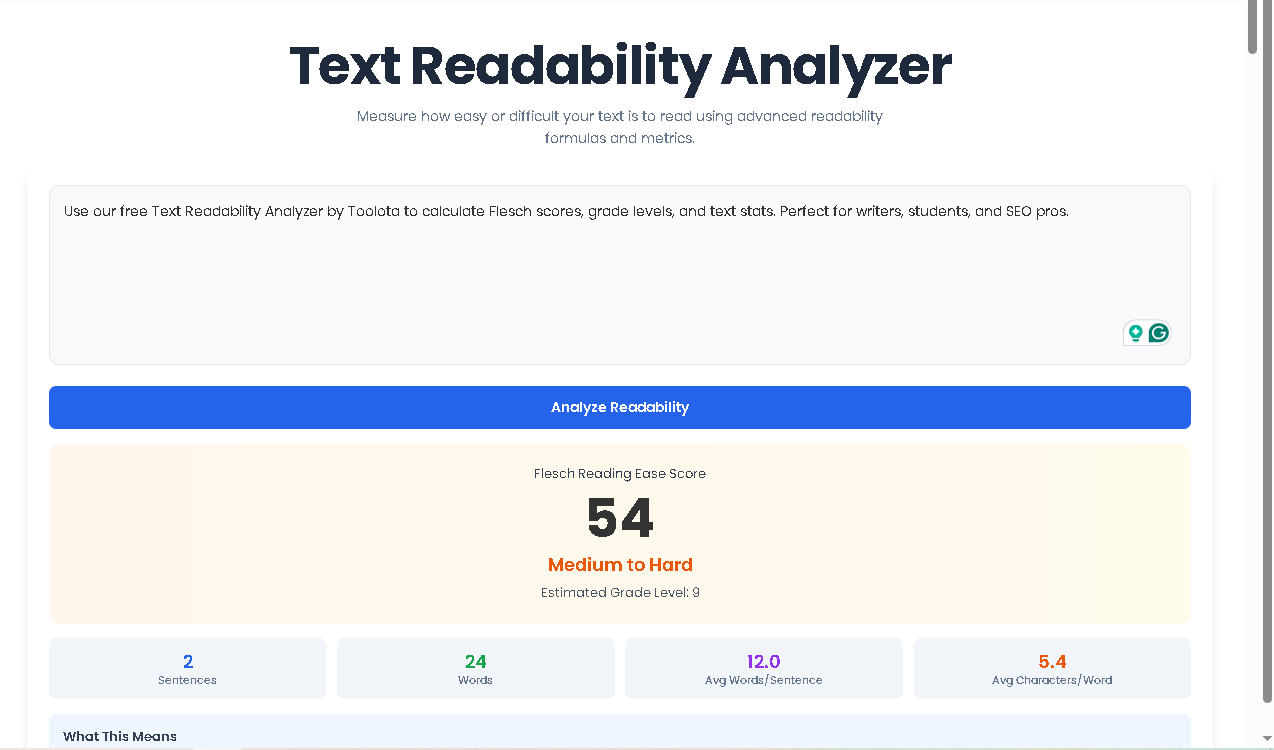
Instantly, the results section will appear below the button. The analysis is presented in a clean, visually organized dashboard:
The Score Card: The most prominent feature displays your Flesch Reading Ease Score as a large number (0-100). The card’s background color shifts from green to red based on difficulty, providing an immediate visual cue.
Difficulty & Grade Level: Directly below the score, you’ll see the plain-English difficulty level (e.g., “Very Easy” or “Medium to Hard”) and an estimated U.S. grade level.
Text Statistics: A four-panel grid shows key metrics: total sentences, total words, average words per sentence, and average characters per word.
Practical Explanation: A brief paragraph explains what your score means for your audience.
Readability Scale: A handy reference guide correlates score ranges with difficulty levels and colors.
Image Suggestion 2: A side-by-side visual showing Step 1 (text pasted in box), Step 2 (mouse clicking the analyze button), and Step 3 (the results panel displayed).
Benefits This Tools
Choosing the Text Readability Analyzer from Toolota offers distinct advantages:
Instant Speed & Ease: Get a comprehensive readability report in less than a second with a single click. No configuration or learning curve is required.
Actionable Accuracy: Based on the proven Flesch formula, it provides reliable, standardized metrics you can trust to guide your revisions.
SEO Optimization: Search engines like Google prioritize content that offers a good user experience, which includes readability. Using this tool can indirectly support your SEO efforts.
Clean, Intuitive UI/UX: The interface is distraction-free, with clear visual cues (like color-coded scores) that make interpretation effortless.
Completely Free & Accessible: There are no hidden fees, account requirements, or usage limits. It’s a public tool designed to help anyone improve their writing.
Understanding Your Text Readability Results
The power of the Text Readability Analyzer lies in interpreting its outputs correctly. Let’s break down what each result means and how you can use it.
The Flesch Reading Ease Score (0-100):
This is the primary metric. A higher score indicates easier reading.
90-100 (Very Easy, Green): Ideal for children’s literature or very broad audiences. Sentences are short, and words are common.
60-89 (Easy to Medium, Blue): The sweet spot for most general content, like popular blogs, news articles, and marketing copy. Accessible to a wide audience, including teens and adults.
30-59 (Medium to Hard, Orange): Common in academic journals, technical papers, and some professional publications. Suitable for college-educated or specialist readers.
0-29 (Very Hard, Red): Extremely dense text, often found in legal documents, advanced scientific research, or complex philosophical works.
The Supporting Metrics:
Sentences & Words: Your total counts. A very low sentence count for a long passage suggests overly long, complex sentences.
Avg Words/Sentence: This is a key driver of the Flesch score. Aim for an average between 15-20 words for standard content. Numbers consistently above 25 often signal difficult reading.
Avg Characters/Word: This approximates word complexity. A lower average (e.g., 4.5) suggests simpler vocabulary, while a higher average (e.g., 6.5) indicates more complex, multi-syllabic words.
By cross-referencing your score with these stats, you can diagnose issues. A low score with a high “Avg Words/Sentence” suggests you should break up long sentences. A low score with a high “Avg Characters/Word” suggests simplifying your vocabulary
Important Conditions & Guidelines for Use
To get the most accurate and useful results from the Text Readability Analyzer, please consider:
Input Quality Dictates Output: The analysis is algorithmic. It works best with complete sentences and proper punctuation. Lists, bullet points, or fragmented notes may yield less meaningful scores.
A Tool for Guidance, Not Absolute Truth: The Flesch score is a powerful indicator, not a final grade. Use it to identify potential problem areas, but always apply human judgment and consider your specific audience’s needs.
Review AI-Generated Content: If analyzing text created by AI writing assistants, a manual review for nuance, tone, and factual accuracy is still essential. This tool checks readability, not content quality.
Intended Use: The Text Readability Analyzer is designed for constructive purposes to improve communication. It should not be used to devalue or misrepresent others’ work.
Frequently Asked Questions (FAQ)