
Loan Calculator
Plan your finances with precision. Calculate monthly payments and total interest costs instantly.
Plan your finances with precision. Calculate monthly payments and total interest costs instantly.
$0
Monthly EMI
$0
Total Payable
$0
Total Interest
0
Total Months
Being able to really nail your financial future is like having a superpower. Every time you make a successful budget, a smart investment, or put together a great content plan, it all begins with knowing the numbers inside and out. Whether you’re someone who creates financial content and needs exact figures for your work, or you’re just trying to map out a personal budget, having the right loan payment calculator is super important. This handy Toolota loan payment calculator is made to give you quick, precise, and complete details on how your loan will be paid off, all in just three simple steps.
When you borrow money—whether it’s for a home, a car, or personal needs—the single most important figure to understand is your Equated Monthly Installment (EMI). This is a fixed amount you pay to your lender every month on a specific date, covering both the original amount you borrowed and the interest they charge. Without knowing this payment, planning your finances for the future becomes really tough. That’s why having a reliable loan payment calculator is so helpful.
What This Tool Does
This handy Loan payment calculator, from Toolota, is designed to give you a super quick EMI calculation. It just needs three key details from any loan—the total amount you’re borrowing, the yearly interest rate, and how long you’ll take to pay it back—and it instantly gives you your exact monthly payment (the EMI). It doesn’t stop there, though. It also shows you exactly how much interest you’ll pay over the whole loan period and the final total you’ll need to pay back. It really takes the guesswork out of borrowing, turning complicated math into something simple and clear.
How It Works
The calculator uses a standard formula that’s accepted everywhere for figuring out loan payments, called the EMI formula. It’s based on the reducing balance method, which means it calculates how much of your payment goes to interest and how much reduces the amount you owe each month:
EMI = P × [(1 + R)^N – 1] / [R × (1 + R)^N]
Where:
P = The total amount you borrowed (the principal)
R = The monthly interest rate (you get this by dividing the yearly rate by 1200)
N = The total number of months you’ll be paying the loan back
By using this formula, the tool makes sure the results it gives you are accurate. It takes into account how interest builds up over time (compound interest) and how each payment you make gradually reduces what you owe.
Who Can Benefit From It
This handy loan payment calculator is ideal for anyone thinking about taking out a loan.
Individuals: Before you even apply, you can easily check if a loan fits your budget and play around with different options (like comparing a 5-year loan to a 7-year one).
Financial Content Creators: If you write about money matters, real estate, or car loans, you need accurate examples that you can back up. This tool lets you whip up precise numbers for your articles in seconds.
Budget Planners: Making sure a loan payment fits into your monthly budget is key. This tool gives you the exact amount you need to manage your cash flow accurately.
What Issues It Solves
The Toolota loan payment calculator does away with the mistakes that can happen when calculating manually, gives you instant comparisons between different loan deals, and helps you see how things like interest rate changes or longer payment periods affect your total costs. It clears up any confusion about finances before you commit to something big.
Toolota is best known for creating top-notch content creation tools, but our dedication to precision and user satisfaction is a core part of everything we do. Our loan payment calculator is a great example of this, offering a financial tool that’s designed with the modern, efficient user in mind.
Reliability and Accuracy
The way our calculator works is carefully crafted to follow standard financial rules, so you get error-free results every single time (just check out the `calculateEMI` function in the source code if you want to see how it’s done). We use the standard reducing balance method to give you the most accurate picture of what your loan payments will really be.
Speed and Clean UI
When it comes to Toolota, speed matters. Our calculator gives you the results instantly after you fill in the details, thanks to some optimized JavaScript. The design is clean, modern, and straightforward (we use Tailwind CSS for the visuals), focusing only on what you need to input and the key results. This simple layout and easy navigation really stand out, making it super easy and stress-free to figure out your EMI.
Even though it’s basically a simple loan payment calculator, this tool has some nice touches:
Confirmation Message: When your calculation is done, a little message pops up to let you know everything went through okay.
Press Enter to Calculate: After you’ve entered all the numbers, you can just hit the ‘Enter’ key to get your results. It makes things quicker and easier.
Starts Ready for You: The calculator automatically puts the cursor in the ‘Loan Amount’ box when you open it, so you can just start typing right away. It’s a small thing, but it saves time for anyone using it a lot.
After examining the HTML and JavaScript behind the Toolota loan calculator (loan_calculator.html), it’s clear that the tool operates using three key input fields and a strong calculation engine. This loan payment calculator keeps things straightforward with its P-R-N approach, making it a handy 3-step solution.
Step 1: Loan Amount Input (The Principal, P)
To start using the Toolota loan calculator, you’ll first enter the loan amount into the field labeled loanAmountInput (you can spot this in the code by its ID). This is where you put the principal amount—basically, the total you plan to borrow. The calculator makes sure this number is neatly formatted so it’s easy to read. Then, the calculateEMI function grabs this value (loanAmount) and uses it as the Principal (P) in the EMI formula.
Step 2: Interest Rate Input (The Rate, R)
After that, you’ll input the annual interest rate into the interestRateInput field. This shows how much borrowing costs, given as a percentage. Here’s an important detail: the calculator’s JavaScript engine doesn’t use the annual rate as-is. Inside the calculateEMI function, it does a little conversion:
This part makes sure the yearly interest rate is changed into a monthly interest rate in decimal form (R), which is important for figuring out the exact monthly payment amount (EMI) when payments are made every month.
Step 3: Loan Duration Input (The Number of Payments, N)
The third and last piece of information needed is the loanTenureInput. This tells us how many months it will take to pay back the entire loan. This is the N (total number of payments) used in the EMI formula. Loans that take longer to pay off usually have smaller monthly payments, but you end up paying more interest overall.
The Calculate Button
The main action happens when you click the calculateBtn. The code waits for this click (using calculateBtn.addEventListener(‘click’, calculateEMI)) to start the whole calculation. The tool is also made to be fast. It automatically detects when you press the ‘Enter’ key in any of the three input fields, so you can get your results quickly without needing to use the mouse.
How the EMI is Calculated
After all the numbers are entered, the calculateEMI function does the math:
Calculating the EMI:
It figures out the monthlyEMI using the formula we discussed.
Working Out the Total Cost:
It calculates the totalAmountPayable (by multiplying the EMI by the number of months) and then finds out how much interest you’ll pay in total (totalInterestPayable) by taking the original loan amount away from the total amount you’ll pay back.
Output Summary & Key Metrics
The calculation results pop up right where you can see them, in the designated output area, using the loanSummary and resultsContainer sections. You’ll see your key financial details right away:
Monthly Payment (EMI): This is the exact fixed amount you’ll need to pay each month (summaryEMI).
Total Interest Payable: This shows the full amount of interest you’ll pay over the life of the loan (summaryTotalInterest).
Total Amount Payable: This is the grand total, combining your original loan amount and all the interest (summaryTotalAmount).
All these numbers are neatly formatted using the formatCurrency function, making them super easy to read and understand. This gives you complete clarity on the full financial commitment you’re looking at. The results section smoothly transitions from hidden to fully visible, giving you a seamless experience. And if you want to start over, the resetBtn lets you clear all your inputs and hide the results instantly, so you can run a new loan payment calculation right away.
Using a top-notch loan payment calculator, like the one Toolota provides, really helps you manage your money better and make smarter choices.
Accuracy and Speed You Can Count On
The biggest win here is avoiding mistakes that humans often make. Trying to figure out compound interest by hand is not only slow but also super easy to mess up, and those errors can cost you a lot of money over the life of a loan. Our calculator gives you spot-on results instantly. If you create content, this means you can quickly get accurate, trustworthy numbers for your financial guides or articles, which saves you loads of time.
Boosting Your Content’s Credibility
Using precise financial tools is key to building authority and trust in your content. When you base your articles on the results from a reliable loan payment calculator, you naturally make your work look more professional and expert. This really helps with how well your content performs in search engines and meets important standards like E-E-A-T.
Comparing Different Scenarios Effortlessly
It’s so simple to use that it encourages you to play around with the numbers. You can easily change the loan length or interest rate to see how different loan offers stack up side-by-side. This lets you pick the most wallet-friendly option before you sign on the dotted line.
Super Easy to Use
The clean design, built with modern web tech, means anyone can use this loan payment calculator effectively, no matter how much they know about finance. The whole process is straightforward and doesn’t require any complicated setup or special knowledge.
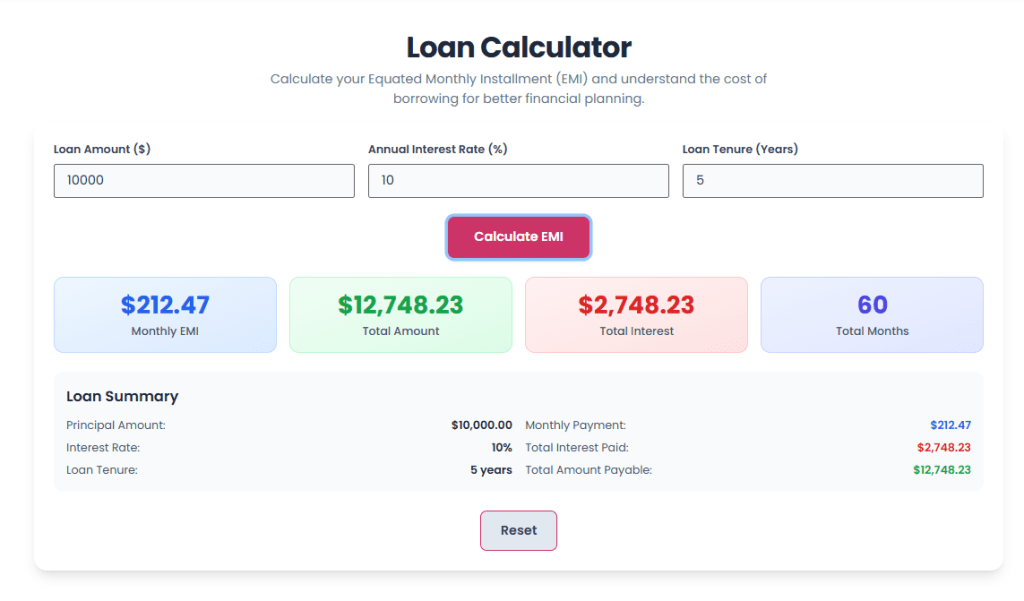
The Toyota loan payment calculator is a great tool for getting accurate results, but remember, the numbers it gives you are only as good as the information you put into it. The final output hinges completely on the quality and details of your input.
Quality of Input Matters: The accuracy of your results is directly tied to the figures you enter for the loan amount (Principal), the interest rate, and the loan term (Tenure). It’s really important to use the most current and confirmed numbers from your lender.
These Are Estimates, Not Guarantees: Keep in mind that the figures generated are just estimates. They don’t automatically include things like potential lender fees, insurance costs, processing charges, penalties for paying off the loan early, or changes if you have a variable interest rate. Always double-check your final loan agreement and talk to a qualified financial advisor.
Fixed Rate Assumption: The calculator works on the assumption that your interest rate is fixed. If your loan actually has an interest rate that can change, your actual monthly payment (EMI) will likely change too. You’ll need to use the calculator again whenever the interest rate adjusts.
Simple Steps to Use It: To get the calculator working, just make sure you fill in all three required fields – the loan amount (P), the interest rate (R), and the loan term (N) – with valid, positive numbers.
The Toolota loan payment calculator utilizes the exact mathematical formula for Equated Monthly Installment (EMI) on a reducing balance basis, instantly converting the annual interest rate to a monthly rate and factoring in compounding over the entire tenure (N). This process eliminates the complexity, time, and potential errors associated with performing the multi-step calculation manually or using basic spreadsheet functions. It provides immediate, error-free results, including a clear breakdown of the total interest paid.
As analyzed in the tool’s underlying script, the loan payment calculator requires three primary variables to compute the EMI and total payment: the Loan Amount (Principal), the Annual Interest Rate (as a percentage), and the Loan Tenure (in months). These three inputs—P, R, and N—are the only pieces of data needed for the calculation engine to run and generate a comprehensive summary of your monthly commitment and total cost.
Yes, the Toolota loan payment calculator is an ideal tool for comparative analysis. Since it is fast and requires minimal input, you can quickly run multiple simulations. For example, you can calculate the EMI for one bank offering 8% interest over 60 months, and then immediately calculate a competing offer of 7.5% over 72 months. This comparison reveals which option offers the best balance of monthly payment versus total interest paid, allowing you to make a financially sound choice.
The increase in total interest payable is a direct result of compounding interest over a longer period. While extending the loan tenure (N) lowers your monthly Equated Monthly Installment (EMI), it allows the interest to accrue on the outstanding principal for more months. The loan payment calculator accurately reflects this financial reality by showing the cumulative interest and the final total amount payable, helping you understand the true long-term cost of borrowing money.

Toolota – 350+ Free Online Tools for PDF, AI, Design & More. Use any place, any time with out paying and signup needed.