Roman Numeral Converter – Fast & Smart Translator | Toolota
Table of Contents
What This Tool Does
The Roman Numeral Converter by Toolota is a specialized, web-based utility designed to perform seamless two-way translation between the modern decimal number system and the classical Roman numeral notation. This isn’t just a simple lookup table; it’s an intelligent tool that processes your input according to historical and mathematical rules, delivering precise results instantly. Whether you’re deciphering the copyright year on a film, understanding a historical document, or checking your child’s homework, this Roman Numeral Converter solves the problem of manual conversion, which is often slow and prone to error. It functions as both a translator and an educational reference, providing clarity where ancient numbering systems meet modern needs.
Why Choose Toolota
Selecting the right digital tool matters, and Toolota’s Roman Numeral Converter stands out for its commitment to accuracy, usability, and purpose-driven design. Unlike generic calculators or static web pages, our tool is built with a deep understanding of the conversion logic in both directions. We prioritize a clean, distraction-free interface that puts the conversion process front and center, eliminating confusing menus or irrelevant features. The underlying algorithm strictly adheres to the standard subtractive notation (where 4 is IV, not IIII), ensuring historically and academically correct outputs every time. Reliability is key; Toolota delivers a robust tool that works instantly in your browser without downloads, sign-ups, or hidden costs, making it a trustworthy resource you can bookmark for lifelong use.
How This Tool Works: The Most Detailed Section
This guide walks you through the exact steps using the real interface elements of the tool. Follow these instructions to achieve perfect conversions every time.
Step 1: Select Your Conversion Mode
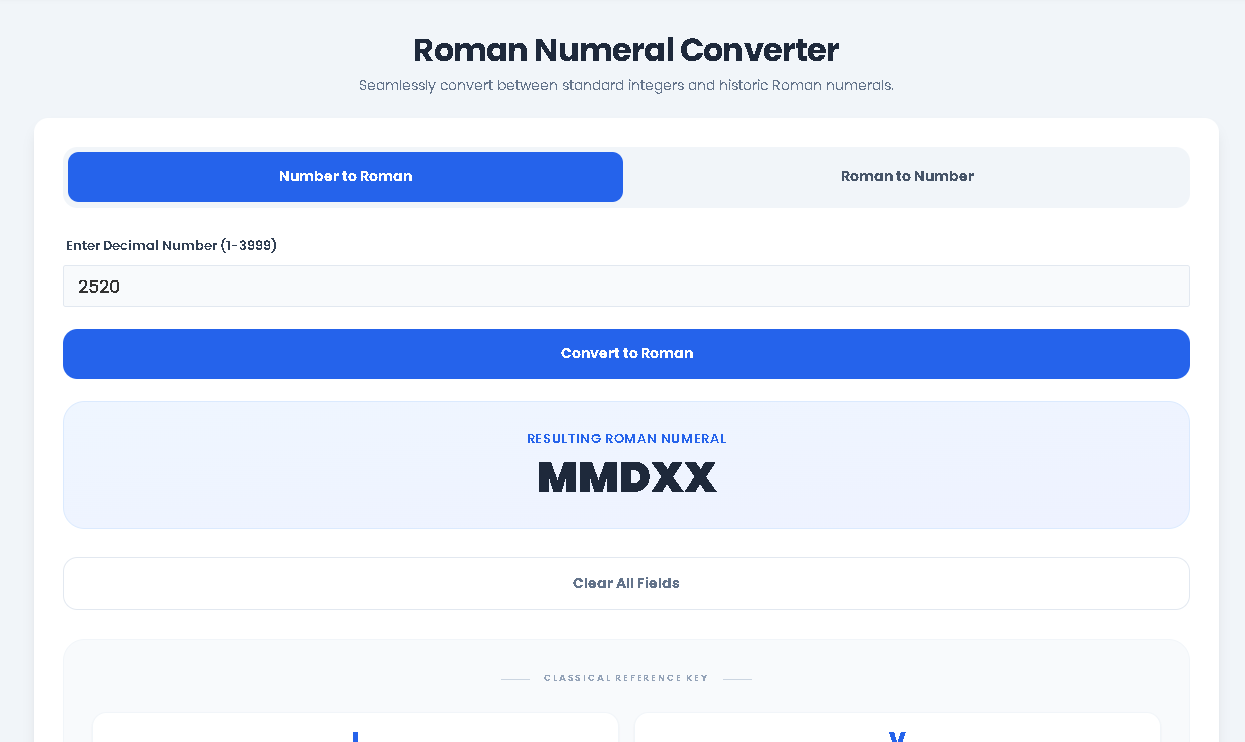
Upon loading the tool, you will see two prominent tab buttons at the top: “Number to Roman” and “Roman to Number.” The active tab (initially “Number to Roman”) has a blue background. Click on the tab that matches your desired conversion. This action changes the main input field and functionality below.
Step 2: Enter Your Input
If “Number to Roman” is selected: You will see an input field labeled “Enter Decimal Number (1-3999).” Click into this field and type any whole number between 1 and 3999. For example, type 2024. The field validates for numbers only.
If “Roman to Number” is selected: You will see an input field labeled “Enter Roman Numeral.” Click into this field and type or paste a Roman numeral using the characters I, V, X, L, C, D, M. For example, type MMXXIV. The input is automatically capitalized.
Step 3: Initiate the Conversion
Directly below the input field is a large, blue button with converting text.
In “Number to Roman” mode, this button reads “Convert to Roman.”
In “Roman to Number” mode, it reads “Convert to Number.”
Click this button once you have entered your value. The tool’s JavaScript function will immediately process your input using its internal algorithm (either the toRoman() or toNumber() function from the code).
Step 4: View Your Result
Instantly after clicking the convert button, a new styled results panel will appear below the button.
For number-to-Roman conversion: The panel is titled “Resulting Roman Numeral” and displays the converted value (e.g., MMXXIV) in large, bold text.
For Roman-to-number conversion: The panel is titled “Resulting Decimal Number” and displays the Arabic numeral (e.g., 2024) in large, bold text.
The result is static text generated by the conversion function, ready for you to read or copy.
Step 5: Clear or Switch Tasks
You have two clear options after viewing a result:
To Perform a New Conversion: You can simply type a new value into the existing input field and click the convert button again. The new result will replace the old one in the same display panel.
To Clear All Fields: Click the “Clear All Fields” button located below the results area. This action, handled by the clearBtn event listener, will empty both input fields and hide any visible result panels, giving you a completely fresh slate.
To Switch Conversion Direction: Simply click the other tab at the top (e.g., from “Number to Roman” to “Roman to Number”). The interface will switch, hiding the previous section and revealing the other, with its own empty input field and ready-to-use convert button.
Quick Tip: You can also press the “Enter” key on your keyboard while focused in either input field to trigger the corresponding convert button click, speeding up your workflow.
Benefits This Tools
Instant Two-Way Speed: The core benefit of this Roman Numeral Converter is its bidirectional speed. There’s no need to use two separate tools or re-load pages. Translation happens in milliseconds, saving you valuable time whether you’re decoding a list of dates or checking multiple conversions.
Guaranteed Accuracy: The tool’s logic is programmed against a defined numeral-value map and follows strict rules of subtraction. This eliminates human error common in manual conversion, such as misplacing a subtractive pair (like writing IX for 9 instead of VIIII).
Built-in Learning Aid: The integrated “Classical Reference Key” at the bottom of the tool acts as a constant learning reference. Seeing I=1, V=5, X=10, etc., alongside the special IV=4 and IX=9 pairs helps users understand the system, making the tool educational, not just transactional.
Streamlined, Intuitive UX: Every element is designed for clarity. The tab system cleanly separates the two functions, labeled buttons leave no doubt about the next action, and results are displayed in a high-contrast, dedicated panel. This intuitive flow requires no instructions for most users.
Zero-Friction Access: As a browser-based tool, this Roman Numeral Converter requires no software installation, account creation, or payment. It works on any device with a modern web browser, making it universally accessible whenever the need arises.
Important Conditions & Guidelines for Use
Input Dictates Output: The accuracy and validity of the result are directly dependent on the correctness of the input provided. The Roman Numeral Converter will process what you give it; entering IIII will yield a numeric result (4), even though it is not the standard classical form.
Range Limitations: For the “Number to Roman” function, the classical Roman numeral system has practical limits. This tool adheres to the common modern convention, converting numbers from 1 to 3999. Numbers outside this range cannot be represented with standard notation (M=1000) and will trigger an error message.
Educational Tool, Not Authoritative Source: While highly accurate, this tool is designed for educational, reference, and practical assistance. For critical academic publication or formal historical analysis, results should be verified against authoritative sources.
Standard Notation: The tool uses the widely accepted subtractive notation (e.g., 4 is IV, 90 is XC). It does not support variant or archaic forms (like IIII for 4).
Frequently Asked Questions (FAQ)