SQL Formatter: Beautify & Minify Queries Instantly | Toolota
Table of Contents
What This Tool Does
In the world of database management and software development, SQL (Structured Query Language) is the fundamental tool for communicating with databases. However, SQL queries—especially complex ones involving multiple joins, nested selects, and conditional logic—can quickly become long, tangled, and difficult to read. This is where a dedicated SQL Formatter becomes indispensable.
A SQL Formatter is a specialized tool designed to take raw, unformatted, or messy SQL code and automatically restructure it according to established readability standards. It applies consistent indentation, logical line breaks, and standardized capitalization to transform a block of text into a clear, hierarchical, and professionally
Why Choose Toolota
You might wonder if manually spacing out your SQL is sufficient. For a simple SELECT * FROM users query, perhaps. But for real-world scenarios, manual formatting is inefficient and error-prone. Here’s why a professional tool like ours is critical:
-
Enforces Consistency: Teams often have different coding styles. A SQL Formatter applies a single, unified standard (like 4-space indents and uppercase keywords), ensuring every query looks like it was written by the same person. This is vital for collaborative projects and code maintenance.
-
Dramatically Improves Readability: Proper indentation visually groups related clauses (SELECT, FROM, WHERE), making the query’s logic flow apparent at a glance. It becomes easy to spot the scope of a JOIN or a nested subquery, reducing cognitive load.
-
Accelerates Debugging: Syntax errors and logical mistakes are much easier to identify in a well-formatted query. A misplaced comma or an incorrect ON clause stands out immediately when the code is structured, saving hours of frustrating troubleshooting.
-
Facilitates Code Reviews: Clean, formatted SQL is easier for peers to review and understand, leading to more effective feedback and faster approval cycles.
-
Prepares for Documentation: Well-formatted SQL can be seamlessly copied into technical documentation, design specs, or presentation slides, looking professional and polished.
Ignoring formatting leads to “spaghetti SQL”—code that is functional but opaque, difficult to modify, and risky to maintain. The Toolota SQL Formatter is your safeguard against this, ensuring your queries are not just functional, but exemplary.
How This Tool Works: The Most Detailed Section
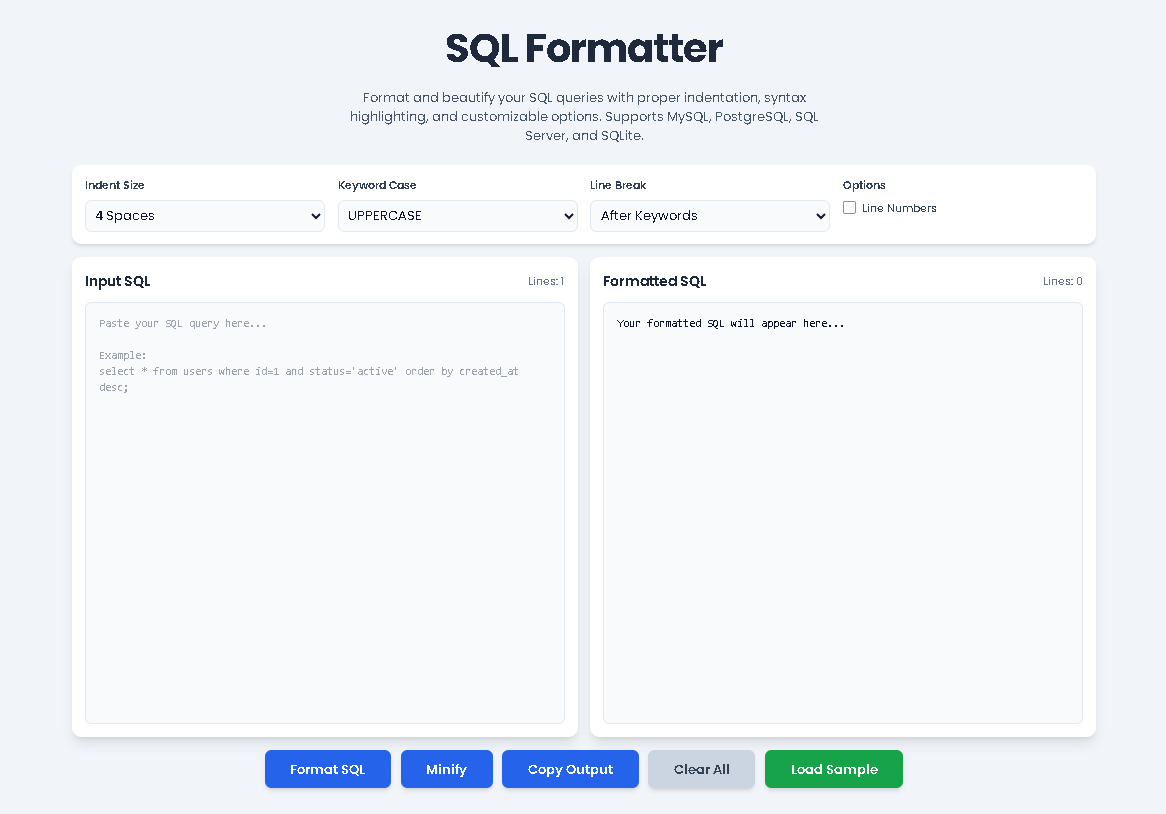
The power of our SQL Formatter lies in its simplicity. The interface is designed for a seamless, zero-friction experience. Follow these steps to transform your SQL instantly:
Step 1: Input Your SQL Code
Navigate to the main input panel labeled “Input SQL.” This is a large, dedicated textarea. You can either type your query directly or, more commonly, paste existing SQL code copied from your database client, code editor, or script file. A live “Lines” counter updates as you type, giving you immediate feedback on the query’s size.
Step 2: Configure Your Formatting Preferences (Optional but Recommended)
Above the input panel, you’ll find a control section with four key customization options:
Indent Size: Choose your preferred level of nesting (2, 4, or 8 spaces). The standard for most style guides is 4 spaces, which our tool selects by default.
Keyword Case: Decide how SQL keywords (SELECT, FROM, WHERE) appear. Options are UPPERCASE (industry standard for prominence), lowercase, or Title Case.
Line Break: Control where major breaks occur—either before or after key clauses. The “after” setting often provides a more natural reading flow.
Line Numbers: Check this box if you want the formatted output to include numbered lines. This is incredibly useful for referencing specific parts of a long query during team discussions or error reporting.
Step 3: Execute Formatting or Minification
With your SQL pasted and preferences set, you have two primary action buttons:
Click the “Format SQL” button. The tool’s engine will parse your code, apply all your chosen rules (indentation, casing, line breaks), and instantly display the beautifully formatted result in the right-hand “Formatted SQL” panel. The output also features syntax highlighting, coloring keywords, strings, and numbers for even faster visual parsing.
Alternatively, click the “Minify” button. This performs the opposite function: it strips all unnecessary whitespace and line breaks, condensing your query into a single, compact line. This is ideal for preparing SQL for embedding in applications or configuration files where file size matters.
Step 4: Utilize the Output
Once your SQL is formatted, you can:
Review it directly in the highlighted output panel.
Copy it with a single click on the “Copy Output” button. A discreet notification will confirm the action.
Start over by clicking “Clear All,” which empties both input and output fields.
Explore the tool’s capability by loading a pre-built sample query with the “Load Sample” button.
This straightforward, four-step process—Paste, Configure, Format, Use—is what makes this SQL Formatter from Toolota so effective. There’s no complexity, just immediate results.
Benefits This Tools
Beyond basic formatting, the Toolota SQL Formatter is packed with features designed for professional use:
Multi-Dialect Support: While formatting rules are largely universal, our tool is tested and effective for the most popular SQL dialects, including MySQL, PostgreSQL, SQL Server, and SQLite. This makes it a versatile companion regardless of your tech stack.
Advanced Syntax Highlighting: The output isn’t just plain text. Keywords are highlighted in blue, strings in green, numbers in red, and comments in gray italics. This color-coding provides an additional layer of instant understanding and helps catch anomalies.
Fully Customizable Output: Unlike rigid formatters, we give you control. Need 2-space indents for a specific project? Prefer lowercase keywords? Want line numbers for a code review? Adjust the settings to match your personal or team style guide perfectly.
Dual-Functionality: It’s both a SQL Formatter and a SQL minifier in one. Switch between making your code perfectly human-readable or machine-optimized with two separate buttons.
Clean, Responsive UI: Built with a modern design framework, the interface is intuitive and works flawlessly on desktops, tablets, and mobile devices. The layout is distraction-free, putting the focus entirely on your code.
Zero Setup, Instant Access: As a web-based tool, there is nothing to download or install. You get immediate access without registration, allowing you to format SQL from anywhere, on any device with a browser.
Error-Resistant Parsing: The formatting logic is designed to handle a wide array of SQL constructs gracefully, from simple statements to complex nested queries with multiple CTEs (Common Table Expressions), helping you structure even the most daunting code blocks.
The primary benefit is unmatched efficiency. What could take 10-15 minutes of tedious manual tabbing and line-breaking is accomplished accurately in less than a second by this SQL Formatter. It’s a direct boost to productivity and code quality.
Important Conditions & Guidelines for Use
To get the most out of the Toolota SQL Formatter, keep these points in mind:
Input Quality Determines Output: The formatter structures valid SQL. It is not a syntax validator. If your input query has critical syntax errors (like a missing parenthesis or a misspelled keyword), the formatting might behave unexpectedly. Always ensure your base SQL is logically correct.
For Analysis, Not Execution: This tool is designed for formatting and beautifying SQL for readability and presentation. It does not execute queries against a database or check for performance issues like missing indexes.
Handling of Comments: Single-line (--) and multi-line (/* */) comments are preserved and highlighted during the formatting process, maintaining your important notes and explanations.
Use Case Awareness:
Use the Format function for preparing code for version control (Git), sharing with colleagues, or finalizing scripts.
Use the Minify function for production environments, API payloads, or anywhere minimizing character count is beneficial.
No Storage or Privacy Concerns: Since the tool runs entirely in your browser, your SQL code is never sent to our servers or stored anywhere. It remains private on your machine, which is crucial for handling sensitive queries containing proprietary business logic.
By understanding these conditions, you can integrate this SQL Formatter reliably into your development and database management workflow.
Frequently Asked Questions (FAQ)