Client-Side Hash Calculator - Free Hash Calculator | Toolota
Table of Contents
What This Tool Does
In the digital world, verifying the authenticity and integrity of data is paramount. A Client-Side Hash Calculator is a specialized web tool that performs this critical function entirely within your web browser. Unlike server-based tools that require you to upload your potentially sensitive data to a remote computer, this Client-Side Hash Calculator executes all cryptographic operations locally on your device. When you input text or select a file, the tool uses JavaScript libraries to compute a unique digital fingerprint, known as a hash. This means from the moment you type or upload, to the second you see the result, your data never travels over the internet. This fundamental characteristic makes a Client-Side Hash Calculator like the one offered by Toolota an essential utility for privacy-conscious users, developers, and IT professionals who prioritize security alongside functionality.
Why Choose Toolota
The primary advantage of a Client-Side Hash Calculator is uncompromising privacy. In an era of frequent data breaches and surveillance concerns, the assurance that your confidential documents, code snippets, or personal text are processed locally is invaluable. There is no log kept on a server, no risk of interception during transmission, and no third-party has access to your input.
Furthermore, a well-designed Client-Side Hash Calculator offers remarkable speed and convenience. Since there’s no network latency waiting for a server to respond and send back results, calculations are virtually instantaneous. This efficiency is perfect for workflows that require rapid, repeated hashing. Tools like the one from Toolota are also universally accessible; they run in any modern browser without requiring software installations, command-line knowledge, or complex system configurations. You get enterprise-grade cryptographic functionality delivered through a simple, clean web interface.
How This Tool Works: The Most Detailed Section
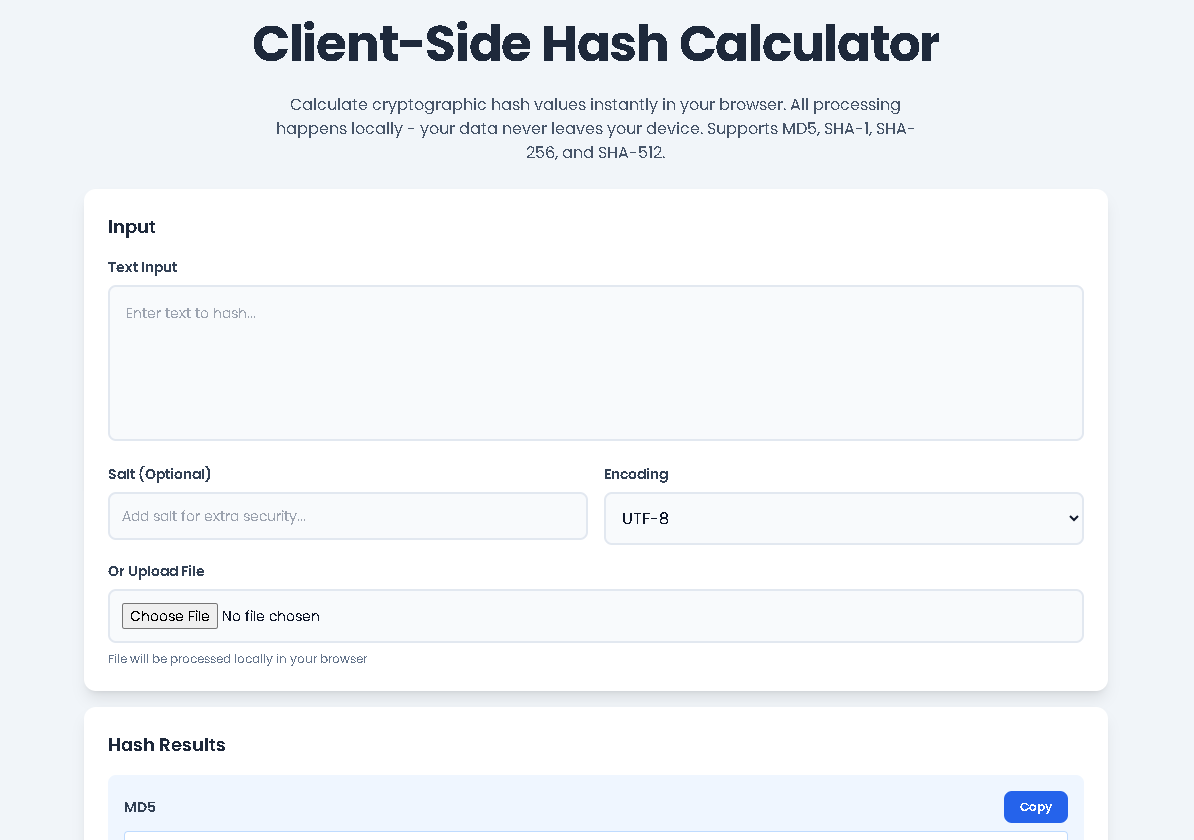
Let’s walk through the exact process of using Toolota‘s Client-Side Hash Calculator. Following these steps will show you how intuitive and powerful this tool is.
Access the Tool: Navigate to the Client-Side Hash Calculator page on the Toolota website. The interface loads immediately in your browser.
Provide Your Input: You have two main options:
Text Input: Locate the “Text Input” text area. Simply type or paste the text you want to hash. For example, you could paste a password string, a configuration file snippet, or any block of text.
File Upload: Alternatively, click the “Choose File” button under “Or Upload File.” Select any text-based file (like a .txt, .csv, .json, or code file) from your computer. The tool will read its contents directly into the text area.
Apply Advanced Options (Optional):
Salt: To enhance security, especially for password hashing scenarios, you can enter a “salt” string in the dedicated field. This unique value is appended to your input before hashing, making the resulting hash much more resistant to pre-computed attack tables (rainbow tables).
Encoding: The dropdown menu lets you specify the encoding of your input. “UTF-8” is standard for text, but you can also select “Base64” or “Hexadecimal” if your input is already in those formats.
Initiate Calculation: Click the prominent blue “Calculate Hashes” button. Alternatively, due to the smart design of this Client-Side Hash Calculator, hashes are computed automatically in real-time as you type in the text area.
Review the Results: Instantly, four result panels will populate:
MD5: A 32-character hexadecimal string.
SHA-1: A 40-character hexadecimal string.
SHA-256: A 64-character hexadecimal string.
SHA-512: A 128-character hexadecimal string.
Each hash is a unique representation of your input (plus any salt).
Utilize Your Hashes:
Click the “Copy” button next to any individual hash to copy that specific string to your clipboard.
Click the “Copy All” button to copy a formatted block containing all four hashes at once for easy reporting or comparison.
Use the “Clear All” button to reset the entire interface and start a new calculation.
This entire process, from input to result, is contained within your browser tab, fulfilling the core promise of a secure Client-Side Hash Calculator.
Benefits This Tools
Using Toolota‘s Client-Side Hash Calculator delivers a suite of tangible benefits:
Absolute Data Privacy: The most significant benefit. Your data is for your eyes and your device only. This is the non-negotiable advantage of a true Client-Side Hash Calculator.
Blazing Speed and Real-Time Feedback: Cryptographic operations are performed by your computer’s processor, leading to instantaneous results. The live-update-on-typing feature enhances productivity.
Comprehensive Algorithm Support: From the legacy MD5 to the robust SHA-512, having four algorithms in one place eliminates the need for multiple tools or websites.
Enhanced Security with Salt: The optional salt input allows you to practice proper password hashing techniques directly in the browser for testing and learning purposes.
Dual Input Methods: The flexibility to either type/paste text or upload a file directly caters to different workflows, whether you’re hashing a string or verifying a downloaded software package.
Exceptional User Experience: The clean, intuitive interface with clear labels, distinct color-coded output panels, and responsive design makes the tool accessible to both beginners and experts.
Export Convenience: One-click copy buttons for individual hashes and the “Copy All” function integrate seamlessly into your workflow, allowing you to quickly paste results into documentation, emails, or code.
Important Conditions & Guidelines for Use
To get the most accurate and secure results from any Client-Side Hash Calculator, keep these points in mind:
Output Depends on Input: The hash is exquisitely sensitive to the input. A single changed character, an extra space, or a different encoding will produce a completely different hash. Always ensure you are hashing the exact intended data.
Not for Password Hashing in Production: While excellent for testing and learning, cryptographic hash functions like SHA-256 are designed for speed. For storing real user passwords, dedicated, slow “key derivation functions” like Argon2, bcrypt, or scrypt are essential. Use this tool to understand hashing, not to hash live production passwords.
No Illegal or Harmful Use: The tool is intended for legitimate purposes of data verification, integrity checks, software development, and education.
Algorithm Selection is Key: Understand the strengths and weaknesses of each algorithm. Use SHA-256 or SHA-512 for modern security needs, and only use MD5 or SHA-1 when dealing with legacy system requirements.
Browser Dependency: Since it’s a client-side tool, it requires a modern, JavaScript-enabled browser. The calculations will not work if JavaScript is disabled.
Frequently Asked Questions (FAQ)