Regular Expression Tester | Free Online Regex Tool | Toolota
Table of Contents
What This Tool Does
A Regular Expression Tester is an interactive tool that allows users to validate, test, and debug regular expressions in real-time without writing any code. Unlike traditional development environments where you need to compile and run programs to test patterns, a dedicated Regular Expression Tester provides immediate visual feedback as you build and refine your expressions. Toolota’s implementation stands out by combining powerful functionality with an intuitive interface that both beginners and experts can appreciate.
This specialized Regular Expression Tester transforms abstract regex patterns into tangible, visual results. You can immediately see which parts of your text match your pattern, identify capture groups, and understand exactly how your expression behaves with different inputs. The tool serves as both a productivity enhancer for experienced developers and an educational resource for those learning regex syntax.
Why Choose Toolota
Toolota‘s Regular Expression Tester serves diverse professional needs:
Developers and Programmers use this Regular Expression Tester to validate patterns before implementing them in code, saving debugging time and reducing errors in production applications. Whether working with JavaScript, Python, PHP, Java, or any language supporting regex, developers benefit from rapid iteration without constant context switching between their IDE and runtime environment.
Data Analysts and Scientists leverage the Regular Expression Tester to create patterns for extracting, cleaning, and transforming data. When working with unstructured text data, log files, or messy datasets, regex becomes an indispensable tool for data preparation, and testing patterns visually accelerates this process significantly.
System Administrators find value in this Regular Expression Tester when creating patterns for log analysis, file searching with tools like grep, or configuring applications that utilize regex for routing, filtering, or validation rules.
Content Professionals and SEO Specialists use the Regular Expression Tester to create patterns for finding and manipulating text in bulk, whether for content audits, finding specific patterns in documents, or preparing text for migration between systems.
Students and Educators benefit from the educational aspects of this Regular Expression Tester, as it provides immediate visual feedback that helps understand how different regex components interact and affect matching behavior.
How This Tool Works: The Most Detailed Section
Understanding exactly how to utilize Toolota‘s Regular Expression Tester ensures you maximize its potential. Follow this detailed workflow based on the actual interface and functionality:
Step 1: Access the Tool Interface
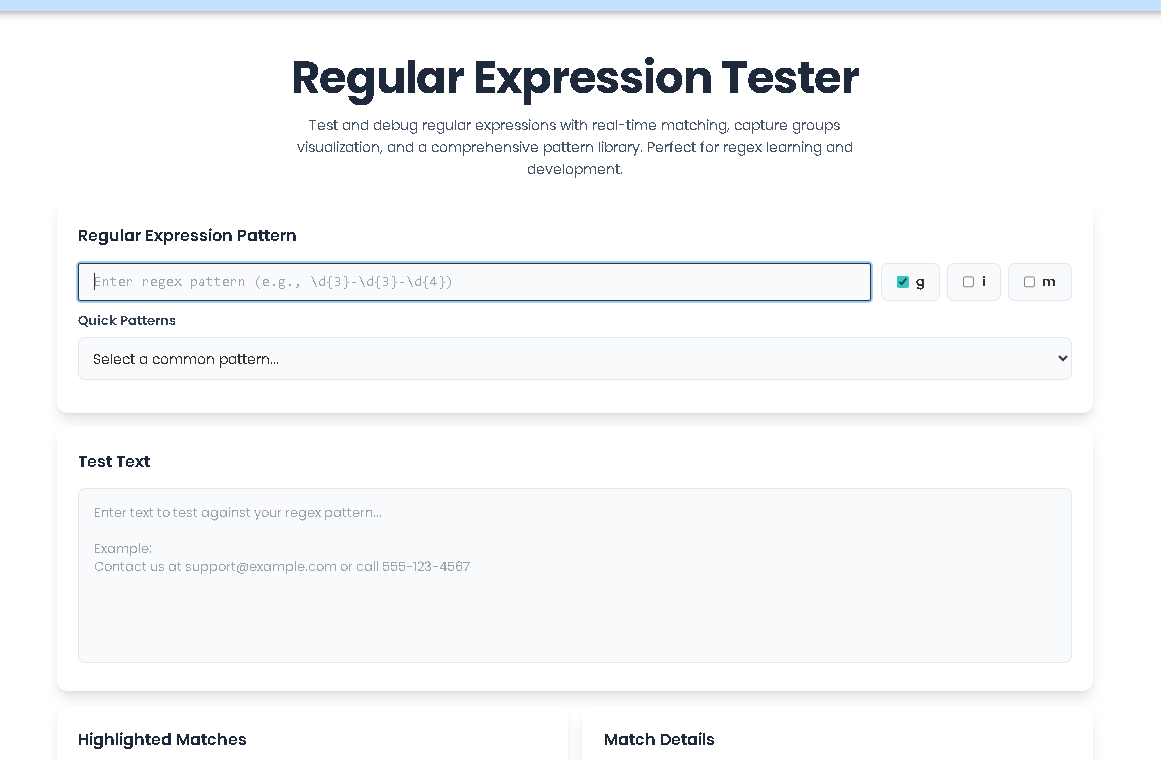
Navigate to Toolota‘s Regular Expression Tester in your web browser. The clean, organized interface presents all controls without overwhelming the user. The layout follows a logical workflow from pattern input to result visualization.
Step 2: Input Your Regex Pattern
Locate the “Regular Expression Pattern” field at the top of the Regular Expression Tester. This is where you’ll enter your regex pattern. Begin with simple patterns if you’re new to regex – for example, try \d{3}-\d{3}-\d{4} for matching US phone number formats.
Pro Tip: Use the pattern library dropdown directly below the input field to load common patterns. Selecting “Phone (US)” from the library automatically populates the field with the phone number pattern, demonstrating how this Regular Expression Tester accelerates development.
Step 3: Configure Matching Flags
Adjacent to the pattern field, you’ll find three flag checkboxes labeled “g”, “i”, and “m”. These modify how the Regular Expression Tester applies your pattern:
Global (g): When checked (default), finds all matches rather than stopping after the first match.
Case Insensitive (i): Makes pattern matching ignore differences between uppercase and lowercase letters.
Multiline (m): Changes how ^ and $ anchors work, making them match the start and end of each line rather than the entire string.
For most use cases, keep “g” checked. Add “i” when case shouldn’t matter in your matches. Use “m” only when working with multiline text where patterns should apply per line.
Step 4: Enter Test Text
In the “Test Text” section below the pattern controls, paste or type the text you want to test against your pattern. This Regular Expression Tester provides a generous text area that can accommodate substantial content – from short snippets to lengthy documents.
Example Test Text: Contact us at support@example.com or call 555-123-4567. For billing questions, email billing@company.org or call 800-555-0199.
Step 5: Analyze Results Immediately
As you enter text or modify your pattern, the Regular Expression Tester automatically updates results in real-time. Observe two primary output areas:
Left Panel – Highlighted Matches: Your test text appears with all matches visually highlighted. In our example, both email addresses and phone numbers would be distinctly colored, making pattern effectiveness immediately apparent.
Right Panel – Match Details: Each match appears with specific details: the matched text, its position within the input (start and end indices), and any capture groups extracted. For patterns with parentheses, you’ll see each group’s content labeled numerically.
Step 6: Review Statistics
Below the main output panels, the Regular Expression Tester displays a statistics dashboard with four key metrics:
Total Matches: Count of all matches found
Capture Groups: Maximum number of groups extracted from any single match
Matched Characters: Total characters across all matches
Text Coverage: Percentage of input text covered by matches
These metrics help quantify your pattern’s effectiveness. High text coverage might indicate overly broad matching, while low coverage could mean missed patterns.
Step 7: Refine and Iterate
Based on the visual feedback and statistics, adjust your pattern. Perhaps you need to make it more specific to avoid false positives, or more inclusive to catch edge cases. The real-time nature of this Regular Expression Tester means each adjustment shows immediate consequences.
Step 8: Export or Copy Results
When satisfied with your pattern, use the “Copy Matches” button to extract all matched text to your clipboard. The Regular Expression Tester formats these as a clean list, ready for pasting into other applications.
Benefits This Tools
Time Efficiency: Traditional regex development involves a write-compile-test-debug cycle that can take minutes per iteration. With this Regular Expression Tester, that cycle reduces to seconds as you type, dramatically accelerating development.
Error Reduction: Visual feedback immediately reveals issues with your patterns. Overly broad matching, missed edge cases, and incorrect group captures become apparent before you implement patterns in production code.
Educational Value: For those learning regex, this Regular Expression Tester serves as an interactive textbook. Seeing immediate visual consequences of adding * versus + quantifiers, or understanding how character classes work through direct observation, cements conceptual understanding more effectively than static examples.
Pattern Validation: Before committing regex patterns to code, database constraints, or configuration files, validate them thoroughly with diverse test cases using this Regular Expression Tester. This prevents bugs that might otherwise surface only in production environments.
Cross-Platform Consistency: Since this Regular Expression Tester uses JavaScript’s regex engine, patterns validated here will behave identically in any JavaScript environment (Node.js, browsers). While subtle differences exist between regex engines across programming languages, JavaScript’s implementation shares most syntax with other major languages.
No Installation Required: As a web-based Regular Expression Tester, there’s nothing to download or install. Access it from any device with a modern browser, making it ideal for quick validations regardless of your environment.
Important Conditions & Guidelines for Use
While Toolota‘s Regular Expression Tester is powerful, understanding its boundaries ensures realistic expectations:
JavaScript Regex Engine: This Regular Expression Tester uses JavaScript’s regex implementation, which has some differences from other languages (like PCRE in PHP or Python’s regex module). Features like lookbehind assertions have limited support in older JavaScript engines.
Client-Side Processing: All processing happens in your browser. For extremely large texts (megabytes), performance may degrade, though typical usage remains smooth.
No Server-Side Saving: Patterns and test texts exist only in your current browser session. Use external tools to save important patterns you develop with this Regular Expression Tester.
Educational Focus: While professional-grade in functionality, this Regular Expression Tester prioritizes clarity and learning. Enterprise features like team collaboration, version history, or integration with CI/CD pipelines aren’t included.
Browser Dependency: As a web application, this Regular Expression Tester requires a modern browser with JavaScript enabled. Results may vary slightly between browsers due to implementation differences in their JavaScript engines.
Frequently Asked Questions (FAQ)